
PDF Reader Pro: Edit PDFs
Nicht beanspruchtPDF Reader Pro is the PDF editor your Mac deserves
Von SUN TEAME PTE. LTD. · Produktivität


Kurz gesagt
PDF Reader Pro: Edit PDFs is a macOS app for reading, editing, signing and organizing PDF files. It can change existing text, add annotations and signatures, reorder or merge pages, and set passwords, all processed on the Mac without an account or uploads. The standout feature is that it edits the actual words on a page rather than placing a box over them.
Zusammenfassung von Debuts, basierend auf dem Eintrag im App Store.Info
PDF Reader Pro is the PDF editor your Mac deserves. Read, edit, sign and organize documents in a beautiful app built for macOS — fast with big files, private by design, and simple enough to use without a manual.
EDIT THE REAL TEXT Most PDF apps put a box on top of the page. PDF Reader Pro changes the words themselves. Click any line and retype it — the original font is kept whenever possible, and the advanced editor previews every change before you apply it, even many at once.
ANNOTATE LIKE ON PAPER • Add text boxes with any font, size and color • Highlight passages in six colors • Draw freehand with a smooth pen • Place images anywhere, then move and resize them freely • Undo and redo everything
SIGN IN SECONDS Draw your signature with the trackpad, type it in a handwriting font or import an image. Save it once and reuse it on every contract — just click where it belongs.
ORGANIZE PAGES • Drag thumbnails to reorder pages • Rotate, duplicate, insert blank pages or delete them • Drop PDFs into a document to merge them • Extract a range of pages into a new file • Export pages as PNG or JPEG at the resolution you choose
FIND ANYTHING Instant search highlights every match across the whole document. Jump through chapters with the table of contents and move around with the page and zoom controls.
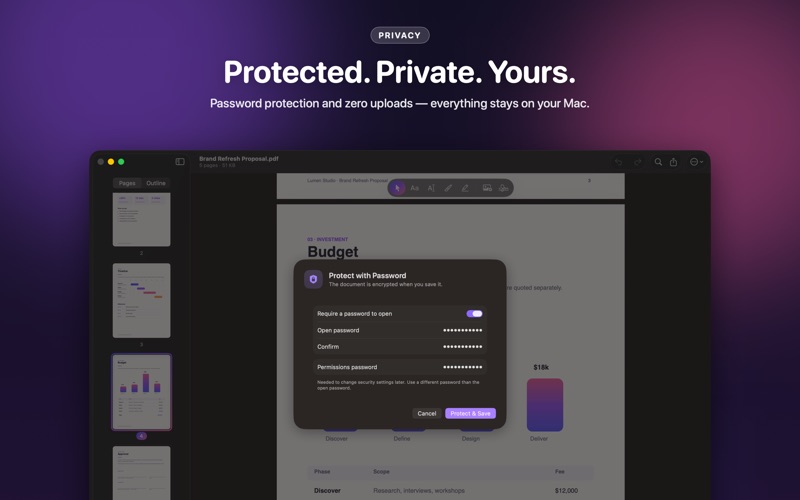
SHARE WITH CONFIDENCE • Protect documents with an open password and a permissions password • Remove passwords from files you own • Flatten annotations so they look the same in every app • Compress large files before sending them • Print, or share straight from the toolbar
PRIVATE BY DESIGN PDF Reader Pro works entirely on your Mac. No account, no uploads, no tracking — your documents stay yours.
MADE FOR MAC • A modern Liquid Glass interface in light and dark mode • A keyboard shortcut for every action • One window per document, restored when you relaunch • Open files from Finder, the Dock or Open Recent • Available in more than 40 languages
Whether you’re signing a lease, marking up a proposal or fixing a typo in a report, PDF Reader Pro gets it done in seconds.
PDF READER PRO SUBSCRIPTION Reading, highlighting, drawing, notes and page reordering are free. Pro unlocks text editing, signatures, images & stamps, password protection, photos to PDF and merging/extracting pages. • Pro Yearly with a 3-day free trial, Pro Monthly, or a one-time Pro Lifetime purchase • Payment is charged to your Apple Account at confirmation of purchase • Subscriptions renew automatically unless cancelled at least 24 hours before the end of the current period • Your account is charged for renewal within 24 hours before the end of the current period • Any unused part of a free trial is forfeited when you purchase a subscription • Manage or cancel in your Apple Account settings at any time
Terms of Use: https://sunteame.com/terms-of-service Privacy Policy: https://sunteame.com/privacy-policy
Nutzer bewerten sie
Melde dich an, um diese App zu bewerten. Ehrlichkeit zählt.
Noch keine Bewertungen. Hast du die App ausprobiert? Gib die erste Bewertung ab.
Mehr Produktivität-Apps
Die besten neuen Produktivität-Apps dieser Woche ChickMark: Habit TrackerChickMark is a simple habit tracker for routines, goals, and reminders
 Dayflint: One Thing a DayToo many priorities?
 Snappy Do ItSix connected modes. One traceable journey.
 Fristo CAFMFristo is the app for Fristo CAFM, the facility management software
 UhWhat? Voice NotesCatch the thought before it disappears
- BeginAnywayMorning alarm for hard tasks: set one task, prove you started, build a streak