
Personal File Library
Nicht beanspruchtKeep everyday files and passcode-protected content in separate, on-device libraries
Von 伟伟 王 · DienstprogrammeWarum wir das erwarten: The thorough description clearly explains its offline design, separate encrypted libraries, and privacy limits, making the value easy to grasp.



Kurz gesagt
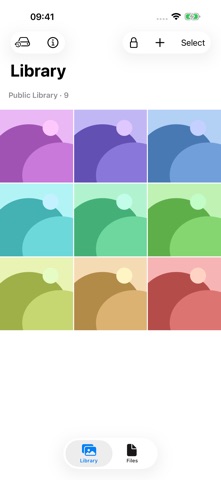
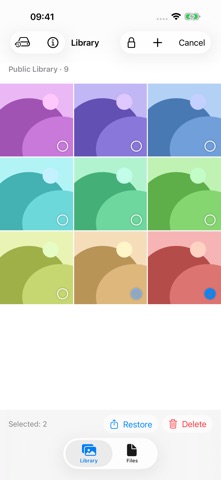
Personal File Library is a utilities app that stores photos, videos, and documents in three separate on-device libraries: one public library with no passcode and two encrypted libraries, each opened with its own six-digit passcode. It suits people who want to keep some files locked away from anyone who can open the app. A standout detail is that the encrypted libraries can be exported as backups protected by a separate password, though there is no password recovery.
Zusammenfassung von Debuts, basierend auf dem Eintrag im App Store.Info
Keep everyday files and passcode-protected content in separate, on-device libraries.
THREE INDEPENDENT LIBRARIES
Open the app to use the public library without an app passcode. Tap the lock and enter either of your two six-digit passcodes to open its corresponding encrypted library. Each library keeps its own files separate.
PHOTOS AND VIDEOS
Import multiple photos and videos from the system picker. Browse thumbnails, zoom into photos, and swipe between items. Videos play automatically, with playback, seeking, and mute controls.
FILES AND BATCH ACTIONS
Import documents from Files and organize them in a separate file list. Select photos or videos to restore copies to Photos. Restore documents to a destination you choose in Files. Delete selected in-app copies after confirmation.
ON-DEVICE STORAGE
The library works offline, without an online account, advertising, tracking, or app cloud sync. The two passcode-protected libraries use local encryption. Moving the app to the background ends the encrypted session; returning opens the public library.
IMPORTANT BEFORE YOU START
- The public library has no app-passcode protection. Anyone who can open the app can access it. - Importing does not delete your originals. Manage those copies separately. - Restoring creates ordinary copies outside the app's passcode protection and keeps the in-app copies. - Manually export an encrypted backup of the current library and restore it on another device with a separate backup password. Up to 10,000 items per backup. Restoration appends new copies; repeated restoration creates duplicates. Encrypted-library backups cannot be restored into the public library. - Change a library's six-digit passcode after verifying the current one. The other library and existing backup passwords are unchanged. - There is no password recovery or automatic cloud backup. Library data is marked for exclusion from system backup. Keep and verify a separate encrypted backup outside this device; without a usable backup or original, losing your device or password may permanently lose your files. - System Photos and Files providers may download cloud originals or sync restored copies according to your device settings. The app does not control these services. - Each photo or document can be up to 50 MiB, and each video up to 1 GiB. Tap a document to preview system-supported formats, including PDF and text. Preview is read-only; unsupported files can be restored to Files for another app. Live Photos are not preserved as complete Live Photos. - English and Simplified Chinese are supported, including built-in offline privacy and help documents.
Nutzer bewerten sie
Melde dich an, um diese App zu bewerten. Ehrlichkeit zählt.
Noch keine Bewertungen. Hast du die App ausprobiert? Gib die erste Bewertung ab.
Mehr Dienstprogramme-Apps
Die besten neuen Dienstprogramme-Apps dieser Woche Vodoalarm: vodostaji BiHVodoalarm javlja kad tvoja rijeka naglo raste, pa ne moraš stalno gledati vodostaje
 Rokey: Romanian KeyboardType Romanian without worrying about diacritics
 Vibe Island: AI Agent MonitorVibe Island is a command center for the AI coding agents running on your Mac
 Private AuthenticatorPrivate Authenticator keeps your two-factor authentication codes on your own Apple…
 Photo Clean: Photo CleanupA crowded camera roll?
 Songbird AlarmWhat if the morning didn't have to start with a loud noise?