
Pill Counter - Offline Tally
Nicht beanspruchtCount tablets spread on a counting tray from a single photo
Von Hoyoung Sohn · Dienstprogramme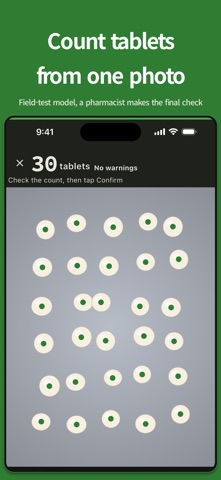


Kurz gesagt
Pill Counter - Offline Tally estimates tablet counts from one photo of tablets spread in a single layer on a counting tray, with on-device processing and no account required. It is built for pharmacy staff and lets users edit results and set a target count. The bundled detection model is a field-test version, so every count must be checked by eye.
Zusammenfassung von Debuts, basierend auf dem Eintrag im App Store.Info
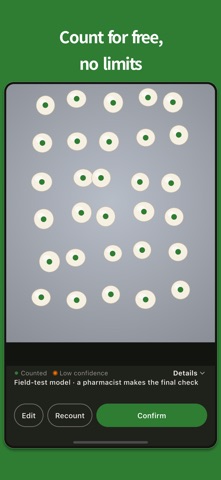
Count tablets spread on a counting tray from a single photo. Built for pharmacy staff. Photos are processed only on your device. No account, no ads, no analytics. Counting is free and unlimited. This build uses a field-test model: treat the count as a reference and always check it by eye.
Made by Yesun Mind Institute as an independent tool, now in English and Korean. Spread tablets in a single layer on a counting tray, take a single photo, and an on-device AI model detects and counts the tablets for you.
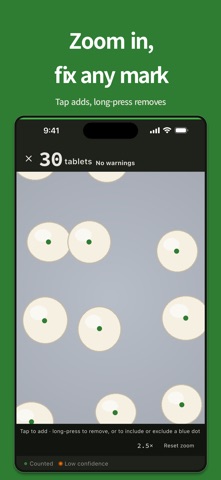
HOW TO USE 1) Spread the tablets in a single layer on the counting tray, with as little overlap as possible. 2) Follow the on-screen level ring and guidance, then take one photo that clearly shows the tablets and the tray. Tapping the shutter freezes the screen on that exact frame instantly. 3) Check the count on the result screen. Tap "Edit", then tap the photo to add a tablet, or long-press a point to remove it. Pinch or double-tap to zoom in for precise edits. Confirm to save the photo and count to history.
CAPTURE HELPERS - Level ring: shows whether the camera is level with the tray. - Torch: a button turns on the torch in low light (uses the camera's own hardware, no extra permission). - Target count: enter the quantity you need, and the result screen shows how far the count is under or over it.
THREE-TIER RESULT - No warnings: none raised; still check by eye. - Needs review: overlap, lighting, or similar factors mean a manual check is recommended. - Retake: the photo is blurry, too dark, or has strong glare, so a new photo is recommended. Fragment candidates (partial tablets) are shown separately from the main count.
WHAT IT SUPPORTS TODAY (v1) - Subject: a counting tray. - Recognition: one tablet type at a time, spread in a single layer. - Recognition may be less reliable when multiple different tablet types are mixed together, or when tablets are stacked in multiple overlapping layers. - Dispensing envelopes are not yet supported.
THIS BUILD IS A FIELD-TEST MODEL The detection model bundled in this version is a field-test model and has not yet passed our production accuracy bar. Always verify it visually.
PHOTOS AND RECORDS NEVER LEAVE YOUR DEVICE The app does not save the photo to your gallery, upload it to a server, or share it with anyone. Counting and viewing saved history work without an internet connection. There is no separate app account or sign-in, and the app contains no analytics or advertising modules. Buying Pro and restoring a purchase need a connection to the App Store and an Apple Account; Apple handles the payment, and the app never receives card details.
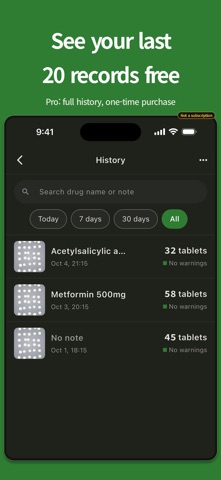
HISTORY STAYS ON YOUR DEVICE (LAST 500 RECORDS) A confirmed count (photo, count, target, and note) is saved only on your device and appears in the history list. Up to 500 records are kept; older ones are removed automatically. Delete a single record, clear all at once, or uninstall the app to remove everything.
PRO: FULL HISTORY (ONE-TIME PURCHASE) Counting stays free with no limit. Without Pro, your 20 most recent saved records are viewable; older records are not deleted, they stay on your device and unlock when you buy Pro. On a new device, Restore Purchase unlocks Pro only; records and photos are not moved.
LIMITATIONS AND DISCLAIMER Pill Counter is a counting aid for dispensing workflows. It is not a medical device and does not provide medical advice, diagnosis, or treatment information. The displayed count is for reference only: final quantity verification and dispensing responsibility must always rest with a qualified pharmacist or authorized staff. Do not finalize a dispensing decision based solely on this app's result.
PERMISSIONS The only permission is Camera, used for the tablet photo and the torch.
Nutzer bewerten sie
Melde dich an, um diese App zu bewerten. Ehrlichkeit zählt.
Noch keine Bewertungen. Hast du die App ausprobiert? Gib die erste Bewertung ab.
Mehr Dienstprogramme-Apps
Die besten neuen Dienstprogramme-Apps dieser Woche Drainly: Speaker CleanerMuffled speaker after a splash, rain, or a sweaty workout?
 Photo & PDF Resize: KBFile too large to upload?
 Arvectum Proxy LauncherArvectum Proxy Launcher is a network utility that routes your iPhone through a proxy you…
 Vodoalarm: vodostaji BiHVodoalarm javlja kad tvoja rijeka naglo raste, pa ne moraš stalno gledati vodostaje
 FairAuth: AuthenticatorFairAuth creates the codes for two-step verification on iPhone and iPad
 Polarglow: Aurora AlertsKnow tonight's chance of seeing the aurora where you are, and never miss a storm night