
PocketSign – Scan & Sign PDF
Nicht beanspruchtScan, fill and sign PDFs privately on your iPhone and iPad, without ever giving up…
Von Nick Shaw · ProduktivitätWarum wir das erwarten: A focused, privacy-first PDF signing tool with a clear value proposition, thoughtful description and broad iPhone and iPad appeal.



Kurz gesagt
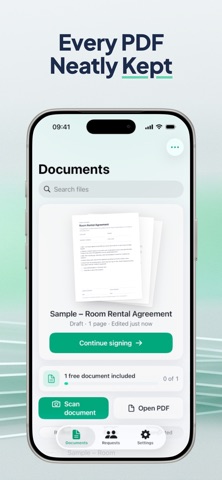
PocketSign, Scan & Sign PDF is a productivity app for scanning, filling, and signing PDFs on iPhone and iPad, with all processing done on the device. Its page manager lets users reorder, rotate, duplicate, and delete pages, and the Pro plan adds online signing requests that recipients can complete in a browser without an account.
Zusammenfassung von Debuts, basierend auf dem Eintrag im App Store.Info
Scan, fill and sign PDFs privately on your iPhone and iPad, without ever giving up control of your documents.
PocketSign is a calm, focused place to finish paperwork. Open a PDF or scan a paper document, add what's needed and export a clean, flattened copy. Everything happens on your device, and your original file is never changed.
SCAN PAPER INTO A TIDY PDF Point your camera at a page and PocketSign finds the edges automatically. Crop, apply a filter, retake a page or reorder them, then combine everything into one multi-page PDF.
OPEN THE DOCUMENTS YOU ALREADY HAVE Bring in PDFs from Files, iCloud Drive or other apps, including password-protected files. They open ready to work on, with nothing uploaded.
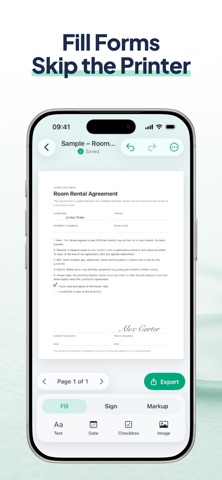
FILL AND SIGN BY TAPPING THE PAGE Tap anywhere to add text, dates, checkboxes, initials, signatures or stamps. Drag and resize to place each one exactly, with undo and redo whenever you need them.
YOUR SIGNATURE, KEPT SAFE Draw, type or import your signature. Save it in a vault locked with Face ID, or use it once and it's never kept.
MARK UP AND ORGANISE Use the pen, highlighter and eraser, with full Apple Pencil support. The page manager lets you reorder, rotate, duplicate and delete pages.
EXPORT WITH CONFIDENCE Save, share or print a flattened PDF so your entries stay as you placed them. The original document is left untouched.
INVITE OTHERS TO SIGN (PRO) When a document needs more than your signature, send a private link to one or several people. Set the signing order, assign fields to each person and follow progress as signatures come in. Recipients can sign in the app or in any web browser, with no account needed. When everyone has finished, download the completed PDF.
PRIVATE BY DESIGN There are no accounts, no analytics and no tracking. Your documents stay on your device. A file is only uploaded when you choose to request signatures and confirm it, and shared documents are deleted automatically after 7, 30 or 90 days, as you prefer.
PLANS The free plan includes one completed PDF of any length, signed by you. PocketSign Pro adds unlimited documents and online signing requests for £5.99 a month or £34.99 a year. There is no free trial. Payment is charged to your Apple ID and the subscription renews automatically unless cancelled at least 24 hours before the end of the current period. You can manage or cancel it in your App Store account settings.
Open a document, sign it and get on with your day. Download PocketSign.
Nutzer bewerten sie
Melde dich an, um diese App zu bewerten. Ehrlichkeit zählt.
Noch keine Bewertungen. Hast du die App ausprobiert? Gib die erste Bewertung ab.
Mehr Produktivität-Apps
Die besten neuen Produktivität-Apps dieser Woche ChickMark: Habit TrackerChickMark is a simple habit tracker for routines, goals, and reminders
 Dayflint: One Thing a DayToo many priorities?
 Fristo CAFMFristo is the app for Fristo CAFM, the facility management software
- BeginAnywayMorning alarm for hard tasks: set one task, prove you started, build a streak
 DHUDEDHUDE Analityxs es la herramienta de gestión diaria para grupos de restauración y ocio…
 Fillerless: Teleprompter CoachFillerless is a teleprompter that follows your voice and then tells you how you spoke