
Radaa: Baby Feeding Tracker
Nicht beanspruchtRadaa makes it easy to follow your baby's feeds in the first months — one-handed, and…
Von MUJMAL ALHULUL ESTABLISHMENT · Gesundheit und FitnessWarum wir das erwarten: A carefully written listing with clear value, one-handed controls, bilingual support and strong privacy promises.



Kurz gesagt
Radaa: Baby Feeding Tracker logs breastfeeding, bottle feeds and pumping in the first months, with timers, quick buttons on the Lock Screen and Control Center, and Siri voice commands. It is aimed at parents of newborns and stands out for keeping all baby data on the device, with no server uploads.
Zusammenfassung von Debuts, basierend auf dem Eintrag im App Store.Info
Radaa makes it easy to follow your baby's feeds in the first months — one-handed, and even without opening the app.
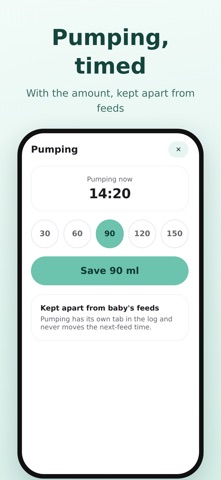
Log a feed in seconds - Breastfeeding: one tap starts the timer, switch sides with a tap, and each side is timed. - Bottle: pick the usual amount and save in two taps; fix the time if you logged it late. - Pumping: a timer and an amount, kept separate from the baby's feeds in the log.
Quick buttons, no app needed Add Radaa's buttons to Control Center, the Lock Screen or the Action Button: nurse right, nurse left, switch side, feeding is over, bottle, and pumping.
Your voice, with Siri "Radaa, start feeding" — Siri asks: breast or bottle? which side? how many ml? Plus "switch side", "feeding is over" and "start pumping".
Everything at a glance - The home screen shows the last feed, how long ago it was, and roughly when the next one is due. - Widgets for the Home Screen and the Lock Screen. - The feeding timer appears on the Lock Screen and in the Dynamic Island, with switch and finish buttons. - The log is split in two: feeds in one tab, pumping in the other.
Gentle reminders A reminder for the next feed based on your own usual gap, with snooze for 10, 15 or 30 minutes, and a weekly summary every Sunday.
A report for the doctor A ready PDF before the appointment: feeds, amounts, durations and gaps.
Made for your baby Colours follow your baby: blue for a boy, pink for a girl, neutral before you set it. There's a calm night mode for night feeds, and you can switch between Arabic and English inside the app.
Your privacy Your baby's data is saved on your device only. We never send it to a server.
Radaa Plus - No ads - More than one baby - Nicknames Siri understands - The full doctor's report: every feed with its time, amount, duration and side, up to 30 days - Smarter prediction of the next feed from the last 7 days - Ask Siri "When was the last feeding?" - The full log and weekly insights - App icon in your baby's colour
Subscribe monthly or yearly (with a free trial where offered), or buy it for life. A subscription renews automatically unless cancelled at least 24 hours before the period ends, and it can be managed or cancelled in your Apple account settings. The full report is also available as a one-off purchase, with no subscription.
Note: Radaa is a tool for logging and organising feeds. It is not a medical app and gives no medical advice. Always consult your doctor.
Nutzer bewerten sie
Melde dich an, um diese App zu bewerten. Ehrlichkeit zählt.
Noch keine Bewertungen. Hast du die App ausprobiert? Gib die erste Bewertung ab.
Mehr Gesundheit und Fitness-Apps
Die besten neuen Gesundheit und Fitness-Apps dieser Woche Orbit: Self-Care Habit TrackerYour healthy choices deserve more than a checkmark
 Wellbeing: Digital WellbeingBillions of people spend more time scrolling than they want to
 Cairn: Hot Flash LogCairn is a perimenopause symptom tracker built around one thing the others get wrong…
 Solstice Perimenopause TrackerSolstice is a perimenopause tracker — not a fertility app with a mode bolted on
 Court OrderCourt Order sorts out who plays next, so nobody has to
 Finn: Baby TrackerFinn is the calm, quick way to track your baby's feeds, sleep, diapers and pumping — and…