
Renotify: Notification History
Nicht beanspruchtDismissed a notification by accident?
Von HAKJAE KIM · Dienstprogramme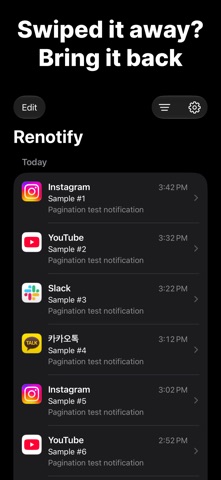


Kurz gesagt
Renotify: Notification History keeps a copy of the notifications your iPhone receives, using the Notification automation in iOS 27 Shortcuts. It is for people who dismissed or cleared a notification before reading it. Its history is stored only on the device, and it has no accounts, ads, or tracking.
Zusammenfassung von Debuts, basierend auf dem Eintrag im App Store.Info
Dismissed a notification by accident? Cleared one before you read it? Now you can see it again in Renotify.
Renotify uses the Notification automation in iOS 27 Shortcuts to keep the notifications you receive on your iPhone. Set it up once, and new notifications are saved automatically.
Features • Timeline: See your notifications grouped by day. • Search: Find past notifications by app name, title, or message. • Date & app filters: Show only a specific day or a specific app. • App icons: See at a glance which app each notification came from. • Light and dark themes, in English and Korean.
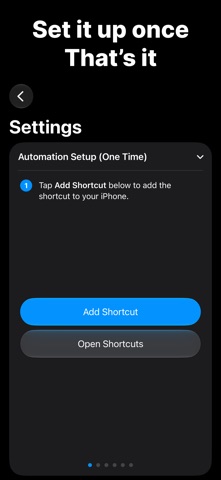
One-time setup 1. In the Settings tab, tap Add Shortcut to add the shortcut. 2. In the added shortcut, choose the apps whose notifications you want to save. 3. Turn on Automation. That's it! (Send a test notification to check your setup right away.)
Your notifications stay on your iPhone • Your history is stored only on your device. • No accounts, ads, or tracking. • Notification content is never sent to a server.
Good to know • Requires iOS 27 or later. • Only notifications from apps added to the Shortcuts automation are saved. Add newly installed apps to the shortcut yourself. • Notifications are saved starting from when you install Renotify and turn on the automation.
Contact: hakjae.dev@gmail.com
Nutzer bewerten sie
Melde dich an, um diese App zu bewerten. Ehrlichkeit zählt.
Noch keine Bewertungen. Hast du die App ausprobiert? Gib die erste Bewertung ab.
Mehr Dienstprogramme-Apps
Die besten neuen Dienstprogramme-Apps dieser Woche Drainly: Speaker CleanerMuffled speaker after a splash, rain, or a sweaty workout?
 Photo & PDF Resize: KBFile too large to upload?
 Arvectum Proxy LauncherArvectum Proxy Launcher is a network utility that routes your iPhone through a proxy you…
 Vodoalarm: vodostaji BiHVodoalarm javlja kad tvoja rijeka naglo raste, pa ne moraš stalno gledati vodostaje
 Dusty: Photo Cleaner PetYour camera roll's new pet
 FairAuth: AuthenticatorFairAuth creates the codes for two-step verification on iPhone and iPad