
Reverloop: Focus & Grow
Nicht beanspruchtSmall focus
Von SHAN SHALIN PATEL · ProduktivitätWarum wir das erwarten: Its clear terrarium reward system and thoughtful Screen Time blocking make focus feel genuinely rewarding.





Info
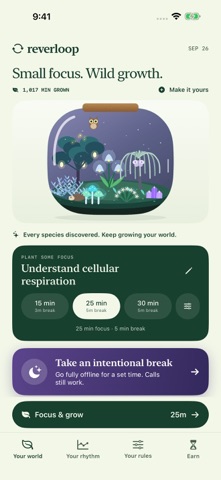
Small focus. Wild growth.
Turn focused minutes into a little world of your own. Reverloop combines a study timer, a growing terrarium, and intentional breaks that help you find your way back to work.
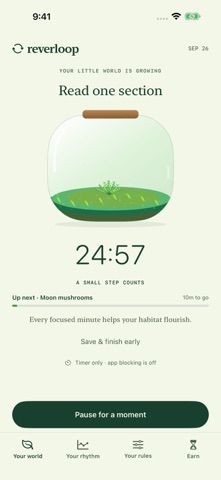
GROW YOUR OWN TERRARIUM Start with a little fern. As your focused time adds up, discover exotic plants, colorful decorations, and cartoon creatures that roam your habitat. Arrange your discoveries across seven spots. Saved partial sessions count, and breaks never erase what you have grown.
MAKE ROOM TO FOCUS Choose a task and session length. With your permission, Screen Time blocks the apps and categories you select. Keep essential communication and study tools accessible. Pause when life interrupts, or save the focus you have already done.
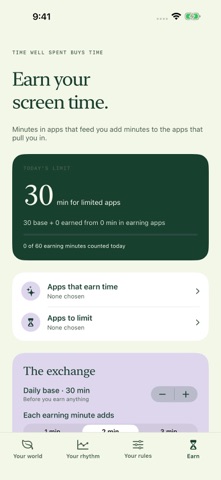
EARN YOUR SCREEN TIME Pick apps that feed you, like news, books or language practice, and apps you want to limit. Limited apps share a daily base, and every minute in an earning app adds more, up to a maximum you set. They lock when today's limit is reached, unlock as soon as you earn more, and reset at midnight. Usage is counted by Apple's Screen Time on your iPhone.
TAKE AN INTENTIONAL BREAK Start an Offline Reset for a time you choose, like 6 to 8 PM. Every app pauses except phone calls and the apps you allow, such as Messages. Your apps return on their own when time is up, and you can end the reset early at any moment.
LEAVE YOURSELF A WAY BACK Write one small next action before your break. Return to that cue when you are ready to continue.
LOCK SCREEN WIDGETS See your focus timer, lifetime minutes and next habitat reward with circular, inline and rectangular Lock Screen widgets. Add Reverloop when customizing your Lock Screen.
KEEP YOUR PROGRESS Review your study history and export it when you choose. This version stores progress on your device and has no advertising or app account requirement.
REVERLOOP PLUS (OPTIONAL SUBSCRIPTION) The free version includes 10, 25, and 45 minute sessions with 2, 5, and 10 minute breaks, app blocking, earned screen time, Offline Resets, your terrarium, and your history. Reverloop Plus adds: - Custom focus lengths from 5 to 180 minutes and breaks from 1 to 60 minutes, with saved presets - A lifetime focus pass: earn 66 habitats at focus milestones, from Cozy café at 25 minutes and Night garden at 1,000 to Phoenix nest at 15,000. Past focus counts. Each world has its own plants and animated creatures. Earned habitats stay usable on this device after Plus ends; earning new Plus habitats requires an active subscription. No reset or deadline. Plus also opens the four seasonal worlds all year. - Weekly and monthly trends, your best time of day, and minutes by task - Four color themes with matching app icons
Reverloop Plus is available monthly or yearly. Payment is charged to your Apple Account at confirmation. Subscriptions renew automatically unless cancelled at least 24 hours before the end of the current period. Manage or cancel anytime in your Apple Account settings.
Notifications and app blocking require permission. Reminder delivery depends on your notification settings. Return statistics reflect recorded app interactions, not proof of studying or learning outcomes.
Nutzer bewerten sie
Melde dich an, um diese App zu bewerten. Ehrlichkeit zählt.
Noch keine Bewertungen. Hast du die App ausprobiert? Gib die erste Bewertung ab.
Mehr Produktivität-Apps
Die besten neuen Produktivität-Apps dieser Woche ChickMark: Habit TrackerChickMark is a simple habit tracker for routines, goals, and reminders
 Dayflint: One Thing a DayToo many priorities?
 Snappy Do ItSix connected modes. One traceable journey.
 Fristo CAFMFristo is the app for Fristo CAFM, the facility management software
 UhWhat? Voice NotesCatch the thought before it disappears
- BeginAnywayMorning alarm for hard tasks: set one task, prove you started, build a streak