
Rowby: Crochet Row Counter
Nicht beanspruchtRowby is an offline row counter for crochet and knitting on iPhone
Von Anastassiya Shugaley · LifestyleWarum wir das erwarten: Rowby solves a real crafter pain point by pairing your own pattern with a row counter, offline and private, with a clear free start.


Kurz gesagt
Rowby: Crochet Row Counter is an offline row counter for crochet and knitting on iPhone. It shows your PDF, photo or scanned pattern beside the count, and a ruler moves to the next row with each tap, with voice commands and Lock Screen counting available in the Pro tier. Aimed at crocheters and knitters who want their pattern and counter on one screen, it keeps patterns on the device and works without an account.
Zusammenfassung von Debuts, basierend auf dem Eintrag im App Store.Info
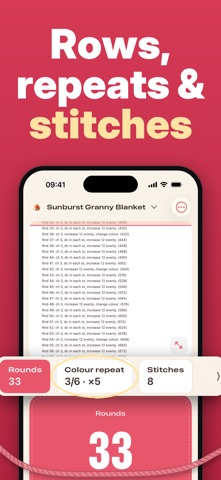
Rowby is an offline row counter for crochet and knitting on iPhone. Your pattern (PDF, photo or camera scan) and your counter share one screen: tap the big count pad and a ruler slides to the next row. Free to start — your first project and 30 rows cost nothing; no account, patterns stay on your iPhone.
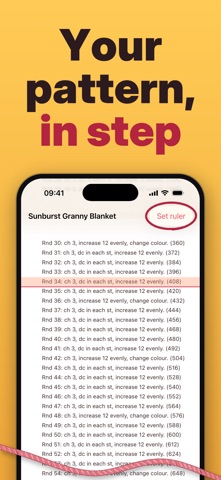
Rowby keeps your pattern and your counter on the same screen. Tap anywhere on the big count pad and the coral ruler slides down to the next row of your own pattern — no paper clips, no sticky notes, no scrolling back to find where you were.
Your own patterns, on your iPhone Add a PDF from Files, a photo, or scan the paper copy with the camera. Set the ruler once by tapping your current row and the next one; from then on it follows your count, page after page. Patterns stay on your iPhone — Rowby never uploads or shares them, and never generates them.
Hands-free counting Say “next”, “back” or “undo” and keep both hands on the hook. Speech is recognised on your device, nothing is recorded. Or count from the Lock Screen: a +1 button sits next to your row. The screen stays awake while you work.
Counters that count themselves A repeat counter follows your rows and resets itself every time the repeat is done, so “increase every 6th round” is one glance, not arithmetic. Add extra counters for stitches, set a target, and leave yourself a reminder on any row: “Row 36: change to cream”.
Start from a project Ten ready-made projects: a granny square blanket, a ripple blanket, a beanie, a market bag, vanilla socks, a dishcloth and more. Pick one and Rowby sets up its counter, its repeat and its row reminders for you — “Round 36: start the border”. Each project also points to video tutorials and free written patterns on the sites that host them. New projects are added with every update.
A counter you can trust Every tap is written to the project journal with its time. Undo one step, or go back to any moment in the history — no more distrusting the number on the screen.
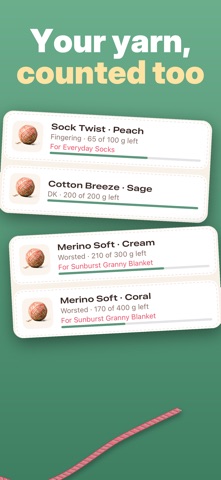
Everything in one project Cover photo, hook or needle size, time worked, and the yarn you are using. Your yarn stash keeps weights, colours and what’s left after each project.
Try Rowby before you pay: your first project and your first 30 rows cost nothing. Rowby Pro then unlocks the pattern ruler, hands-free counting, unlimited projects, the yarn stash and the pattern links. No account, no cloud, no tracking — and you can export everything as a file whenever you like.
Terms of Use (EULA): https://jjjulietttee-jpg.github.io/rowby-app/terms.html Privacy Policy: https://jjjulietttee-jpg.github.io/rowby-app/privacy.html
Nutzer bewerten sie
Melde dich an, um diese App zu bewerten. Ehrlichkeit zählt.
Noch keine Bewertungen. Hast du die App ausprobiert? Gib die erste Bewertung ab.
Mehr Lifestyle-Apps
Die besten neuen Lifestyle-Apps dieser Woche askoraAI 회상 노트
 Familjekalender – familjens årFamiljekalender är en delad kalender för hela familjen, där varje dag kan bära ett foto…
 My Anime TrackerAnime watch order, no guesswork.
 WatchLux: Animated Watch FacesOver 750 animated watch faces for Apple Watch and Wear OS
 SCNT ControlSCNT conecta tu teléfono con tu difusor de aroma por Bluetooth y te da el control…
 Sakinah: Quran, Adhkar & DuaSakinah brings the Qur'an, the prayer and daily remembrance together in one calm app, in…