
SlimScan: Scan or Shrink PDF
Nicht beanspruchtTired of "Attachment too large"?
Von TAHA ABBAS · DienstprogrammeWarum wir das erwarten: Clear, practical value and a detailed description make this useful for anyone fighting oversized PDFs.



Info
Tired of "Attachment too large"?
The scanner built into your iPhone makes beautiful PDFs, but they are huge. A few pages can be too big to email, and a folder of scans can quietly eat through your iCloud storage. SlimScan fixes that – for new scans and for the PDFs you already have.
SHRINK THE PDFs YOU ALREADY HAVE • Share any PDF to SlimScan from Mail, Files, WhatsApp or Safari – or open it from inside the app. • SlimScan rebuilds it as a small, sharp PDF and shows you exactly how much you saved (for example: was 14 MB, now 1.3 MB). • Drop pages you don't need before you send. • Works with anything you can print or export as a PDF – reports, slide decks, spreadsheets, web pages – not just scans.
SMALL. REALLY SMALL. • A 20-page document in 1.5 MB or less. That's about 75 KB a page – often 1/10th the size of a default phone scan. • Less iCloud storage used, faster to email, and quicker to upload anywhere. • The exact file size is shown before you send, with a clear "EMAIL SAFE" check against the limit. • Text pages become razor-sharp black & white. Colour pages stay in colour. • SlimScan fine-tunes quality across the whole document so every page fits. Busy pages borrow space from simple ones.
SCAN LIKE A PRO • Uses Apple's own document camera: automatic edge detection, perspective correction and multi-page capture. • Import photos from your library. • Rotate, reorder or delete pages. • Your pages stay put until you delete them – a failed send, a phone call, or closing the app never means starting over.
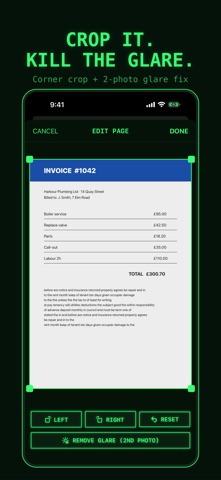
FIX IT IN SECONDS • Crop dead space off any page: drag the corners, done. • Glossy paper? Remove Glare combines two photos of the page and keeps the glare-free parts. • Shadows and uneven light are evened out automatically.
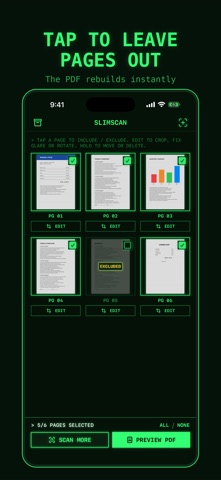
PRINT PREVIEW THAT LETS YOU CHOOSE • See the real PDF before you send it. • Tap any page to leave it out. The file rebuilds instantly and the size updates as you go. • Choose the size you need: TINY, EMAIL or HI-Q. Pick A4 or Letter.
SEND IT ANYWHERE • Email straight from the app, or share to Outlook, Gmail, WhatsApp, Messages, AirDrop and more. • Print with AirPrint. • Save to your in-app archive, which you can also see in the Files app.
ZERO MARKETING. ZERO DATA. KEEP YOUR PRIVACY. • No ads. No tracking. No analytics. No account. No sign-up. • SlimScan collects no data. Your documents never leave your iPhone unless you send them. • Everything is processed on the device, so it also works in flight mode. • Made in Switzerland – where privacy isn't an afterthought, it's the standard.
ONE SIMPLE PRICE • Try it free: your first 3 PDFs are on us (trial PDFs carry a small SlimScan watermark). • Then unlock SlimScan forever with a single payment. No watermark, unlimited PDFs. • No subscription. No renewals. No upsells. Pay once, it's yours.
Two looks: a retro green-screen terminal with a turnable mode dial, or a clean classic iOS style. Switch any time.
Nutzer bewerten sie
Melde dich an, um diese App zu bewerten. Ehrlichkeit zählt.
Noch keine Bewertungen. Hast du die App ausprobiert? Gib die erste Bewertung ab.
Mehr Dienstprogramme-Apps
Die besten neuen Dienstprogramme-Apps dieser Woche Drainly: Speaker CleanerMuffled speaker after a splash, rain, or a sweaty workout?
 Photo & PDF Resize: KBFile too large to upload?
 Arvectum Proxy LauncherArvectum Proxy Launcher is a network utility that routes your iPhone through a proxy you…
 Vodoalarm: vodostaji BiHVodoalarm javlja kad tvoja rijeka naglo raste, pa ne moraš stalno gledati vodostaje
 Dusty: Photo Cleaner PetYour camera roll's new pet
 FairAuth: AuthenticatorFairAuth creates the codes for two-step verification on iPhone and iPad