
Timeflow - Time Widgets
Nicht beanspruchtTimeflow puts sleep time, estimated earnings, countdowns and calendar progress on a…
Von CHANWOO KOO · DienstprogrammeWarum wir das erwarten: Timeflow packs sleep planning, earnings estimates and countdowns into clear widgets, backed by a thorough description and screenshots.



Kurz gesagt
Timeflow Time Widgets is a utilities app that shows sleep timing, estimated earnings, countdowns and calendar progress as board cards and Home Screen widgets. It suits people who want time-based information at a glance, from planning bedtime to tracking days until an event. One distinctive feature is the sleep dial, where the bedtime window can be moved around a clock without changing its length.
Zusammenfassung von Debuts, basierend auf dem Eintrag im App Store.Info
Timeflow puts sleep time, estimated earnings, countdowns and calendar progress on a board and Home Screen widgets. Add a clock, a note with a link, or a photo alongside your time cards.
■ Plan sleep on a clock dial Drag bedtime and wake-up time around the dial. Move the colored arc to shift the whole window without changing its length. “If I sleep now” shows the time until you wake up, minus the time you expect to take to fall asleep.
■ Estimated earnings by day, month and year Enter hourly, monthly or annual pay, then choose your workdays and hours. View gross or estimated net earnings, and browse estimates for previous days and months. Amounts are in Korean won; net estimates use South Korean rules.
■ See how much time has passed Track the year, month, week or day with dots, blocks, bars or rings. Start the week on Sunday or Monday and show a full day, morning or afternoon. The daily time card moves from time until leaving home to returning home and bedtime. Subtract time for meals, chores and other plans to see your free time after getting home.
■ Count down or count days since a date See days until a trip or event, or days since a birthday, adoption or anniversary. Include today in a countdown or count the starting date as day one. For a deadline, choose available days and hours to count remaining work sessions.
■ Clocks, text and photos Choose an analog or digital clock with Minimal, Classic or Rounded styling. Add a web link to a text card, or make a card just for a photo. Countdown, elapsed-day, clock and text cards also support background photos, with adjustable framing for each size and a darkness control.
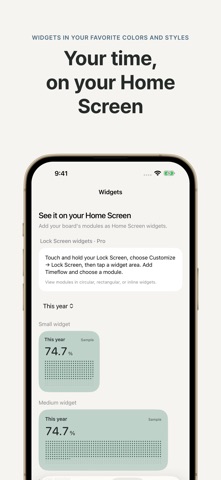
■ From a card to your Home Screen Set the content, then choose a design while viewing the preview. Small, medium and large widgets are supported, with extra large widgets on iPad. A widget opens its module; a text widget with a link opens the web address you set.
■ Lock Screen widgets and Live Activities With Pro, see compact Lock Screen widgets for 12 module types, excluding photo modules. With Pro, start or stop a Live Activity from each module’s detail screen and see it in Dynamic Island on supported iPhones. Each session stays active for up to eight hours; iOS may end it sooner. Remaining-time displays count down automatically; other values refresh when you open the app or edit the module.
■ Free and Pro Create up to three personal modules for free. Example modules do not count toward this limit. A one-time Timeflow Pro purchase removes ads and unlocks unlimited modules, Lock Screen widgets and Live Activities. The purchase screen shows the current price.
Calculation and data notes • Module settings and selected photos are stored on your device and shared with the widget. No login or developer-operated cloud sync is required. Apple handles purchases and restores. Free use may include ads; see the privacy policy for usage, diagnostics, purchase and advertising data. • Earnings history is recalculated from your current pay and schedule. It is an estimate, not a timesheet or a record of payments received. • Net pay estimates use 2026 South Korean employment tax and social insurance rules. They may differ from actual withholding or year-end tax results. Assumptions and sources are available in the app. • Sleep calculations are for planning. Timeflow does not set alarms or measure sleep. • iOS controls Home Screen widget refresh times. Clock widgets are not guaranteed to update every second.
Available in Korean, English, Japanese and Simplified Chinese on iPhone with iOS 18 or later and iPad with iPadOS 18 or later.
Nutzer bewerten sie
Melde dich an, um diese App zu bewerten. Ehrlichkeit zählt.
Noch keine Bewertungen. Hast du die App ausprobiert? Gib die erste Bewertung ab.
Mehr Dienstprogramme-Apps
Die besten neuen Dienstprogramme-Apps dieser Woche Drainly: Speaker CleanerMuffled speaker after a splash, rain, or a sweaty workout?
 Photo & PDF Resize: KBFile too large to upload?
 Arvectum Proxy LauncherArvectum Proxy Launcher is a network utility that routes your iPhone through a proxy you…
 BillVoice : Lecteur de billetsPointez votre iPhone vers un billet, touchez l’écran n’importe où et entendez ce que…
 Look Twice: Scam & AI CheckLook twice before you click
 Vodoalarm: vodostaji BiHVodoalarm javlja kad tvoja rijeka naglo raste, pa ne moraš stalno gledati vodostaje