
Xsi: Day Planner & Journal
Nicht beanspruchtXsi turns your day into one timeline, and that timeline is your journal
Von 善康 梁 · LifestyleWarum wir das erwarten: Xsi's clear timeline concept, on-device transcription, and well-documented features make its value easy to grasp quickly.




Info
Xsi turns your day into one timeline, and that timeline is your journal.
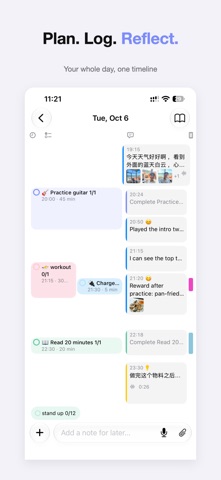
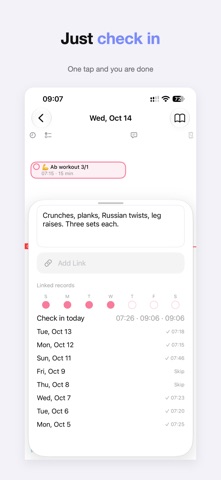
Most journal apps hand you a blank page and expect you to know what to write. Xsi doesn't ask you to write a journal. It asks you to live your day: schedule events, check off to-dos, tick habits, say a quick thought, snap a photo. Everything lands on one timeline in the order it happened, and that is already a journal. Want to say more? Add a written note.
ONE DAY, ONE TIMELINE - Plans on the left (events, to-dos, habits), what actually happened on the right (notes, voice, photos, links) - Tap to check off, press and drag to reschedule. It works the way a calendar does - Tap anything to open a half-height panel and edit it in place, with the timeline still visible above
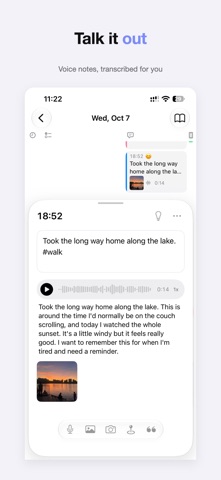
SAY IT, AND IT'S SAVED - Hold the mic and talk. Let go, and you have a voice note with a text transcript - Transcription runs on your phone. Nothing is uploaded - Ask Siri to add a note or an idea without opening the app - Start recording from the Action button, Control Center, or the Lock Screen - Share links, photos, or text from any app straight into your day
IDEAS DON'T GET LOST - Mark a quick note as an idea and it shows up in your Review tray - Unfinished to-dos wait there too: move to today, reschedule, or let go - Turn an idea into a to-do in one tap, or fold it into your journal
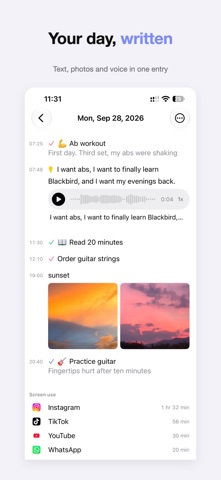
A JOURNAL YOU'LL ACTUALLY READ - Flip the day into reading mode: your timeline becomes a clean, chronological entry, plus anything you wrote - Browse by week, month, or #tag, search everything, export to Markdown - Notes support light Markdown and save as you type
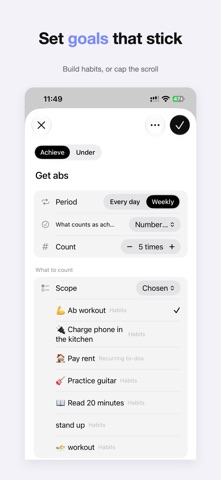
SEE WHERE YOUR TIME WENT - Choose the apps you want to track (set up with a Shortcuts automation), and see them next to the things you finished - Review any day, week, month, or year: how much time you spent, when, and on what - Set your own goals, like "workout 5 times a week" or "social apps under 1 hour a day," and compare only against yourself - No scores, no streaks, no rankings. Just the numbers - App usage comes from Shortcuts, so it's an approximation and won't match Apple's Screen Time exactly
LET AI DRAFT A PLAN (OPTIONAL) Describe a goal, copy the prompt into any AI app you like, paste the reply back, preview and tweak it, then import it as goals, habits, events, and to-dos. One tap to undo.
PRIVATE, AND FAIRLY PRICED - Your data stays on your device, with optional iCloud sync (Pro) - Voice transcription happens on-device - No account, no ads - Logging is free forever. You'll never lose access to your own entries - Xsi Pro is a one-time purchase, no subscription: iCloud sync, unlimited goals and tracked apps, weekly/monthly/yearly review, full-text search, and journal compilations - Export all your data any time (Markdown, photos, recordings)
For anyone who wants to plan without being buried by plans: studying for an exam, training, reading more, using the phone less, or just paying attention to your days.
Nutzer bewerten sie
Melde dich an, um diese App zu bewerten. Ehrlichkeit zählt.
Noch keine Bewertungen. Hast du die App ausprobiert? Gib die erste Bewertung ab.
Mehr Lifestyle-Apps
Die besten neuen Lifestyle-Apps dieser Woche askoraAI 회상 노트
 Familjekalender – familjens årFamiljekalender är en delad kalender för hela familjen, där varje dag kan bära ett foto…
 My Anime TrackerAnime watch order, no guesswork.
 Sakinah: Quran, Adhkar & DuaSakinah brings the Qur'an, the prayer and daily remembrance together in one calm app, in…
 Mizwala: Prayer Times & QiblaMizwala is a calm, focused companion for the five daily prayers
 Primero DiosAbres el teléfono sin pensar y se te van veinte minutos