
Bifolio: Private Journal
Sin reclamarBifolio is a private journal that opens like a book
De Canopus Labs Ltd · Estilo de vidaPor qué la esperamos: A clear privacy story and thorough feature set make this journal compelling to readers who value control.


En resumen
Bifolio: Private Journal is a lifestyle app for keeping journals on an iPhone, with entries that can hold text, photos, video, audio and drawings. Everything is encrypted on the device before it syncs to iCloud, and there is no Bifolio account or tracking. One standout detail is that Bifolio never writes entries for you, only offering questions when a blank page is hard to start.
Resumen de Debuts, basado en la ficha de la App Store.Acerca de
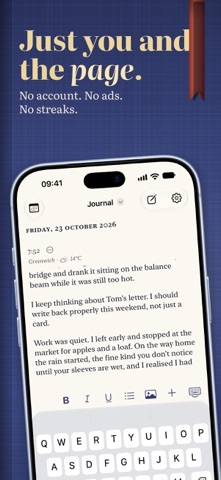
Bifolio is a private journal that opens like a book.
YOURS, AND SEALED What you write, and every photo, video, recording and drawing with it, is encrypted on your iPhone before it syncs to your iCloud. The keys travel between your devices in iCloud Keychain, and an optional recovery key of your own lets you back in if they can't. There is no Bifolio account, no server of ours and no tracking of any kind. Settings shows whether iCloud is up to date.
YOUR WORDS STAY YOURS Bifolio never writes your entries. If a blank page is hard to start, it offers a question. Where Apple Intelligence is available, it can suggest questions drawn from your recent entries, worked out on your iPhone. Journaling Suggestions can start an entry from a moment your iPhone remembers, and Apple's Writing Tools are there when you want them. One switch in Settings turns all of it off.
JOURNALS LIKE BOOKS Keep as many journals as you like, each a book on your shelf in its own cloth. Write as many entries a day as you want, and add photos (several at once, or straight from the camera), video, audio transcribed on your iPhone where your language is supported, and drawings or handwriting. Mark how you felt, and let Bifolio note where you were and the weather. An entry's own menu moves it to another journal or shares it.
LOOK BACK Search everything you have written, even what you said in your recordings. The calendar marks the days you wrote, and On This Day brings back the same date in earlier years.
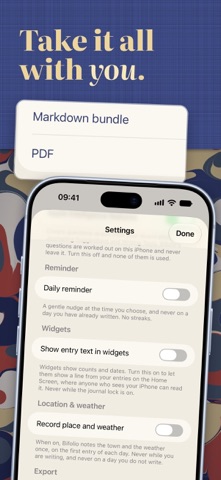
YOURS TO TAKE WITH YOU Export everything, one journal or one day as a PDF, or as a ZIP of Markdown files with the original photos, video, audio and drawings. Share a single entry as a PDF. Bring journals in from Day One, Apple Journal or an earlier Bifolio export, and undo an import that wasn't what you wanted. A weekly backup can keep copies in a folder you choose. Exports and backups are plain files, not encrypted, and Bifolio says so wherever it makes one.
QUIET BY DESIGN No streaks, no badges, no congratulations. A few lines is a full entry, and so is a single photograph. An optional daily reminder stays quiet on days you have already written.
AROUND YOUR IPHONE Widgets for today, On This Day and the month, and a New Entry control for Control Centre. Siri and Shortcuts can start an entry, open today, record audio or search. Lock the journal with Face ID, Touch ID or a passcode of its own: after several wrong passcodes it makes you wait, longer each time, and with the lock on, widgets never show what you wrote.
AN OPEN BOOK ON IPHONE DUO Folded, Bifolio is a pocket journal for a quick note. Unfolded, it becomes a spread: your days on one side, the page you are writing on the other. Read your journal as a book and the crease becomes its spine, with two facing pages that turn like paper, one day after another. On other iPhones it is the same journal in a single, unhurried column.
Terms of Use (EULA): https://www.apple.com/legal/internet-services/itunes/dev/stdeula/
Así la valora la gente
Inicia sesión para valorar esta app. Lo que cuenta es ser sincero.
Aún no hay valoraciones. ¿La has probado? Sé el primero en valorarla.
Más apps de Estilo de vida
Las mejores apps nuevas de Estilo de vida esta semana askoraAI 회상 노트
 Familjekalender – familjens årFamiljekalender är en delad kalender för hela familjen, där varje dag kan bära ett foto…
 My Anime TrackerAnime watch order, no guesswork.
 WatchLux: Animated Watch FacesOver 750 animated watch faces for Apple Watch and Wear OS
 SCNT ControlSCNT conecta tu teléfono con tu difusor de aroma por Bluetooth y te da el control…
 Sakinah: Quran, Adhkar & DuaSakinah brings the Qur'an, the prayer and daily remembrance together in one calm app, in…