
CRA Navigator
Sin reclamarKnow your next CRA action – and what still needs attention
De Marcel Knop · ProductividadPor qué la esperamos: The description explains a clear workflow for CRA compliance, and the free core makes it easy to try.



Acerca de
Know your next CRA action – and what still needs attention.
CRA Navigator helps product managers and implementation teams organise work for the Cyber Resilience Act, EU Regulation (EU) 2024/2847 on cybersecurity for products with digital elements. Follow your work from scope and product classification through security measures and conformity assessment to reporting and support processes.
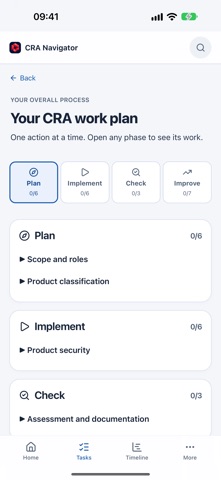
FIND YOUR NEXT STEP • A short introduction explains how the workflow works. • Home, Tasks, Timeline and More give you a clear place to start. • 22 guided actions across six modules explain the objective, approach and expected result. • Implement, Check and Finish help you confirm outcomes deliberately. • Prerequisites, questions to clarify and waiting states remain visible.
KEEP THE WHOLE PROCESS IN VIEW • Plan, Implement, Check and Improve show where you are in the process. • Assign owners and target dates, and use a timeline linked to the relevant actions. • Progress reflects confirmed work; previous module completion does not stand in for new checkpoints.
WORK THROUGH CRA QUESTIONS • Record scope and product classification decisions • Prepare security requirements and vulnerability handling • Plan conformity assessment, technical documentation and approvals • Prepare local incident drafts with deadlines calculated from relevant timestamps • Track the support period and readiness to place a product on the market
START FREE, EXPORT WITH PRO The work plan, tasks, CRA tools, report preview and backup restoration are free. CRA Navigator Pro unlocks PDF/HTML reports, editable ODT templates, encrypted JSON backups and ICS calendar exports. One purchase, no subscription. Apple displays your regional price before purchase. Existing Pro purchases can be restored.
ON IPHONE, IPAD AND MAC The interface and guidance are available in German, English and French. Your work stays on the individual device; there is no automatic team or cloud sync. Transfer work yourself using backups. Access is protected with Face ID, Touch ID or your device password; a configured device passcode or Mac password is required. No user account, advertising or analytics trackers.
The app does not submit reports to authorities and does not replace individual legal or technical assessment. Progress is not evidence of conformity. Applicable legislation and relevant official sources remain authoritative.
Así la valora la gente
Inicia sesión para valorar esta app. Lo que cuenta es ser sincero.
Aún no hay valoraciones. ¿La has probado? Sé el primero en valorarla.
Más apps de Productividad
Las mejores apps nuevas de Productividad esta semana ChickMark: Habit TrackerChickMark is a simple habit tracker for routines, goals, and reminders
 Dayflint: One Thing a DayToo many priorities?
 Snappy Do ItSix connected modes. One traceable journey.
 Fristo CAFMFristo is the app for Fristo CAFM, the facility management software
- BeginAnywayMorning alarm for hard tasks: set one task, prove you started, build a streak
 DHUDEDHUDE Analityxs es la herramienta de gestión diaria para grupos de restauración y ocio…