
DartSight - Darts Aim Guide
Sin reclamarDartSight is a practice app that helps you see where to aim in darts
De Yusuke Takeuchi · Salud y forma física


En resumen
DartSight - Darts Aim Guide is a practice app that uses the iPhone camera to recognize a dartboard and show a PASS POINT on screen for BULL, T20 or T19. The point is calculated from the dart's drop due to gravity, so it suits darts players who want an aiming reference during practice. It does not calculate scores.
Resumen de Debuts, basado en la ficha de la App Store.Acerca de
DartSight is a practice app that helps you see where to aim in darts.
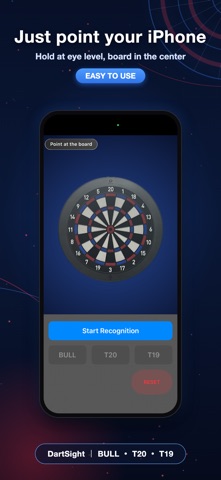
Stand where you throw, hold your iPhone at eye level in front of your face, and point the camera at your dartboard. DartSight recognizes the board. Choose a target – BULL, T20 or T19 – and DartSight shows your "PASS POINT", an aiming guide, on the camera view.
The PASS POINT is the nearer point your dart passes through, calculated with the dart's drop due to gravity. For BULL, for example, it appears around the outer "20" number. Throw through that point and the dart arcs down into the BULL.
The display follows small movements of your iPhone, so you can practice in a stance close to your usual one.
KEY FEATURES - Dartboard recognition with the camera - Target selection: BULL, T20, T19 - PASS POINT calculated from the dart's arc - Display follows your hand movement - RESET to recognize the board again
HOW TO USE 1. Stand where you throw and hold your iPhone at eye level, in front of your face 2. Point your iPhone so the board is in the center of the screen 3. Tap "Start Recognition" 4. Choose BULL, T20 or T19 5. Practice using the PASS POINT on screen
DartSight does not calculate scores. Please use the PASS POINT as a practice guide to check your throw. The PASS POINT is based on a typical throwing speed, so the best point may differ depending on how you throw.
Recognition speed and display stability may vary with lighting, distance, the area around the board, and how you hold your iPhone. Accuracy drops when the board is near the edge of the screen, so keep it in the center.
Así la valora la gente
Inicia sesión para valorar esta app. Lo que cuenta es ser sincero.
Aún no hay valoraciones. ¿La has probado? Sé el primero en valorarla.
Más apps de Salud y forma física
Las mejores apps nuevas de Salud y forma física esta semana Orbit: Self-Care Habit TrackerYour healthy choices deserve more than a checkmark
 Wellbeing: Digital WellbeingBillions of people spend more time scrolling than they want to
 Padel Score Tracker: PacoKeep padel score on your Apple Watch without looking at it
 DeskFlow: Workday MovementYou don't need another workout app
 Vigia: meds & family healthVigia keeps your health and your family's in order: a child, a parent, a partner
 Pinfall: Bowling StatsPinfall is the bowling score tracker for league bowlers who want to get better, not just…