
DivineCalc: Shop Ledger
Sin reclamarDivineCalc is a calculator and a ledger in one, made for market stalls, small shops and…
De CHENG CHI LO · ProductividadPor qué la esperamos: A focused, well-explained niche tool with clear value for market stall and small shop sellers, backed by privacy and CSV export.



En resumen
DivineCalc: Shop Ledger is a calculator that also saves each calculation as a ledger entry, with labeled line items, types such as Sales or Purchases, and daily totals on a calendar. It is aimed at market stalls, small shops and online sellers. It stands out for working fully offline with no account, and it can export a date range as a CSV file.
Resumen de Debuts, basado en la ficha de la App Store.Acerca de
DivineCalc is a calculator and a ledger in one, made for market stalls, small shops and online sellers.
Use it like any calculator — and turn every calculation into a ledger entry.
■ Label items inside the calculation Attach labels such as "Cabbage" or "Tomato" under the numbers. Each labeled part gets brackets and a subtotal, so you always see what makes up the total.
■ Long-press = to save Every entry has a type (Sales, Purchases, Expenses — or your own), an optional title such as the customer's name, and a note. Tap an earlier entry to load it back and fix it.
■ Daily totals on a calendar See each day's totals by type, together with every entry. Filter by type.
■ Export CSV Choose a date range and export a CSV file that opens in Excel, Numbers or Google Sheets.
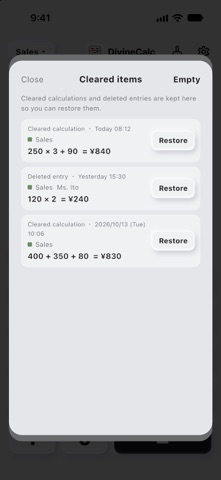
■ Undo mistakes Cleared calculations and deleted entries go to Cleared items first, so you can restore them.
■ Private by design No account, no internet access, no ads, no data collection. Everything stays on your iPhone.
Available in English, Japanese, Traditional Chinese, Simplified Chinese and Korean. Supports many currencies, including JPY, USD, EUR and TWD.
Así la valora la gente
Inicia sesión para valorar esta app. Lo que cuenta es ser sincero.
Aún no hay valoraciones. ¿La has probado? Sé el primero en valorarla.
Más apps de Productividad
Las mejores apps nuevas de Productividad esta semana ChickMark: Habit TrackerChickMark is a simple habit tracker for routines, goals, and reminders
 AirBuildAI agents build your native iOS app and handle App Review
 Dayflint: One Thing a DayToo many priorities?
 Snappy Do ItTurn photos, text and voice into tasks, plans and more.
 Fristo CAFMFristo is the app for Fristo CAFM, the facility management software
 Breakly: Screen Time LimitStop doomscrolling with mini and long breaks