
DM Home Theater Remote
Sin reclamarDM Home Theater Remote puts your Apple TV, your network AV receiver and your Google TV…
De JOSHUA CHARLES JORDAN · UtilidadesPor qué la esperamos: Clear value, thoughtful privacy and a demo mode that lets anyone explore the whole app first.


En resumen
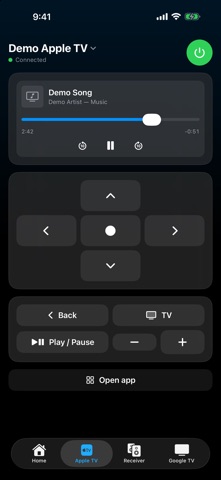
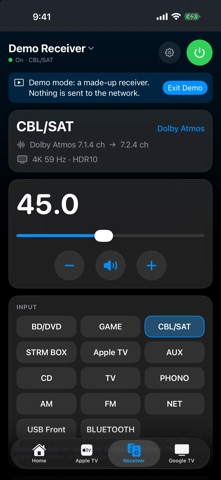
DM Home Theater Remote controls an Apple TV, a network AV receiver and a Google TV from one app on Mac and iPhone. It lets users build one-button activities, such as turning on the receiver, choosing its input and opening an Apple TV app, and it talks to devices directly over home Wi-Fi with no account or data collection. It stands out for its Demo Mode, which lets people explore the full app with made-up devices before connecting anything.
Resumen de Debuts, basado en la ficha de la App Store.Acerca de
DM Home Theater Remote puts your Apple TV, your network AV receiver and your Google TV in one app, on your Mac and your iPhone. No account, no ads, no data collected.
Press "Watch Apple TV" and it turns on the receiver, picks the right input, wakes the Apple TV and opens your app. Press "All Off" and it all turns off. Make your own buttons: choose the devices, the receiver input, the listening mode, the volume, the Apple TV app to open, and a Shortcut or (on iPhone) the lights to set.
WHAT YOU GET • One-button activities you design yourself, with your own names and icons • A signal-path strip showing Apple TV, receiver input and TV at a glance; tap a device to wake it • A full Apple TV remote: directions, now playing with scrubbing, apps, keyboard, volume • A full network AV receiver remote: power, precise volume, inputs by name, listening modes and live audio and video format, bass and treble, zones, setup menu • A Google TV remote: directions, Back, Home, media keys, HDMI inputs, app shortcuts, power • On iPhone, lights in any of your Apple Homes can be part of a button; on the Mac a button can run a Shortcut • Menu-bar controls and keyboard shortcuts on the Mac
WORKS WITH Apple TV, many Pioneer, Onkyo and Integra network receivers, and Google TV televisions. Everything talks to your devices directly over your home Wi-Fi, so it is fast and keeps working without an internet connection.
TRY IT FIRST No devices handy? Tap "Try Demo Mode" on the first screen to explore the whole app with made-up devices. Nothing is sent to your network in demo mode.
PRIVACY DM Home Theater Remote does not collect, store or send any information about you. It only talks to the devices on your own network. Local Network access is needed to find them.
An independent app, not affiliated with or endorsed by Apple, Google or any receiver or TV manufacturer.
Así la valora la gente
Inicia sesión para valorar esta app. Lo que cuenta es ser sincero.
Aún no hay valoraciones. ¿La has probado? Sé el primero en valorarla.
Más apps de Utilidades
Las mejores apps nuevas de Utilidades esta semana Drainly: Speaker CleanerMuffled speaker after a splash, rain, or a sweaty workout?
 Photo & PDF Resize: KBFile too large to upload?
 Arvectum Proxy LauncherArvectum Proxy Launcher is a network utility that routes your iPhone through a proxy you…
 Vodoalarm: vodostaji BiHVodoalarm javlja kad tvoja rijeka naglo raste, pa ne moraš stalno gledati vodostaje
 FairAuth: AuthenticatorFairAuth creates the codes for two-step verification on iPhone and iPad
 Polarglow: Aurora AlertsKnow tonight's chance of seeing the aurora where you are, and never miss a storm night