
Dockter: Dock & App Launcher
Sin reclamarDockter puts your apps, folders and bookmarks into one menu, opened from its Dock icon…
De Nejat Erdal · ProductividadPor qué la esperamos: Clear value, a privacy-first design, and a thoughtful one-menu concept make this a promising Mac launcher.


Acerca de
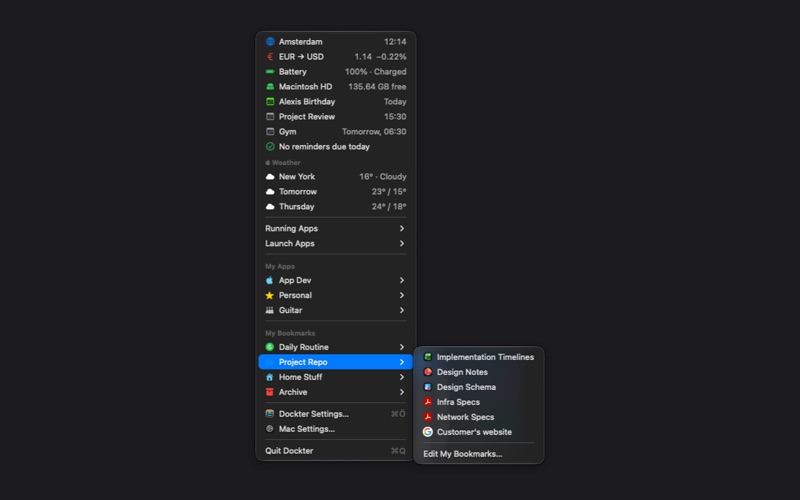
Dockter puts your apps, folders and bookmarks into one menu, opened from its Dock icon or the menu bar - whichever you prefer, or both.
ONE MENU, FROM TWO PLACES Click the Dock icon or the menu bar icon and the same menu opens. Everything is built fresh each time, so what you see is true right now.
YOUR APPS, YOUR FOLDERS Group your favourite apps into folders you name and colour yourself. A green dot shows what's already running.
BOOKMARKS THAT BEHAVE Web links, files and folders together in one place. Bookmarked folders can be browsed right in the menu, one level at a time, and links show the site's own icon. Items that move or land in the Trash are flagged, not silently broken.
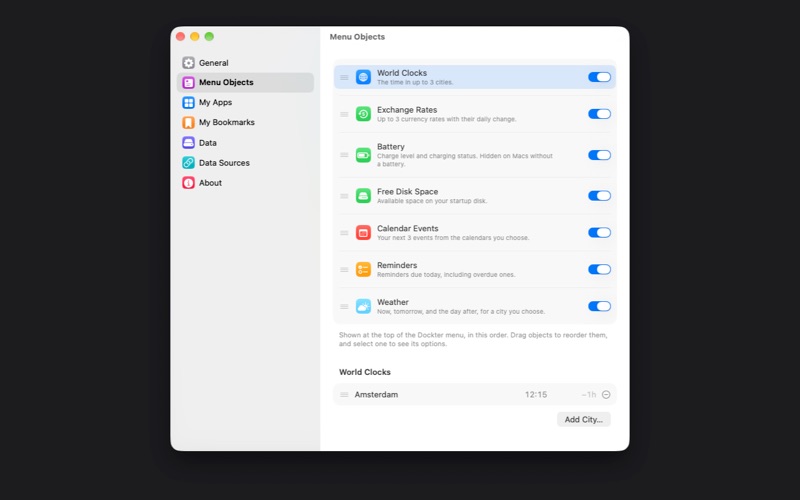
THE THINGS YOU CHECK ANYWAY Weather for a city you choose, world clocks, today's events and reminders, exchange rates, free disk space and battery. Each one is optional, and you decide the order.
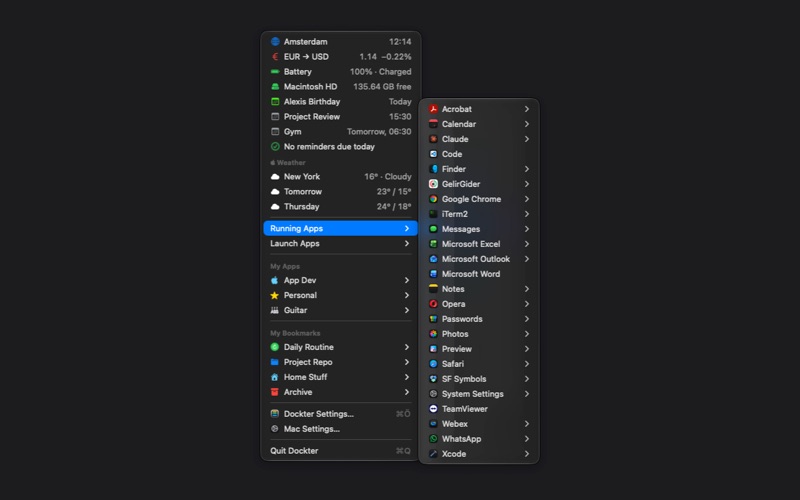
EVERYTHING RUNNING, EVERYTHING INSTALLED Running Apps lists what's open, with each app's windows and tabs, and brings an app forward with all its windows. Launch Apps lists everything installed, arranged as in your Applications folder.
ADD THINGS IN A SECOND Drag an app, file or folder onto Dockter's icon. Send a page straight from Safari or Firefox with Share > Dockter. Chrome, Edge, Opera and Brave get a one-click bookmarklet.
YOURS, AND PRIVATE Everything you put in Dockter stays on your Mac. No accounts, no ads, no tracking, and no servers of ours. Dockter uses the internet only for the weather in the city you pick, exchange rates, and the icons of the sites you bookmark. Window names in Running Apps need Screen Recording permission, because that's where macOS keeps them - Dockter reads names and nothing else, and never records or captures your screen.
TRY IT FOR 30 DAYS Everything in Dockter works for 30 days from the first time you run it, at no cost and with nothing to sign up for. After that, one payment unlocks it for good on every Mac using your Apple Account. It isn't a subscription and nothing renews. Nothing is deleted if you wait - your folders and bookmarks stay exactly where you left them.
Weather data provided by Apple Weather.
Privacy Policy: https://nae-dev.com/dockter/privacy-policy.html Terms of Use (EULA): https://www.apple.com/legal/internet-services/itunes/dev/stdeula/
Así la valora la gente
Inicia sesión para valorar esta app. Lo que cuenta es ser sincero.
Aún no hay valoraciones. ¿La has probado? Sé el primero en valorarla.
Más apps de Productividad
Las mejores apps nuevas de Productividad esta semana ChickMark: Habit TrackerChickMark is a simple habit tracker for routines, goals, and reminders
 Dayflint: One Thing a DayToo many priorities?
- BeginAnywayMorning alarm for hard tasks: set one task, prove you started, build a streak
 DHUDEDHUDE Analityxs es la herramienta de gestión diaria para grupos de restauración y ocio…
 FTC BIOBUZZ Scorer & TrainerBIOBUZZ Scorer is a free, ad-free scorer for the 2026–2027 FTC season, built on…
 Intent - Scroll by ChoiceTake back control of your screen time