
En Cards - Business Card Scan
Sin reclamarEn Cards turns every business card exchange into a relationship you can follow up on
De Chingwei Chen · Productividad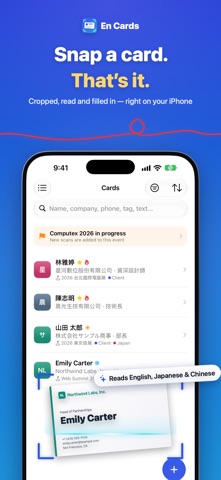



En resumen
En Cards - Business Card Scan is a productivity app that saves business cards from photos, reads their text into fields, and keeps a record of each contact, including where you met and a timeline of interactions. It suggests follow-up reminders and can draft follow-up emails on the device. Its standout feature is that all card recognition happens on the device and cards are never uploaded to the company's servers.
Resumen de Debuts, basado en la ficha de la App Store.Acerca de
En Cards turns every business card exchange into a relationship you can follow up on.
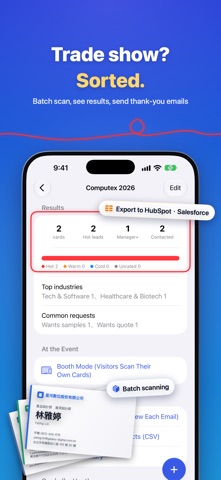
Snap it, and the card is saved • Automatic cropping, straightening and text recognition sorts name, company, title, phone and email into fields • Reads Taiwanese and Japanese cards, and pairs two-sided cards automatically • Back from a trade show? Scan the whole stack, or lay the cards on a table and take one photo • Add contacts from QR codes or pasted email signatures
Remember every person • Automatically records where you met (venue or meeting name) • Heat (hot, warm, cold), request tags and custom tags • A timeline of calls, emails, visits and meetings • Birthdays, interests, family and who introduced you • Recognizes the same person after a job change and keeps their career history
Never miss a follow-up • Follow-up and birthday reminders, plus key contacts you haven’t reached in a while • Apple Intelligence drafts follow-up emails on your device, including formal Japanese • Post-show emails in one go, event results and a weekly report
Find people fast • Card wall, company pages, a map of nearby clients, and filters by seniority and industry • Caller ID for your cards, even if they’re not in your contacts • Export to Excel, HubSpot, Salesforce and Zoho, or import from another card app • Your own digital card: others just scan the QR code with the iPhone Camera • Siri, Spotlight, and Home Screen and Lock Screen widgets
Your cards stay with you • All recognition happens on your device; cards are never uploaded to our servers • With iCloud Sync on, your data is stored only in your own iCloud • Lock the app with Face ID
Available in English, 日本語, 繁體中文 and 简体中文.
Así la valora la gente
Inicia sesión para valorar esta app. Lo que cuenta es ser sincero.
Aún no hay valoraciones. ¿La has probado? Sé el primero en valorarla.
Más apps de Productividad
Las mejores apps nuevas de Productividad esta semana ChickMark: Habit TrackerChickMark is a simple habit tracker for routines, goals, and reminders
 Dayflint: One Thing a DayToo many priorities?
 Snappy Do ItSix connected modes. One traceable journey.
 Fristo CAFMFristo is the app for Fristo CAFM, the facility management software
 UhWhat? Voice NotesCatch the thought before it disappears
- BeginAnywayMorning alarm for hard tasks: set one task, prove you started, build a streak