
GoodWiFi: WiFi Heat Map & Test
Sin reclamarSee where your Wi-Fi drops, room by room
De Tensor LLC (United States) · UtilidadesPor qué la esperamos: Clear value, a thorough description, and a useful home Wi-Fi problem make this a promising debut for curious app explorers.


En resumen
GoodWiFi: WiFi Heat Map & Test is a utility that maps Wi-Fi quality floor by floor as you walk through your home, measuring response time, lost packets, dropouts and speed. It is aimed at people who want to find weak spots room by room and learn whether to move the router or add a mesh point. It stands out for keeping maps and readings on the phone, with no account and no tracking.
Resumen de Debuts, basado en la ficha de la App Store.Acerca de
See where your Wi-Fi drops, room by room.
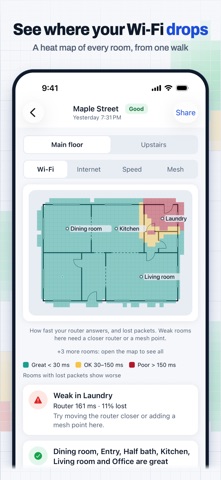
Hold up your iPhone and walk through your home. GoodWiFi follows where you go, checks your connection every second, and paints a heat map of every floor. Then it tells you, in plain English, where the weak spots are and what to try first: move the router, or add a mesh point.
No laptop, no extra hardware. It works with any router, mesh system or internet provider.
MEASURES WHAT YOU ACTUALLY NOTICE Signal bars can look full while a video call freezes. GoodWiFi measures the connection itself, everywhere you walk: • How fast your router answers, every second • Lost packets • Dropouts: a connection that freezes for a few seconds shows up on the map, where it happened • Internet response time • Speed tests every few rooms, automatically as you walk (or tap Speed test): download and upload pinned to the map
A FLOOR PLAN WITHOUT DRAWING ONE • iPhone with LiDAR: GoodWiFi traces walls, doors and windows while you walk, to scale, and lines up later surveys of that floor with the same plan • Any iPhone: add a photo of your floor plan and set its scale, or skip the plan and GoodWiFi outlines the area you walked • Every floor of the house: when you take the stairs, GoodWiFi notices and asks if you're upstairs now
PLAIN-ENGLISH FINDINGS Below the map, GoodWiFi lists what it found, worst first: "Weak in Office", "1 dropout in the Bedroom", "Kitchen and Living room are great". Each survey gets a Good, Fair or Poor verdict, and you can switch the map between Wi-Fi, internet, speed and mesh.
MESH WI-FI: COVERAGE GAP OR ROAMING? A weak room on a mesh is often a phone holding on to a far access point. GoodWiFi tracks which access point your iPhone used and marks rooms where it likely stayed on the wrong one (estimated on iPhone).
NAME ROOMS AS YOU GO Tap Name this room and pick or type a name, or hold the button and say "Kitchen". Your findings then talk about your rooms, not coordinates.
PRIVATE BY DESIGN • While you survey, the camera only works out where you are. The preview is blurred, and camera frames are never saved • Voice naming is recognized on your iPhone, and the audio isn't kept • Your maps and readings stay on your phone. No account, no ads, no tracking • Anonymous crash reports help us fix bugs, with no locations, Wi-Fi names or room names, and you can turn them off in Settings
ABOUT IPHONE LIMITS iPhone apps can't read Wi-Fi signal strength (dBm), so GoodWiFi measures response time, lost packets, dropouts and speed: what decides how your Wi-Fi feels. Scanned floor plans need an iPhone with LiDAR on iOS 17 or later.
FREE, HOME AND PRO Free: one place with as many floors as it has, every measurement, heat maps, findings and the verdict, and the latest survey of each floor.
GoodWiFi Home, a one-time purchase: unlimited places (your home, a cabin, your parents' house), full survey history to see what changed after each fix, and placement suggestions: mark where your router and mesh points are, and GoodWiFi shows where moving one, or adding one, would cover more of your rooms. Pay once, no subscription.
Así la valora la gente
Inicia sesión para valorar esta app. Lo que cuenta es ser sincero.
Aún no hay valoraciones. ¿La has probado? Sé el primero en valorarla.
Más apps de Utilidades
Las mejores apps nuevas de Utilidades esta semana Drainly: Speaker CleanerMuffled speaker after a splash, rain, or a sweaty workout?
 Photo & PDF Resize: KBFile too large to upload?
 Arvectum Proxy LauncherArvectum Proxy Launcher is a network utility that routes your iPhone through a proxy you…
 Vodoalarm: vodostaji BiHVodoalarm javlja kad tvoja rijeka naglo raste, pa ne moraš stalno gledati vodostaje
 TidyShots: Screenshot CleanerScreenshots pile up fast: receipts, memes, codes you needed once, directions you already…
 Screenshot Tidy: Sort & FindYou saved it