
Lidarmeter: LiDAR Floor Plan
Sin reclamarLidarmeter turns your iPhone into a floor plan tool
De Serdar Keskin · ProductividadPor qué la esperamos: Clear value and a thorough description make this a useful offline tool for measuring and documenting spaces.



En resumen
Lidarmeter: LiDAR Floor Plan turns an iPhone into a floor plan tool. Users scan rooms with the LiDAR scanner or draw plans by typing wall lengths or tracing over a PDF or photo, then export a PDF report, a 3D model, or DXF files for AutoCAD, ArchiCAD and Revit. The app works offline without an account, and one notable point is its site mode for pinning photos of cracks or damp to exact spots on the plan.
Resumen de Debuts, basado en la ficha de la App Store.Acerca de
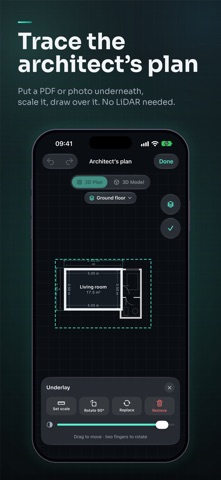
Lidarmeter turns your iPhone into a floor plan tool. Walk through a home with the LiDAR scanner and get a measured floor plan, a 3D model and a PDF report in minutes. No LiDAR? Draw the plan by typing the lengths you measured, or trace over an architect's PDF or a photo of a paper plan.
SCAN WITH LIDAR • Scan room after room in one go; rooms snap together on their own • A live radar shows where you are and which rooms are done • Walls, doors, windows and furniture are recognised as you scan • Floor area, ceiling height and room type update live
DRAW AND EDIT, ON EVERY IPHONE • Draw a room as a rectangle, corner by corner or by typing wall lengths • Put a PDF or photo of a plan underneath, scale it with a length you know and trace over it • Move, rotate and reshape rooms, type exact wall lengths, add doors, windows and furniture • Floors: duplexes and multi-storey homes, lined up and stacked in 3D • Text notes and dimension lines on the plan
3D MODEL • A true-to-size 3D model built from your plan • Walk inside, look from above, choose floor materials and wall colours
SITE MODE • Pin photos of cracks, damp or damage to the exact spot on the plan, with their height above the floor • Tags, voice notes turned into text on the phone, and walkthrough recordings
SHARE • PDF report with a scaled plan, room schedule, room-by-room pages and photo findings • DXF for AutoCAD, ArchiCAD and Revit, plus SVG, USDZ, OBJ and CSV • With Pro, reports carry your company logo and contact details
PRIVATE BY DESIGN No account needed. Your scans, photos and plans stay on your iPhone, and everything works offline.
FREE AND PRO Lidarmeter is free to start: 2 new projects a month, scanning, drawing, plans, 3D and watermarked PDF and PNG exports. Lidarmeter Pro, monthly or yearly with a 1-week free trial, adds unlimited projects, watermark-free vector reports, your logo, room pages and the photo report, DXF and SVG, USDZ, OBJ and CSV, and backup to your iCloud Drive.
Scanning needs an iPhone Pro with LiDAR (iPhone 12 Pro or later). Drawing works on every iPhone with iOS 26. Measurements may differ slightly from the actual building; check critical dimensions before construction.
Terms of Use: https://lidarmeter.com/en/terms/ Privacy Policy: https://lidarmeter.com/en/privacy/
Así la valora la gente
Inicia sesión para valorar esta app. Lo que cuenta es ser sincero.
Aún no hay valoraciones. ¿La has probado? Sé el primero en valorarla.
Más apps de Productividad
Las mejores apps nuevas de Productividad esta semana ChickMark: Habit TrackerChickMark is a simple habit tracker for routines, goals, and reminders
 Dayflint: One Thing a DayToo many priorities?
 Snappy Do ItSix connected modes. One traceable journey.
 Fristo CAFMFristo is the app for Fristo CAFM, the facility management software
 UhWhat? Voice NotesCatch the thought before it disappears
- BeginAnywayMorning alarm for hard tasks: set one task, prove you started, build a streak