
Loopily: ADHD Routine Timer
Sin reclamarFor ADHD brains dealing with Time Blindness and Executive Dysfunction, a to-do list…
De DANIEL JOHN HOLMES · ProductividadPor qué la esperamos: A thoughtful, well-targeted ADHD routine app with clear value, per-step days, and a learning timer that should appeal to its niche.






En resumen
Loopily is a productivity app for people with ADHD who struggle with time blindness and executive dysfunction. You write a routine as timed steps, and it shows a countdown for each one, a finish time, and a Lock Screen Live Activity. A standout feature is that steps can carry their own days, so one routine can cover tasks that only apply on certain days.
Resumen de Debuts, basado en la ficha de la App Store.Acerca de
For ADHD brains dealing with Time Blindness and Executive Dysfunction, a to-do list isn't the problem. Knowing how long anything actually takes is. Loopily takes what you need to do out of your head, breaks it into steps, and gives every one its own countdown, so you always know where you are and how long you've got left.
HOW IT WORKS
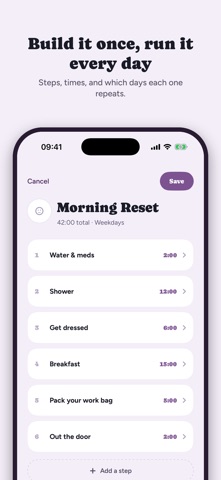
Write a routine as a list of steps, each with how long it takes. Loopily adds them up and tells you when you'll finish before you start. Run it one step at a time: a big countdown on screen, and a Live Activity on your Lock Screen so the clock is there when you put the phone down.
Run over on a step and the clock keeps counting. Loopily just moves your finish time. One soft chime by default. Turn it off, or make it repeat, in Settings.
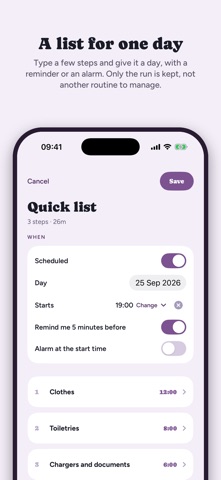
Give a routine its days and a start time, and Loopily can remind you five minutes before. Switch on "Alarm at the start time" and a real alarm rings when it is due, even with the phone on silent (iOS 26 and later).
ONE ROUTINE, NOT SEVEN
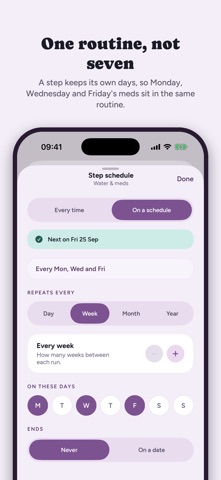
Most routine apps leave you two options: keep seven near-identical routines in step with each other, or skip the bits that don't apply today and hope you notice. In Loopily a step keeps its own days. Bins out on Tuesday, hair wash Monday and Thursday, the meds that are Monday, Wednesday and Friday: all in one routine, each appearing only when it applies. Individual checklist items can do it too, so the gym kit only shows up inside "pack the bag" on training days.
IT LEARNS YOUR REAL PACE
Every run is saved. After a few goes at a step, Loopily compares your estimate with what actually happened and offers a better one on the summary screen. Tap it and the next run starts smarter. Forgot to stop the clock in the shower? Correct the finished run, and the record and the suggestions follow.
The User Guide in Settings shows each feature in action, one short page at a time.
FREE
• Two saved routines, unlimited steps in each • Checklists on any step, with auto-complete • A reminder before a routine starts, and an alarm at its start time • Live Activity on the Lock Screen and Dynamic Island • A notification when a step's time is up • The clock keeps running if you leave the app • Past runs, with how long each step actually took
Así la valora la gente
Inicia sesión para valorar esta app. Lo que cuenta es ser sincero.
Aún no hay valoraciones. ¿La has probado? Sé el primero en valorarla.
Más apps de Productividad
Las mejores apps nuevas de Productividad esta semana ChickMark: Habit TrackerChickMark is a simple habit tracker for routines, goals, and reminders
 Dayflint: One Thing a DayToo many priorities?
 Fristo CAFMFristo is the app for Fristo CAFM, the facility management software
- BeginAnywayMorning alarm for hard tasks: set one task, prove you started, build a streak
 DHUDEDHUDE Analityxs es la herramienta de gestión diaria para grupos de restauración y ocio…
 FTC BIOBUZZ Scorer & TrainerBIOBUZZ Scorer is a free, ad-free scorer for the 2026–2027 FTC season, built on…