
Macaroni - Markdown Viewer
Sin reclamarMacaroni works with one Markdown file or a whole folder of them
De NOODLE DRAGON STUDIO LIMITED · Utilidades


Acerca de
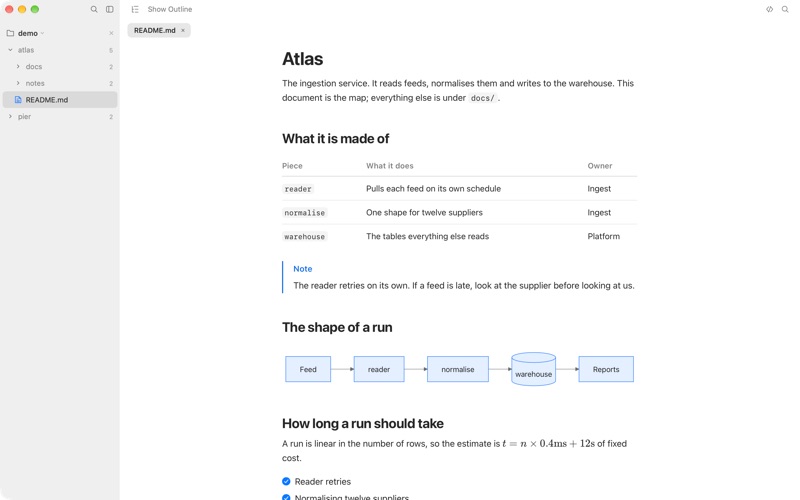
Macaroni works with one Markdown file or a whole folder of them.
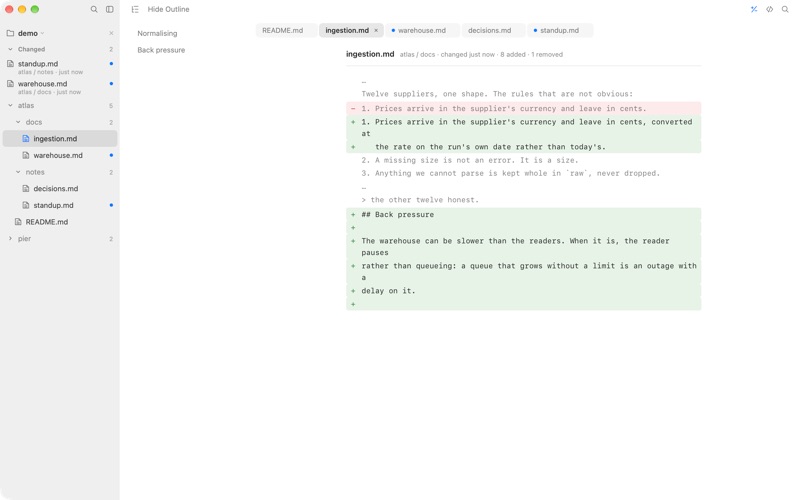
Open a .md file and it is the fast, beautiful, native reader you expect on a Mac. Point it at a folder and it watches the whole tree, lists what has been written since you last read it, and shows you exactly what moved, line by line, against the version you last read rather than against a commit. It remembers what you have read across quits and restarts, so changes made while it was closed are waiting for you.
That second half is what you want when an AI agent, a colleague or a build is writing into your documents while you read them. The first half is what you want the rest of the time.
READING, ONE FILE OR MANY
• Renders what documents actually contain: tables, task lists, footnotes, YAML front matter, GitHub alerts, details blocks, emoji, LaTeX math through KaTeX, Mermaid diagrams and highlighted code. • Tabs that stay out of the way: a click in the sidebar previews a file, a double click keeps it, and each tab remembers its own place and view. • Command-N opens another window on the same folder, and every window comes back as you left it. • A quiet, beautiful window: one bar, no chrome, typography set by measuring, in the system's own materials and colors, light and dark. • Double-click a .md file in Finder, or press Space on one for Quick Look. • An outline column that follows you down the page, and works over the Markdown source and over a diff. • A reading measure set by counting characters rather than by taste, with the text size and the column width in your hands.
WATCHING A FOLDER
• A real nested tree that stays true as files appear, change and disappear. • A Changed feed, newest first, with unread marks that clear as you read. • What Changed: a line by line diff against the version you last read, with an outline of the sections that moved. • Full text search across the project, and a separate find inside the document with a counter. • Four ways in: open a document, open a folder, drop either on the window, or paste a path. A path from a terminal or an AI agent opens as it stands, spaces and all, and Macaroni works out whether it names a document or a folder.
WHAT IT WILL NOT DO
Macaroni never writes to a Markdown file. Not a formatting pass, not a metadata line. It is sandboxed, it contains no networking code, and scripts in the page it renders your document into may not connect anywhere: apart from an image a document links to on the web, everything it draws comes from the file on disk and from the app itself. There is no account, no sync and no telemetry.
Así la valora la gente
Inicia sesión para valorar esta app. Lo que cuenta es ser sincero.
Aún no hay valoraciones. ¿La has probado? Sé el primero en valorarla.
Más apps de Utilidades
Las mejores apps nuevas de Utilidades esta semana Drainly: Speaker CleanerMuffled speaker after a splash, rain, or a sweaty workout?
 Photo & PDF Resize: KBFile too large to upload?
 Arvectum Proxy LauncherArvectum Proxy Launcher is a network utility that routes your iPhone through a proxy you…
 Vodoalarm: vodostaji BiHVodoalarm javlja kad tvoja rijeka naglo raste, pa ne moraš stalno gledati vodostaje
 Dusty: Photo Cleaner PetYour camera roll's new pet
 FairAuth: AuthenticatorFairAuth creates the codes for two-step verification on iPhone and iPad