
Music Stand
Sin reclamarYour sheet music on your iPhone, with hands-free page turns
De Ased Iqbal · Música y audioPor qué la esperamos: A thoughtfully described niche tool with clear value for musicians, hands-free turns, setlists, and practice aids all in one place.




En resumen
Music Stand is a sheet music reader for iPhone that turns pages hands-free with a Bluetooth pedal, keyboard, or screen tap. It is aimed at musicians who read PDF scores, practise with a built-in metronome and tuner, and play through setlists for gigs. One detail that stands out is that markups stay on their pages and never change the original PDF.
Resumen de Debuts, basado en la ficha de la App Store.Acerca de
Your sheet music on your iPhone, with hands-free page turns. Turn with a Bluetooth pedal or a tap, mark up your parts, run a whole setlist, and keep a metronome and a tuner one tap away.
On iPhone Duo, open it and your music opens with it: two pages side by side, each the true shape of a sheet of paper. Read a spread the way you read a printed part on a stand.
HANDS-FREE PAGE TURNS • Bluetooth page-turner pedals and keyboards work out of the box: arrows, Page Up / Page Down, Space or Return • Or tap the right of the page to go forward and the left to go back; tap the middle for the controls • Turn two pages at a time like a book, or one at a time so the next page is always in view • The controls fade away, and the screen stays awake while the music is open
MARK UP YOUR PARTS • Pen, highlighter and eraser, with undo: circle a bar, write in a fingering, highlight a repeat • Marks stay on their page in every layout and never change your PDF • Share a copy with your markings drawn in
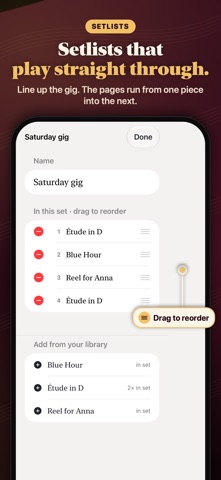
SETLISTS FOR THE GIG • Put pieces in order for a gig or a service; drag to reorder; the same piece can go in twice • Play a setlist straight through: the turn after the last page of one piece opens the next
PRACTISE WITH IT • Metronome: 30–300 BPM, tap tempo, time signatures, subdivisions and an accented first beat; it keeps clicking while you read and turn • Tuner: note name and a cents needle, A = 415 to 466 Hz. It listens only while it is open and records nothing • Practice timer and a simple log of what you played and for how long
EASY ON THE EYES • Crop margins: one tap finds the music on page 1 and every page follows, so the notes fill the screen • Next-page preview: the top of the next page sits under the one you are reading • Night mode for a dark stage: the page turns black and the notes soft grey
YOUR OWN LIBRARY • Import PDFs of your scores, parts and charts from Files, or choose Open in Music Stand from Safari, Mail or Files • Your library is kept on your iPhone and shows in the Files app, so you can back it up • Go to any page in one tap: tap the page number for a strip of every page • Rename any score; imported file names are tidied for you • Each score and setlist reopens at the page you left • A sample practice chart is ready to try the moment you open the app
ON EVERY IPHONE One page at a time, or two side by side in landscape, chosen in the View menu. On iPhone Duo it follows the fold by itself. Close the Duo and the outer display carries on one page at a time.
No account needed. Your music never leaves your phone.
Así la valora la gente
Inicia sesión para valorar esta app. Lo que cuenta es ser sincero.
Aún no hay valoraciones. ¿La has probado? Sé el primero en valorarla.
Más apps de Música y audio
Las mejores apps nuevas de Música y audio esta semana Listenality: Music StatsStats, recaps and share cards for Apple Music and YouTube Music
 KlingKlang – Control de AudioKlingKlang reúne todas las salas de tu sistema Sonos en una sola pantalla
 Davinyl: Vinyl Record ScannerScan any record
 PNEUMA Granular SynthPNEUMA turns your voice into an ethereal instrument
 Luthier ToolkitLuthier Toolkit puts the numbers you need at the bench in one place: fret positions…
 Clearsing: Learn to SingLearn to sing in tune