
My Network Scanner (MyNeS)
Sin reclamarMyNeS (My Network Scanner) turns your phone into a full home-network scanner
De Erkan CIFTCI · UtilidadesPor qué la esperamos: A clear, privacy-focused network scanner with a thorough description and useful security insights for home users.




En resumen
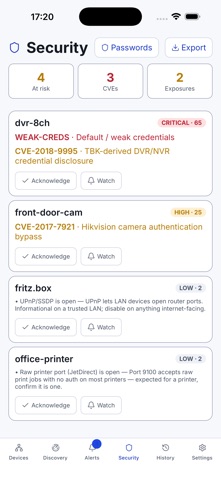
My Network Scanner (MyNeS) runs on your phone and finds devices on your Wi-Fi, then estimates each one's manufacturer, model, type and operating system from its MAC address, hostname and advertised services. It suits people who want to see what is connected to their home network without a server or an account. It stands out for flagging open ports and known-CVE fingerprints on your own devices, with links to advisories.
Resumen de Debuts, basado en la ficha de la App Store.Acerca de
MyNeS (My Network Scanner) turns your phone into a full home-network scanner. No server, no Docker, no pairing, no account — the scanning engine runs entirely on your device.
Open the app on your Wi-Fi and MyNeS finds the devices around you and tells you what they are: manufacturer, model, type and operating system, pieced together from IP, MAC address, vendor (OUI), hostnames and the services each device advertises.
WHAT YOU GET
• Fast discovery — a ping/TCP sweep plus mDNS/Bonjour, SSDP/UPnP and optional Bluetooth LE finds Wi-Fi and nearby Bluetooth devices. • Real identification — vendor from the MAC address, device type and OS from the services a device exposes. Rename devices and add your own notes. • Identify with AI (optional) — tap to send a device's technical facts to our hosted service for a manufacturer/model/type guess when the offline heuristics aren't sure. • Security view — flags open ports, default-credential risks and known-CVE fingerprints on the gear you own, with links to the advisories. • Alerts & history — see what joined or left your network over time, and get a notification when something new appears (optional background scanning). • Home Assistant (optional) — connect your own instance to cross-check its device list against a live scan. • Private by design — no accounts, no analytics, no ads, no trackers. Your scan results and settings stay on your device.
PERMISSIONS
• Local Network — to discover devices on your Wi-Fi (this is the scan). • Bluetooth — only if you turn on Bluetooth LE discovery. • Notifications — only if you enable background scan alerts.
MyNeS does not use your location. It is the mobile edition of the open-source My Network Scanner (MyNeS) project.
Así la valora la gente
Inicia sesión para valorar esta app. Lo que cuenta es ser sincero.
Aún no hay valoraciones. ¿La has probado? Sé el primero en valorarla.
Más apps de Utilidades
Las mejores apps nuevas de Utilidades esta semana Vodoalarm: vodostaji BiHVodoalarm javlja kad tvoja rijeka naglo raste, pa ne moraš stalno gledati vodostaje
 NadhirNadhir is an independent app
 Rokey: Romanian KeyboardType Romanian without worrying about diacritics
 Vibe Island: AI Agent MonitorVibe Island is a command center for the AI coding agents running on your Mac
 Private AuthenticatorPrivate Authenticator keeps your two-factor authentication codes on your own Apple…
 Photo Clean: Photo CleanupA crowded camera roll?