
NowNext: ADHD Planner
Sin reclamarPlanners built for neurotypical brains ask you to organize everything up front
De Dane Bonnigson · Productividad




En resumen
NowNext: ADHD Planner is a productivity app that starts with a brain dump of every task, then limits the day to a Now list of up to three items, with Next and Later holding the rest. It includes a visual focus timer, tiny steps, a home screen widget, and a one-time Pro purchase. Its standout feature is that all data stays on the device, with no account required.
Resumen de Debuts, basado en la ficha de la App Store.Acerca de
Planners built for neurotypical brains ask you to organize everything up front. NowNext works the other way: get it out of your head first, then pick just three things for right now.
Made for ADHD brains, busy brains, and anyone who has stared at a 40-item to-do list and done none of it.
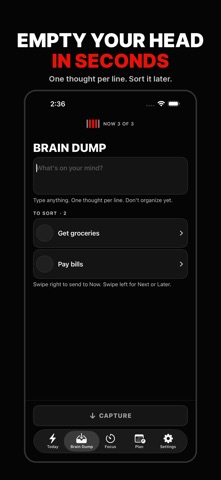
BRAIN DUMP • Type or paste anything, one thought per line. Every line becomes a task. • No categories, no due dates, no decisions yet. Just get it out. • Say "Add to my NowNext" to Siri to capture without opening the app.
NOW, NEXT, LATER • Now holds up to three things (you can change the limit from 1 to 5). • Everything else waits in Next or Later, out of sight and out of the way. • Swipe to move a task. When Now is full, finish one before adding another.
TINY STEPS • Break big, scary tasks into steps so small they feel silly. • The focus screen shows only your next step, nothing else.
VISUAL FOCUS TIMER • A shrinking colored disk shows time as space, not just numbers. • Pause, add five minutes, or end early. Every focused minute still counts. • See the countdown on your Lock Screen and in the Dynamic Island. • Get a gentle notification when time is up.
FIGHT TIME BLINDNESS • Add a rough time guess to any task. • NowNext compares your guess with the time you actually focused.
HOME SCREEN WIDGET • See your Now list and check things off without opening the app.
NOWNEXT PRO (one-time purchase, no subscription) • Upcoming, as a countdown: your calendar shown as time left (45 min, 3 days, 2 weeks) instead of a grid of dates, with a 14-day horizon strip and one-tap prep tasks. • Prefer a regular calendar? Flip to month, week or day view any time. Every event still shows how long until it starts. • Put any task on the calendar from its "Where it lives" menu, and optionally add it to your iPhone calendar too (iCloud, Google, Outlook). • Tap any event to fix the wording or move it. • Routines: tasks that come back daily, on weekdays, weekly or monthly. Missed days never pile up. • Insights: focus minutes by day and tasks finished each week. • Time-sense calibration: learn how your guesses compare with reality ("tasks take you about 40% longer than you think") and plan with a personal multiplier.
PRIVATE BY DESIGN • No account, no sign-up, no ads, no tracking. • Everything is stored on your device. We never see your tasks.
NowNext is a planning and focus tool. It is not a medical device and does not diagnose or treat ADHD or any other condition.
Así la valora la gente
Inicia sesión para valorar esta app. Lo que cuenta es ser sincero.
Aún no hay valoraciones. ¿La has probado? Sé el primero en valorarla.
Más apps de Productividad
Las mejores apps nuevas de Productividad esta semana ChickMark: Habit TrackerChickMark is a simple habit tracker for routines, goals, and reminders
 Dayflint: One Thing a DayToo many priorities?
 Snappy Do ItTurn photos, text and voice into tasks, plans and more.
 Fristo CAFMFristo is the app for Fristo CAFM, the facility management software
 UhWhat? Voice NotesCatch the thought before it disappears
- BeginAnywayMorning alarm for hard tasks: set one task, prove you started, build a streak