
PlugIt – Sound Reactions
Sin reclamarPlugIt gives your charger a personality
De JOSEPH BRYAN OSIAS BATERNA · Utilidades




En resumen
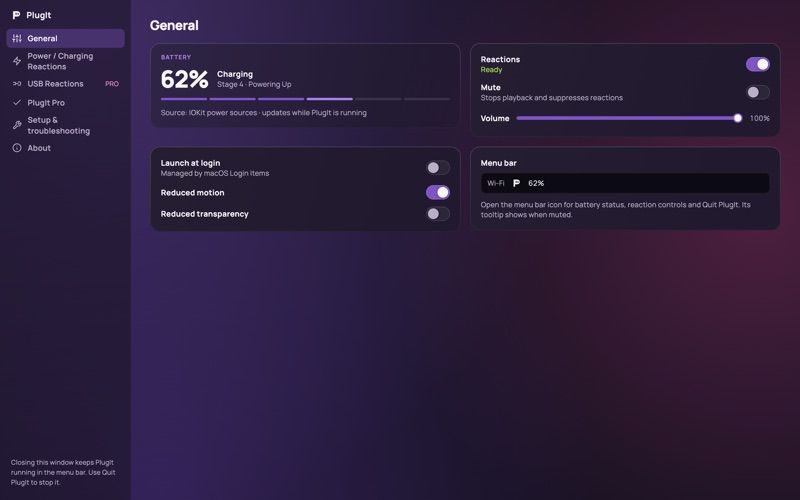
PlugIt, Sound Reactions plays a sound when a MacBook is plugged in or unplugged, and a different sound for each charging stage up to a finale at 100%. It suits Mac users who want audible feedback from their charger, with 379 built-in sounds and the option to import their own. Each stage plays once per session, and the app stays in the menu bar.
Resumen de Debuts, basado en la ficha de la App Store.Acerca de
PlugIt gives your charger a personality.
Plug in your MacBook and PlugIt plays a sound. Unplug it and it plays another. As the battery fills, each charging stage gets its own sound, with a finale when you reach 100%.
CHARGING REACTIONS • Sounds for charger connected and charger disconnected • Six charging stages: Spark (0–20%), Warming Up (21–40%), Amped (41–60%), Powering Up (61–80%), Almost There (81–99%) and Fully Charged (100%) • Each stage plays once per charging session, so it never nags
379 BUILT-IN SOUNDS • Choose a sound for every reaction from 11 categories, including Arcade, Game, Level Up, Power Up, Robot, Space & Sci-Fi and Victory • Search and preview before you pick • Import your own sounds. They stay on your Mac
LIVES IN YOUR MENU BAR • See your battery level and turn reactions on or off from the menu bar • Keeps playing when you close the window • Can launch at login
PLUGIT PRO A one-time purchase. No subscription. • USB Reactions: play a sound when a USB device connects or disconnects • Multiple sounds per reaction, played at random • Reaction profiles for work, gaming or quiet time • Custom battery thresholds for each charging stage • Quiet Hours to silence charging reactions overnight • Per-reaction volume
PRIVATE BY DESIGN No account, no ads, no tracking and no analytics. Everything stays on your Mac.
Charging reactions need a Mac with a built-in battery. On a Mac without one, you can still preview sounds and use USB Reactions.
Así la valora la gente
Inicia sesión para valorar esta app. Lo que cuenta es ser sincero.
Aún no hay valoraciones. ¿La has probado? Sé el primero en valorarla.
Más apps de Utilidades
Las mejores apps nuevas de Utilidades esta semana Drainly: Speaker CleanerMuffled speaker after a splash, rain, or a sweaty workout?
 Photo & PDF Resize: KBFile too large to upload?
 Arvectum Proxy LauncherArvectum Proxy Launcher is a network utility that routes your iPhone through a proxy you…
 Look Twice: Scam & AI CheckLook twice before you click
 Vodoalarm: vodostaji BiHVodoalarm javlja kad tvoja rijeka naglo raste, pa ne moraš stalno gledati vodostaje
 Ham Radio IQHam Radio IQ answers one question: which band is open right now, from where you are, and…