
Quern: Transcribe & Summarise
Sin reclamarA summary you can check
De Martin McDermid · ProductividadPor qué la esperamos: Its careful description, clear value and on-device privacy make it a strong debut for meeting note-takers.




En resumen
Quern: Transcribe & Summarise records meetings, interviews or lectures on an iPhone, labels each speaker, and lists decisions, open questions and action items. Tapping the time beside any point plays back the part of the recording it came from. Everything runs on the device with no account or upload, and it costs £19.99 once after a 30-day free trial. It requires iPhone 15 Pro or later.
Resumen de Debuts, basado en la ficha de la App Store.Acerca de
A summary you can check. Quern writes down a meeting, interview or lecture as it's said, works out who said what, and lists what was decided and who took on what. Tap the time beside any point to hear the moment it came from.
Free to try for 30 days, then £19.99 once. No subscription. Requires iPhone 15 Pro or later.
All of it happens on your iPhone. No account, nothing uploaded, no monthly bill.
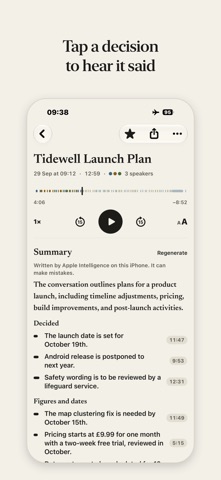
SUMMARIES YOU CAN CHECK A clear overview, the key points grouped into what was decided, what's still open and the figures and dates, and the action items with who took them on. Tap the time beside any point or action to hear where it was said. Apple Intelligence writes the summary and can make mistakes, so every point leads back to the recording. Name a speaker and the summary uses their name straight away. Longer recordings are split into titled chapters you can jump between. Quern works through long recordings section by section, so a long meeting gets a proper summary, not a guess.
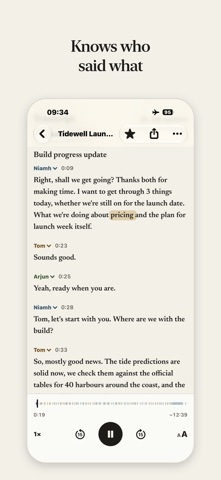
WHO SAID WHAT Quern tells the voices apart and labels each speaker. Rename them, merge two that are really one person, move a passage to the right speaker, or tell it how many people were in the room and let it look again. Not sure who's who? Play a few seconds of any speaker. Ask Quern to recognise the people you record often, with their agreement, and it suggests them in later recordings for you to confirm; their voiceprints stay on your iPhone, and you can forget them any time.
A LIVE TRANSCRIPT Watch the words appear as people speak. Afterwards, tap any word to hear that moment; the word being played lights up as the recording goes. Read it verbatim, with every "um" kept, or switch to Clean to hide the fillers and stutters. Misheard a word? Long-press it to fix it; fix a name and Quern offers to change it everywhere. When a name is spelt more than one way, Quern points it out and fixes every one in a tap.
NOTHING IS UPLOADED Transcription, speaker labels and summaries all happen on the device, using Apple's on-device speech recognition and Apple Intelligence. Quern has no server and no account, so your recordings are never sent to us or to anyone else. They're in your iPhone's iCloud or computer backup if you have one turned on, like the rest of your data; voiceprints never are. Once it's set up, it works in Aeroplane Mode.
BUILT NOT TO LOSE A RECORDING Quern saves the audio as it records: if the app is closed or your phone switches off mid-meeting, you keep all but the last few seconds. A phone call pauses the recording instead of ending it, with Resume one tap away. Start recording from the Lock Screen, Control Centre, the Action Button or Siri, and keep an eye on it in the Dynamic Island.
YOURS TO KEEP AND TAKE ELSEWHERE Export any recording as a folder: Markdown with its audio, plus SRT and VTT subtitles with speaker names, ready for Obsidian or your notes app. Or share it as a PDF or as plain text. Bring in audio or video from Voice Memos, WhatsApp, Files or Mail, and Quern transcribes it the same way.
ORGANISED WITHOUT EFFORT Folders, tags and favourites. Search every title and every transcript. Recordings appear in Spotlight, and Siri and Shortcuts can open them.
ONE FAIR PRICE Try everything free for 30 days. Unlocking Quern costs £19.99, once, and works with Family Sharing. If you don't unlock it, you can't make new recordings or import files, but everything you've recorded stays yours to play, read and export.
WHAT YOU NEED iPhone 15 Pro or later. Quern does all its transcription and summarising on your iPhone, which needs Apple Intelligence; it won't install on earlier models. Summaries need Apple Intelligence switched on. Transcription works in your iPhone's language, or another you choose, where Apple's on-device speech recognition supports it, and the summary is written in that language where Apple Intelligence supports it.
Así la valora la gente
Inicia sesión para valorar esta app. Lo que cuenta es ser sincero.
Aún no hay valoraciones. ¿La has probado? Sé el primero en valorarla.
Más apps de Productividad
Las mejores apps nuevas de Productividad esta semana ChickMark: Habit TrackerChickMark is a simple habit tracker for routines, goals, and reminders
 Dayflint: One Thing a DayToo many priorities?
 Snappy Do ItSix connected modes. One traceable journey.
 Fristo CAFMFristo is the app for Fristo CAFM, the facility management software
 UhWhat? Voice NotesCatch the thought before it disappears
- BeginAnywayMorning alarm for hard tasks: set one task, prove you started, build a streak