
QuizLock: Parental Screen Time
Sin reclamarTaking the phone away always ends in tears?
De hoseong choi · Educación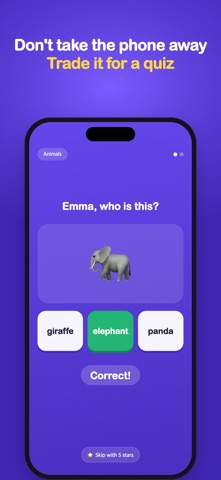


En resumen
QuizLock: Parental Screen Time locks a child's phone at intervals you set and shows an age-matched quiz before they can continue. Stars earned for correct answers can be spent to skip a quiz, and only a parent passcode can turn it off. Aimed at parents of children aged 3 to 7 who want screen time to include some learning.
Resumen de Debuts, basado en la ficha de la App Store.Acerca de
Taking the phone away always ends in tears? Let a quiz do the talking. At the times you choose, a quiz pops up over whatever your child is watching. Get it right and they pick up right where they left off.
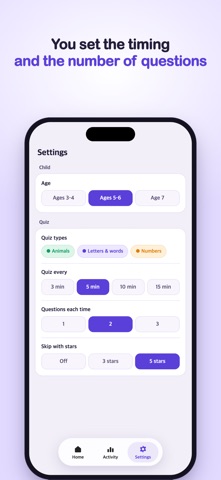
■ A quiz pops up right on time Pick every 3, 5, 10 or 15 minutes. When time is up, the phone locks and a quiz appears — over videos, games, any app.
■ Quizzes that fit your child's age Ages 3–4 get picture and number questions only. Ages 5–6 add simple words and first letters. Age 7 adds sorting, missing letters and simple sums. Choose from [ Animals, Letters & words, Numbers ].
■ Earn stars, spend stars Every correct answer earns stars. Collected stars can be spent to skip a quiz — a small way to practice "just a bit more" on their own.
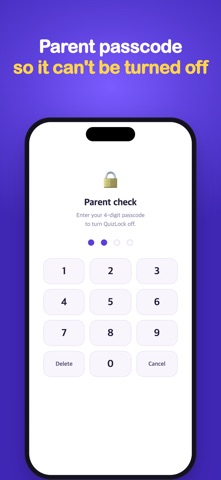
■ Only a parent can turn it off Turning QuizLock off or unlocking early needs your parent passcode. Choose apps that should never lock, like learning apps.
■ Today at a glance See questions solved, accuracy and screen time, and which quiz types your child is best at.
▶ Great for parents who - are tired of the daily "give me the phone" battle - want screen time to include a little learning - find that timers alone don't stop the video - want letters and numbers to feel like a game
▶ How it works 1. Add your child's name and age 2. Choose how often quizzes appear and how many questions each time 3. Tap "Start QuizLock" and hand the phone over 4. When time is up, a quiz pops up — answer it and keep watching
[ Permissions ] - Screen Time: locks other apps during quiz time - Notifications: lets you know when it's quiz time - Live Activities (optional): shows the countdown on the Lock Screen and Dynamic Island
Your child's activity stays on the phone. If you sign in, it's backed up to your own iCloud.
Así la valora la gente
Inicia sesión para valorar esta app. Lo que cuenta es ser sincero.
Aún no hay valoraciones. ¿La has probado? Sé el primero en valorarla.
Más apps de Educación
Las mejores apps nuevas de Educación esta semana FluencyToolShadow a native Japanese sentence, hear your own voice back, and get scored.
 YoMoo: Read & Shadow JapaneseYoMoo turns real Japanese writing into graded reading practice: news articles, Wikipedia…
 KeyswingLearn music notes, rhythm and piano through playful practice in a magical forest.
 Uncle Math Homeschool - 6 to 8No Math Fear, Uncle Math Is Here
 Malachi SpeaksMalachi Speaks gives a voice to people who don't use speech
 SelvarisWatch evolution unfold in real time – on an entire planet