
SeniorHub Simple launcher
Sin reclamarSeniorHub Simple launcher gives your loved one a calm, uncluttered screen on their…
De Benjamin Cohen Solal · Estilo de vida


En resumen
SeniorHub Simple launcher gives an older person a calm iPhone screen with a few large buttons, built to run inside iOS Assistive Access. It offers photos, today's appointments, a "How are you feeling today?" check-in, a way to ask family for help, and an emergency call option, all set up by a family member through a QR-linked household and a four-digit settings code. It is not a medical device and cannot unlock the phone.
Resumen de Debuts, basado en la ficha de la App Store.Acerca de
SeniorHub Simple launcher gives your loved one a calm, uncluttered screen on their iPhone: a few large buttons, plenty of space, nothing confusing.
ON IPHONE, APPLE DOES THE SIMPLIFYING iOS already has a mode built for this: Assistive Access, in Settings, Accessibility. It replaces the home screen with very large icons and allows only the apps you choose. SeniorHub installs into it as the everyday app, alongside Apple's own Phone and Messages — which remain the best way to call and write, and the only ones that can show a missed call.
A guide opens the first time you launch the app and walks you through turning that mode on.
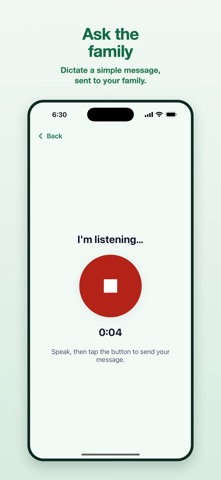
WHAT YOUR LOVED ONE FINDS IN THE APP • Their photos, taken and viewed with a single button • Today's appointments, with no calendar to decipher • "Ask the family": they press, they speak, their family receives the message • "How are you feeling today?", five faces to tap • "Call emergency services": their family is alerted, then the phone dials the emergency number
EVERY BUTTON SAYS WHAT IT DOES Under the two most important buttons, a sentence explains what will happen. Because a red button someone hesitates over is a button they never press — and should have.
The screen adapts to the text size chosen in iOS settings: text is never cut off and never shrunk.
SET UP BY THE FAMILY, NOT BY THE SENIOR A family member installs the app, links it to the SeniorHub household by scanning a QR code, and chooses what appears. Settings sit behind a four-digit code, so your parent cannot get lost in them by accident.
The app also works on its own, with no account: it then keeps photos and emergency help, and the rest leaves the screen.
WHAT WE DO NOT DO SeniorHub is not a medical device: no monitoring, no diagnosis, no emergency service. On iPhone, the app never takes over the device, never shares the screen and records no background measurements — iOS does not allow it, and we do not try to work around that.
The passcode that exits Assistive Access belongs to whoever sets up the phone. SeniorHub does not hold it and cannot unlock any device.
The device remains its owner's, and they can ask for that mode to be turned off at any time.
SeniorHub is part of a set of apps that help families stay close to their elders, simply.
Así la valora la gente
Inicia sesión para valorar esta app. Lo que cuenta es ser sincero.
Aún no hay valoraciones. ¿La has probado? Sé el primero en valorarla.
Más apps de Estilo de vida
Las mejores apps nuevas de Estilo de vida esta semana askoraAI 회상 노트
 Familjekalender – familjens årFamiljekalender är en delad kalender för hela familjen, där varje dag kan bära ett foto…
 My Anime TrackerAnime watch order, no guesswork.
 WatchLux: Animated Watch FacesOver 750 animated watch faces for Apple Watch and Wear OS
 SCNT ControlSCNT conecta tu teléfono con tu difusor de aroma por Bluetooth y te da el control…
 Sakinah: Quran, Adhkar & DuaSakinah brings the Qur'an, the prayer and daily remembrance together in one calm app, in…