
SP Umbra
Sin reclamarHealthier screen time for you and your family
De ARMANDO JULIAN DIAZ PERALTA · Productividad





En resumen
SP Umbra is a productivity app that sorts phone apps into groups, such as Work, Personal and Sensitive Apps, so users can pause a group or disconnect it until they choose to bring it back. It is aimed at people who want less screen time and families who share a phone with children. One notable feature is that Sensitive Apps can hold private notes that stay on the iPhone and are excluded from device backups.
Resumen de Debuts, basado en la ficha de la App Store.Acerca de
Healthier screen time for you and your family. SP Umbra sorts your apps into groups (Professional/Work, Personal and Sensitive Apps) so you can pause an entire group and choose when it comes back. Be present at dinner, focus at work, and lend your phone to your kids without worrying. When you're ready, slide to bring your apps back.
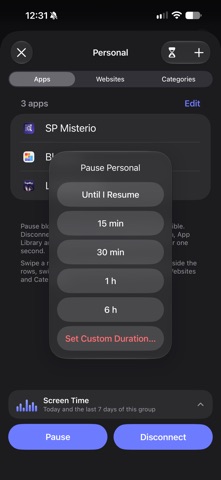
PAUSE OR DISCONNECT • Pause: iOS blocks access to the group's apps and websites. Apps stay visible. • Disconnect: apps come off your Home Screen, your App Library and Settings until you bring them back. Watch an optional ad to earn one hour for one group; you have two ads across the app, and each one comes back 12 hours after you use it. Start the hour when you're ready; you can resume early. • Pause for 15 minutes, 30 minutes, 1 hour, 6 hours, a custom duration, or until you resume the group. • Groups can hold apps, app categories and websites. Groups with categories or websites can only be paused.
FOR YOUR FAMILY • Handing your phone to your kids? Put apps that aren't meant for them in Sensitive Apps and disconnect the group first, along with anything else you'd rather they didn't open. • Block in-app purchases handled by the App Store. • Stop apps from being installed or deleted. • With Premium, protect access to SP Umbra with a PIN or Face ID.
FOR YOUR PRIVACY • At work, take your banking and social media apps out of sight. • Choose whether Sensitive Apps shows up on your Groups screen. • Keep private notes inside Sensitive Apps: search, autosave, newest on top. Creating and editing notes is free. • With Premium, set up an App PIN, then give your notes a different PIN for direct access from the sign-in screen. Anyone who has entered SP Umbra can read them. • Your notes stay on this iPhone and are left out of device backups.
LOCKED BY YOU (PREMIUM) • A 4 to 6 digit PIN, asked every time you open the app. • Use Face ID to open SP Umbra or only your notes. Tap its button on the sign-in screen. • Too many wrong tries and a wait time kicks in, longer with each attempt.
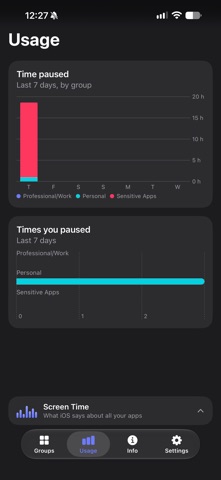
SEE YOUR HABITS • Your screen time for the last 7 days, app by app. • With Premium, how long each group stayed paused, and how often you paused it.
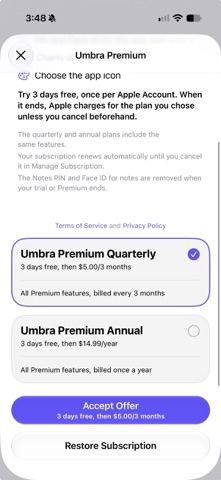
UMBRA PREMIUM Quarterly or annual subscription, with the same features in both: disconnect without ads and for as long as you choose, the Sensitive Apps group, PINs and Face ID for the app and your notes, charts of your pauses, and a choice of app icons. Both plans start with a 3-day free trial, once per Apple Account. When the trial ends, Apple charges the plan you chose, and the subscription renews automatically unless you turn off auto-renew at least 24 hours before the end of the current period. Manage or cancel it in your Apple Account settings. Terms of Use: https://www.apple.com/legal/internet-services/itunes/dev/stdeula/ Privacy Policy: https://superpartner.dev/ambientes/privacy/
PRIVATE BY DESIGN Built on Apple's Screen Time framework. No account. SP Umbra doesn't send your groups or notes to SuperPartner. Groups and settings may be included in your iPhone backup; notes are excluded.
Optional ads are provided by Google AdMob, which processes device and ad data. Your groups, notes and Screen Time data are not shared with Google. Tracking permission is optional and does not change the reward. Privacy choices and ad reporting are available in Info.
Requires iOS 18 or later and Screen Time permission.
Así la valora la gente
Inicia sesión para valorar esta app. Lo que cuenta es ser sincero.
Aún no hay valoraciones. ¿La has probado? Sé el primero en valorarla.
Más apps de Productividad
Las mejores apps nuevas de Productividad esta semana ChickMark: Habit TrackerChickMark is a simple habit tracker for routines, goals, and reminders
 Dayflint: One Thing a DayToo many priorities?
 Snappy Do ItTurn photos, text and voice into tasks, plans and more.
 Fristo CAFMFristo is the app for Fristo CAFM, the facility management software
 UhWhat? Voice NotesCatch the thought before it disappears
- BeginAnywayMorning alarm for hard tasks: set one task, prove you started, build a streak