
Spex : Smart Glasses Detector
Sin reclamarKnow when smart glasses are advertising near you
De Zippy IT Solutions Ltd. · Utilidades


En resumen
Spex is a utility that listens for Bluetooth signals from smart glasses with cameras, such as Ray-Ban Meta and Snap Spectacles, and alerts the user when a matching device is detected nearby. It is aimed at people who want to know when such glasses are around them, and detection runs on the iPhone. One thing that stands out is that alerts show a confidence band and a proximity level, not a made-up distance.
Resumen de Debuts, basado en la ficha de la App Store.Acerca de
Know when smart glasses are advertising near you.
Camera-carrying smart glasses announce themselves over Bluetooth when they power on, pair or come out of their case. Spex listens for those signals and tells you, calmly and plainly, when a matching device is detected nearby.
Spex detects devices such as Ray-Ban Meta, Oakley Meta, Meta Ray-Ban Display, Snap Spectacles, RayNeo, Rokid, Looktech, Solos AirGo Vision and Xiaomi AI Glasses when they advertise over Bluetooth. Meta Quest headsets are recognized too, and named as headsets rather than mistaken for glasses.
LIVE RADAR • Detections appear in real time on the Radar while Spex is open • Every detection carries a confidence band: Possible, Likely or Confirmed • Proximity is shown as Immediate, Near or Far, with a closer, further or steady trend, never a made-up distance • Open a detection to see the model, when it was first and last seen, its signal trend and the technical details behind the match • Settings › Nearby signals lists every Bluetooth device the scan hears while Spex is open, so you can see exactly what it is working with
ALERTS WHILE YOUR PHONE IS IN YOUR POCKET • Get a Lock Screen alert when glasses are detected nearby, even with Spex closed • Confirmed alerts name the device and its range; Likely alerts name the device • Possible-match alerts tell you when a nearby device partly matches smart glasses; turn them off in Settings if you only want stronger matches • Alerts are throttled per device, so a busy street doesn't flood your phone
APPLE WATCH • A discreet tap on your wrist with the device name and proximity • A complication shows whether Spex is watching and when it last alerted
LOCK SCREEN AND DYNAMIC ISLAND • While Spex is watching, a quiet Live Activity shows its status and how many devices are nearby, with a Stop button
SHORTCUTS AND ACTION BUTTON • Start and stop watching with Siri and Shortcuts: Arm Spex, Disarm Spex and Toggle Spex • Assign Toggle Spex to the Action Button to arm or disarm with one press
HISTORY • A log of what was detected and when, with its confidence and proximity • Delete single entries or erase the whole history. No location is recorded.
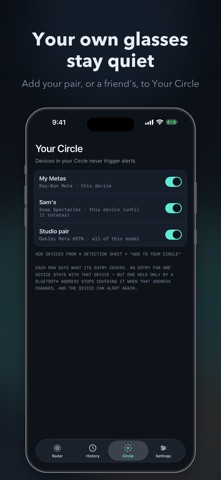
YOUR CIRCLE • Add your own glasses, or a friend's, so they stop alerting • Where the signal allows, an entry covers that one device, so silencing your pair doesn't silence a stranger's of the same model • Ignore any detection for an hour with one tap
PRIVATE BY DESIGN • Detection runs entirely on your iPhone • No accounts and no analytics • Scan data never leaves your phone: nothing about detections, History or Your Circle is ever sent • Alert summaries go only to your paired Apple Watch • Spex listens passively. It never connects to, pairs with or transmits to any device. • Device support is built into the app, and new models arrive with app updates
WHAT SPEX CAN AND CAN'T SEE Spex detects Bluetooth advertisements. It does not detect recording or streaming. It catches glasses as they power on, pair or leave their case. Glasses that are already connected and idle broadcast rarely, and no detector can promise otherwise; glasses that aren't advertising can't be seen at all. iOS also limits Bluetooth scanning in the background, so background alerts can be delayed, especially in Low Power Mode, and some devices, including Meta Quest headsets, can only be detected while Spex is open. Detection is best-effort: a quiet Radar is not a guarantee that no smart glasses are nearby.
Así la valora la gente
Inicia sesión para valorar esta app. Lo que cuenta es ser sincero.
Aún no hay valoraciones. ¿La has probado? Sé el primero en valorarla.
Más apps de Utilidades
Las mejores apps nuevas de Utilidades esta semana Drainly: Speaker CleanerMuffled speaker after a splash, rain, or a sweaty workout?
 Photo & PDF Resize: KBFile too large to upload?
 Arvectum Proxy LauncherArvectum Proxy Launcher is a network utility that routes your iPhone through a proxy you…
 Look Twice: Scam & AI CheckLook twice before you click
 Vodoalarm: vodostaji BiHVodoalarm javlja kad tvoja rijeka naglo raste, pa ne moraš stalno gledati vodostaje
 Sift: Photo CleanupYour camera roll is full of blurry shots, old screenshots and videos you'll never watch…