
Tono: MP4/M4A to MP3 Converter
Sin reclamarAny audio or video, in the format you need — in two taps
De Tetiana Kalchenko · UtilidadesPor qué la esperamos: The description clearly explains on-device conversion, ringtones and audio extraction, with a strong privacy angle and thorough detail.


En resumen
Tono: MP3/M4A to MP3 Converter is a utility that converts audio and video files, makes ringtones, and extracts soundtracks, all on the iPhone with no uploads. It suits people who need to change audio formats or build a ringtone from a song, recording, or clip. It stands out for keeping every file on the device and working offline.
Resumen de Debuts, basado en la ficha de la App Store.Acerca de
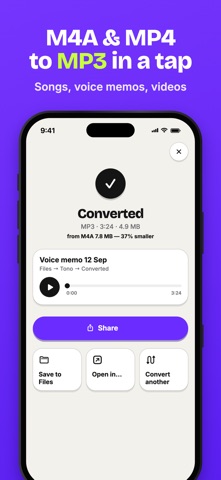
Any audio or video, in the format you need — in two taps. Tono converts files, makes ringtones and pulls sound out of videos right on your iPhone. No uploads, no waiting for a server, and your files never leave your device.
MAKE RINGTONES • Turn any song, voice recording or video into a ringtone • Tono suggests the loudest 30-second part — adjust it to the tenth of a second • Exports ready-to-use M4R ringtone files • A step-by-step guide shows how to set it as your iPhone ringtone or alert sound
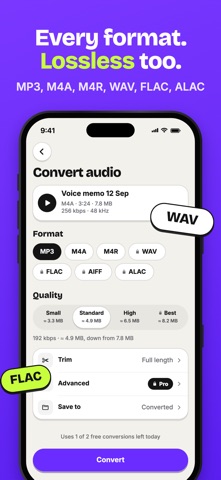
CONVERT ANY FORMAT • M4A to MP3, MP4 to MP3, WAV to MP3, FLAC to MP3 and more • Output to MP3, M4A (AAC), WAV, FLAC, AIFF, ALAC and M4R • Lossless conversion between WAV, FLAC, AIFF and ALAC • Quality presets from 128 to 320 kbps, with the file size estimated before you convert • Advanced settings: bitrate, sample rate (44.1 / 48 kHz), mono or stereo
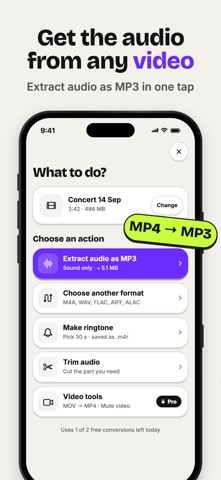
AUDIO FROM VIDEOS • Extract the soundtrack from any video in your Photos or Files • Save a lecture, a concert or a clip as MP3 or M4A • Video tools: convert MOV to MP4 and mute a video in one step
TRIM & FADE • Full-width waveform with precise start and end handles • Pinch to zoom, preview the selection, loop playback • Fade in / fade out and volume normalization
BATCH CONVERSION • Convert a whole set of files with the same settings • Track progress for each file and retry any that fail
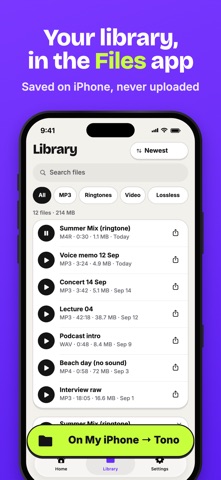
YOUR LIBRARY IN THE FILES APP • Every result is saved to Files → On My iPhone → Tono • Save any result to iCloud Drive or another folder with one tap • Sort, search, filter by format, rename, share or convert again • Built-in player with a waveform
SHARE FROM ANY APP & SHORTCUTS • Use "Convert with Tono" from the share sheet in Photos, Files, Voice Memos and other apps • Open any audio or video file in Tono with "Open in…" • Shortcuts actions: Convert File, Extract Audio, Make Ringtone
PRIVACY • All processing happens on your device — nothing is uploaded • Works offline • No ads, no sign-up
TONO PRO Free to use every day: • 3 conversions per day • Files up to 10 minutes • MP3 and M4A output up to 192 kbps • 1 ringtone to try it out
Tono Pro unlocks everything: • Unlimited conversions of any length • All formats: WAV, FLAC, AIFF, ALAC, M4R • 320 kbps and custom audio settings • Unlimited ringtones • Batch conversion • Fade in / out and normalization • Video tools: MOV to MP4, mute video • Shortcuts actions
Tono Pro is available as a weekly or yearly subscription with a free trial.
Así la valora la gente
Inicia sesión para valorar esta app. Lo que cuenta es ser sincero.
Aún no hay valoraciones. ¿La has probado? Sé el primero en valorarla.
Más apps de Utilidades
Las mejores apps nuevas de Utilidades esta semana Vodoalarm: vodostaji BiHVodoalarm javlja kad tvoja rijeka naglo raste, pa ne moraš stalno gledati vodostaje
 NadhirNadhir is an independent app
 Rokey: Romanian KeyboardType Romanian without worrying about diacritics
 Vibe Island: AI Agent MonitorVibe Island is a command center for the AI coding agents running on your Mac
 Private AuthenticatorPrivate Authenticator keeps your two-factor authentication codes on your own Apple…
 Photo Clean: Photo CleanupA crowded camera roll?