
Utadana: Singing Recorder
Sin reclamarRecord your singing and build it up, song by song
De OKADA TAKUYA · Música y audio


En resumen
Utadana: Singing Recorder is a music app that files each voice recording into a sleeve for its song, so takes of the same song can be listened to and compared over time. It suits singers who practice at home, take lessons, or want to save karaoke performances. It stands out for its A-B loop, which repeats just one short section of a take.
Resumen de Debuts, basado en la ficha de la App Store.Acerca de
Record your singing and build it up, song by song.
Recordings tend to pile up on your phone in date order, and that's it. You can't tell how you sang a song last time. Utadana puts each recording into a sleeve for its song, so you can actually listen back.
Made for moments like these ・Save the song you just sang at karaoke, right there ・Record your practice at home and compare it with your past self ・Record a lesson or your choir part, and replay only the spot you were told to fix ・Record a full acoustic run-through and find where you stumbled
■ Record right away The record button is within reach from every screen. Open the app, tap it, and that take is saved. A live waveform and level meter show that the mic is picking you up.
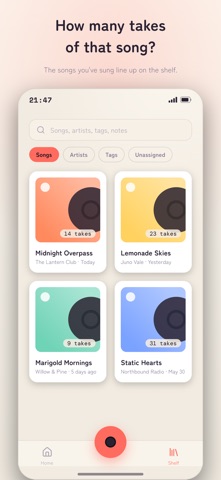
■ One sleeve per song Takes go into a sleeve for their song. Open the Shelf to see every song you've sung. Find a song by title and the title and artist are filled in for you; if it isn't listed, type it in yourself. Your own originals get a sleeve too.
■ Compare takes of the same song over time Open a song to see its takes in the order you recorded them. Play last week's take next to today's. Pin your best take for each song, and it'll be at the top the next time you open it.
■ A-B Loop: repeat just one line Set a start and end point on the waveform to loop just that part. The way into the chorus, a long note, the bar before the key change: listen to those few seconds as many times as you need. Drag the waveform to jump anywhere.
■ Find takes again with tags and notes Add tags like "great chorus" or "clean high notes" and a note about how it felt to each take. Tap "Mark Here" to save the current spot, or save an A-B section, right into the note; tap the time later to jump straight back. Song titles, artists, tags, and notes are searched together, so a few words you wrote take you back to the take you wanted.
■ Play a whole day of takes in a row Home lists your takes by the day you recorded them. Tap ▶ next to a day to play all of that day's takes back to back. Skip between takes, check Up Next, and repeat one take or all of them.
■ Keep listening with the screen off Playback keeps going after you leave the app. Control it from the Lock Screen, so you can listen back on the go.
※ Your recordings stay on your device Your audio, tags, and notes are all stored on your device and are never sent to the developer. No account needed. No ads. To help improve the app, only feature usage and error information is shared, and you can turn this off in Settings.
Questions or requests? Email support@utadana.com.
Así la valora la gente
Inicia sesión para valorar esta app. Lo que cuenta es ser sincero.
Aún no hay valoraciones. ¿La has probado? Sé el primero en valorarla.
Más apps de Música y audio
Las mejores apps nuevas de Música y audio esta semana KlingKlang – Control de AudioKlingKlang reúne todas las salas de tu sistema Sonos en una sola pantalla
 CalabiCalabi is a music toy you can see
 Fingertip Player: Feel MusicClose your eyes
 BANANA-1One banana
 Acord: Guitar Tuner, MetronomeAcord is a precise tuner and metronome for every musician
 MonandaegMōnandæg is two field recorders that cannot leave anything alone