
AirMouse: Remote Trackpad
Ei lunastettuThe computer is across the room and the trackpad is not
Tekijä: Bruno Ramos · ApuohjelmatMiksi odotamme sitä: Clear value and thoughtful gestures make this a compelling remote trackpad for anyone working across the room.


Tietoa
The computer is across the room and the trackpad is not. AirMouse turns the phone already in your hand into the one it is missing.
THE WHOLE PHONE IS THE TRACKPAD One finger moves the cursor, a tap clicks, two fingers scroll and right-click, three switch desktops, and a pinch zooms. Double-tap and hold to drag, text, a file, the corner of a window. Each gesture does what that computer's own trackpad does with it: desktops on a Mac, workspaces on Linux, apps on Windows.
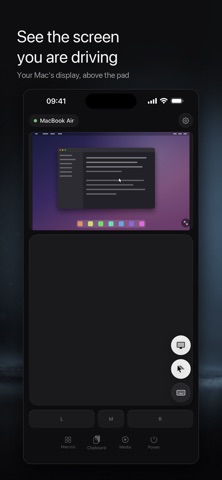
SEE THE SCREEN YOU ARE DRIVING Turn it on and the computer's display appears above the pad. The cursor you are moving, the menu you just opened, the dialog waiting for an answer. A monitor, not a second control surface: the gestures stay where your muscle memory already is. The live screen works with a Mac or a Linux desktop on X11; everything else works with Windows too. Nothing here costs extra: one price, once, and every feature is yours.
THE KEYS A PHONE DOES NOT HAVE Ctrl, Alt, the arrows, F1 to F12, Escape, Tab. Tap a modifier to arm it and it applies to the next key, then lets go by itself. Type live, or write the whole thing first and send it in one go.
BUTTONS THAT DO SEVERAL THINGS A macro is one tile that runs steps in order: a shortcut, some typed text, opening an app or a link, a media key, a pause. Group them into profiles and bind each to an app on the computer. The grid changes when you change what you are doing.
ONE CLIPBOARD, TWO DEVICES Send whatever is on the phone to the computer in one tap, photos included, and copy what the computer holds straight back, text as text, pictures as pictures.
MEDIA AND POWER Play, pause, skip and volume from across the room, using the computer's own media keys, so they reach any player, browsers included. Sleep, lock or shut the computer down when you are done.
IN YOUR LANGUAGE English, Portuguese and Spanish. It opens in whatever your phone is set to, and you can change it at any moment.
YOUR NETWORK, NOWHERE ELSE The phone talks to your computer directly, over your own Wi-Fi. There is no account to make, nothing is sent to a server on the internet, and the app collects nothing about you at all.
WHAT YOU NEED AirMouse Server, our own free companion app for the computer. Windows, macOS or Linux, one file from our site, brunescco.com/pc. On a Mac you drag it into Applications; on Windows and Linux you run the file you downloaded. Open it, pick the computer on the phone, click Allow once, and the phone reconnects on its own from then on.
Ihmisten arvio
Kirjaudu sisään arvioidaksesi tämän sovelluksen. Rehellisyys on tärkeintä.
Ei vielä arvioita. Oletko kokeillut sitä? Anna ensimmäinen arvio.
Lisää Apuohjelmat-sovelluksia
Viikon parhaat uudet Apuohjelmat-sovellukset Vodoalarm: vodostaji BiHVodoalarm javlja kad tvoja rijeka naglo raste, pa ne moraš stalno gledati vodostaje
 Rokey: Romanian KeyboardType Romanian without worrying about diacritics
 Vibe Island: AI Agent MonitorVibe Island is a command center for the AI coding agents running on your Mac
 Private AuthenticatorPrivate Authenticator keeps your two-factor authentication codes on your own Apple…
 Photo Clean: Photo CleanupA crowded camera roll?
 Songbird AlarmWhat if the morning didn't have to start with a loud noise?