
Ambertide: Deadline Planner
Ei lunastettuAmbertide is a calendar, task list and deadline planner that works backwards from the…
Tekijä: Mousa Alwaraki · Tuottavuus



Lyhyesti
Ambertide: Deadline Planner is a calendar, task list and planner that works backwards from due dates. It suits people who juggle deadlines with dependent tasks and want to see whether they still fit. One standout feature is the critical path, which shows the chain of tasks that decides whether a deadline is met and how much slack remains.
Debutsin tekemä tiivistelmä App Store -listauksen pohjalta.Tietoa
Ambertide is a calendar, task list and deadline planner that works backwards from the dates that matter.
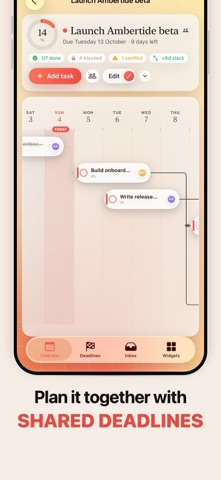
DEADLINES WITH TIMELINES Give a deadline a date, add the tasks that lead up to it, and link the ones that depend on each other. Ambertide draws the timeline, shows what's blocked and what it's waiting on, and warns you when a task is scheduled before the thing it depends on.
KNOW IF IT STILL FITS The critical path shows the chain of tasks that decides whether you make it, and how many days of slack you have left. The next-deadline pill shows your workload for every day until it's due, so overloaded days stand out.
PLAN YOUR DAYS Day, week and month views with drag and drop. Move tasks between days, drop inbox tasks onto a day or a deadline, or just tick them off. Auto-schedule suggests where unscheduled work fits within your daily capacity, and nothing moves until you accept.
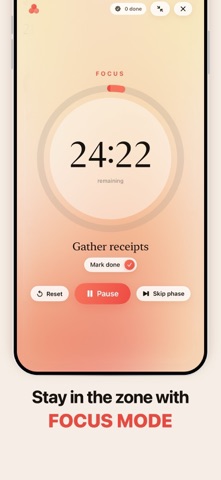
WIDGETS THAT HELP YOU FOCUS Weather, a stocks watchlist with a ticker, a full-screen focus timer, habits with streaks, critical path, an agenda with free time between your calendar events, weekly progress, a workload heatmap, quick notes and a world clock. Add Home Screen and Lock Screen widgets, and follow your focus session in the Dynamic Island.
REMINDERS Local reminders before deadlines, an alert when a deadline no longer fits, an optional daily plan, and nudges for timed tasks and habits.
PRIVATE BY DEFAULT No ads, no tracking and no third-party analytics, and we never sell your data. Sign in with email, Apple or Google and your plans sync across your devices for free. Events from your device calendar are never uploaded, and you can delete your account and all synced data at any time in Settings.
Works on iPhone, iPad, Mac and Apple TV.
Stock data is for information only, may be delayed and is not investment advice.
AMBERTIDE PRO Ambertide Pro is an optional auto-renewing subscription, monthly or yearly (the yearly plan starts with a 7-day free trial). Payment is charged to your Apple ID. It renews automatically unless cancelled at least 24 hours before the end of the current period. Manage or cancel it in your Apple ID's subscription settings.
Terms of Use (EULA): https://www.apple.com/legal/internet-services/itunes/dev/stdeula/ Ambertide Terms: https://ambertide.app/terms/ Privacy Policy: https://ambertide.app/privacy/
Ihmisten arvio
Kirjaudu sisään arvioidaksesi tämän sovelluksen. Rehellisyys on tärkeintä.
Ei vielä arvioita. Oletko kokeillut sitä? Anna ensimmäinen arvio.
Lisää Tuottavuus-sovelluksia
Viikon parhaat uudet Tuottavuus-sovellukset ChickMark: Habit TrackerChickMark is a simple habit tracker for routines, goals, and reminders
 Dayflint: One Thing a DayToo many priorities?
 Snappy Do ItSix connected modes. One traceable journey.
 Fristo CAFMFristo is the app for Fristo CAFM, the facility management software
 UhWhat? Voice NotesCatch the thought before it disappears
- BeginAnywayMorning alarm for hard tasks: set one task, prove you started, build a streak