
Eos - A Daily Scratch Pad
Ei lunastettuEos gives you one note a day
Tekijä: Mark Huot · TuottavuusMiksi odotamme sitä: The description clearly explains the one-note-a-day concept, locked past days, and list handling, making the value easy to grasp.



Lyhyesti
Eos - A Daily Scratch Pad is a productivity app that gives each day one note. Today's page is the only one still editable, and past days stay locked and readable in a scrollable deck, with separate Tomorrow and Someday pages. It stands out for its calendar and weather strip under each day's page, which can be turned off in Settings.
Debutsin tekemä tiivistelmä App Store -listauksen pohjalta.Tietoa
Eos gives you one note a day. Today's page opens when you launch the app, and of all the days you've lived through, it's the only one you can still type on. At midnight it closes, and every day before it stays readable but locked, so what you wrote on a Tuesday in March is still exactly what you wrote.
The days sit in a deck. Today is the open card, and the days behind it are stacked above with only their dates showing. Scroll up to go back through them, tap one to open it, and tap the button at the bottom of the screen (it names the day you're on) to come straight back to today.
TOMORROW AND SOMEDAY Two more pages sit just below today. Tomorrow is for the things you already know are coming, and at midnight it simply becomes today's page, with nothing to copy over. Someday holds whatever doesn't belong to a date yet. You can write on either one whenever you like.
At the foot of Today and Tomorrow, a thin strip lays out the day's events from your calendar, with the hourly forecast for where you are underneath. Tap an event to open it in Calendar, or the forecast to open Weather. Settings lets you switch off either row, or keep the strip on one card and not the other.
LISTS AND TASKS Start a list with a hyphen, a bullet or a checkbox, and Return carries it on to the next line. The bar above the keyboard ticks the tasks under your cursor and moves them up or down within their list. Tasks on a past day stay exactly as you left them.
FORMATTING Bold, italic and headings live in the keyboard bar too. Paste in text written in Markdown and Eos keeps its headings, emphasis and lists. Copy part of a note out and other apps receive it as Markdown.
SEARCH AND SHARE Search finds a word across every day you've written, whatever its case or accents. Any open card can be sent anywhere through the share sheet.
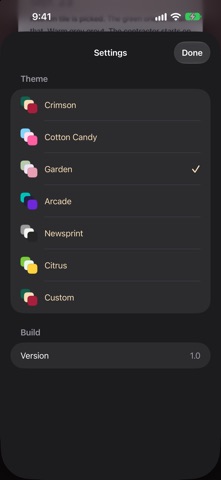
COLOR Color tells you what you're looking at. Today is crimson, a past weekday is warm paper, and a past weekend is deep teal. Five more themes recolor the deck (Cotton Candy, Garden, Arcade, Newsprint and Citrus), and Custom lets you pick the three colors yourself. Eos works out the date and text colors from each card color you choose, so every card stays readable. Your custom colors sync between devices, while each device keeps its own choice of theme.
WIDGET The home screen widget shows today's page in small, medium and large sizes. From 4pm, the medium and large sizes put tomorrow's page beside it (you can switch that off in the widget's settings). Tap the widget to open today's page.
IPAD Eos turns with your iPad and works in Split View and Stage Manager. Once the window is wide enough, Tomorrow and Someday move into a column of their own beside the deck.
PRIVACY Your notes are stored on your device and in your own iCloud account, in the private CloudKit database that only you can read. There's no Eos account to sign up for. Eos doesn't collect analytics or track you, and the developer can't see anything you write. Without iCloud, Eos works the same way and keeps everything on the one device. Your calendar events are read on your device and never leave it. To show the forecast, Eos asks Apple Weather for the weather where you are.
Ihmisten arvio
Kirjaudu sisään arvioidaksesi tämän sovelluksen. Rehellisyys on tärkeintä.
Ei vielä arvioita. Oletko kokeillut sitä? Anna ensimmäinen arvio.
Lisää Tuottavuus-sovelluksia
Viikon parhaat uudet Tuottavuus-sovellukset ChickMark: Habit TrackerChickMark is a simple habit tracker for routines, goals, and reminders
 Dayflint: One Thing a DayToo many priorities?
 Snappy Do ItSix connected modes. One traceable journey.
 Fristo CAFMFristo is the app for Fristo CAFM, the facility management software
 UhWhat? Voice NotesCatch the thought before it disappears
- BeginAnywayMorning alarm for hard tasks: set one task, prove you started, build a streak