
SynqTag - Edit Song's Metadata
Ei lunastettuSynqTag edits your song details and writes them straight into the original music files —…
Tekijä: Duong Duc · Apuohjelmat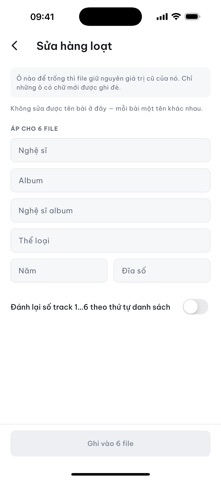




Lyhyesti
SynqTag - Edit Song's Metadata writes title, artist, album, genre, year, track and disc numbers, lyrics and cover art directly into the music file itself, so other players show the same details. It is for people who want to tidy up their music library on their device, with no account and no upload of audio. One notable point: it stages a copy and verifies the tags before replacing the original, leaving the file untouched if any step fails.
Debutsin tekemä tiivistelmä App Store -listauksen pohjalta.Tietoa
SynqTag edits your song details and writes them straight into the original music files — not saved separately inside the app, but written into the file itself, so every other music player sees them too.
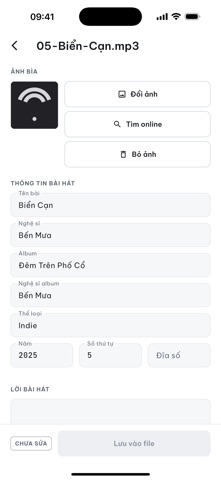
WHAT YOU CAN EDIT • Title, artist, album, album artist • Genre, year • Track number, disc number • Lyrics • Cover art embedded in the file
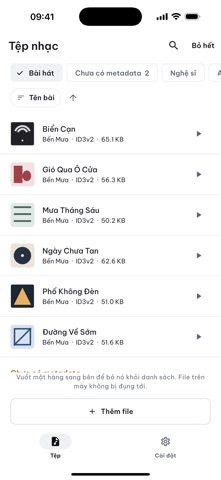
BROWSE LIKE A MUSIC APP Your library is already sorted into All songs, Artists, Albums, Genres and Years — plus one view that gathers exactly the songs missing information, so you know where to start.
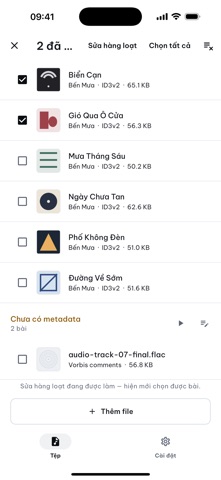
BATCH EDITING Select several songs and set the album, artist or genre for the whole group at once.
FIND COVER ART AND LYRICS Look up artwork and lyrics online and attach them to the file, right from the editing screen.
SAFE WITH YOUR FILES A corrupted music file has no second copy anywhere. So SynqTag never writes directly into your original: it writes a staged copy, reads it back to verify the tags really landed, and only then does that copy replace the original. If anything fails at any step, your file is untouched, byte for byte. The app also warns you before saving when a file format cannot hold one of the fields.
RUNS ENTIRELY ON YOUR DEVICE No account, no sign-in, and your music is never uploaded. The network is used only when you tap to look up cover art or lyrics, and then only the title, artist and album are sent — never the audio file.
SYNQTAG PRO — one payment, yours for good • Unlimited batch editing • Unlimited cover art and lyrics lookups • Every advert gone
The free version edits single songs without limit, and covers lookups for your first 5 songs.
Supported formats: MP3, FLAC, M4A/AAC, WAV, AIFF, OGG, APE, DSF.
Privacy policy: https://synqstudio.cloud/synqtag-privacy
Ihmisten arvio
Kirjaudu sisään arvioidaksesi tämän sovelluksen. Rehellisyys on tärkeintä.
Ei vielä arvioita. Oletko kokeillut sitä? Anna ensimmäinen arvio.
Lisää Apuohjelmat-sovelluksia
Viikon parhaat uudet Apuohjelmat-sovellukset Photo & PDF Resize: KBFile too large to upload?
 Vodoalarm: vodostaji BiHVodoalarm javlja kad tvoja rijeka naglo raste, pa ne moraš stalno gledati vodostaje
 FairAuth: AuthenticatorFairAuth creates the codes for two-step verification on iPhone and iPad
 Polarglow: Aurora AlertsKnow tonight's chance of seeing the aurora where you are, and never miss a storm night
 Letter Explainer: PostklarGot an official letter and only understand half of it?
 NadhirNadhir is an independent app