
Tono: MP4/M4A to MP3 Converter
Ei lunastettuAny audio or video, in the format you need — in two taps
Tekijä: Tetiana Kalchenko · ApuohjelmatMiksi odotamme sitä: The description clearly explains on-device conversion, ringtones and audio extraction, with a strong privacy angle and thorough detail.


Lyhyesti
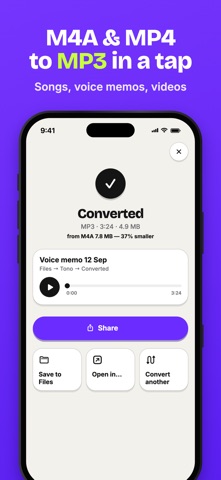
Tono: MP3/M4A to MP3 Converter is a utility that converts audio and video files, makes ringtones, and extracts soundtracks, all on the iPhone with no uploads. It suits people who need to change audio formats or build a ringtone from a song, recording, or clip. It stands out for keeping every file on the device and working offline.
Debutsin tekemä tiivistelmä App Store -listauksen pohjalta.Tietoa
Any audio or video, in the format you need — in two taps. Tono converts files, makes ringtones and pulls sound out of videos right on your iPhone. No uploads, no waiting for a server, and your files never leave your device.
MAKE RINGTONES • Turn any song, voice recording or video into a ringtone • Tono suggests the loudest 30-second part — adjust it to the tenth of a second • Exports ready-to-use M4R ringtone files • A step-by-step guide shows how to set it as your iPhone ringtone or alert sound
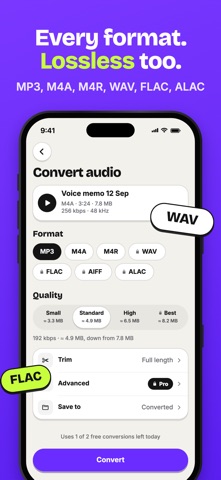
CONVERT ANY FORMAT • M4A to MP3, MP4 to MP3, WAV to MP3, FLAC to MP3 and more • Output to MP3, M4A (AAC), WAV, FLAC, AIFF, ALAC and M4R • Lossless conversion between WAV, FLAC, AIFF and ALAC • Quality presets from 128 to 320 kbps, with the file size estimated before you convert • Advanced settings: bitrate, sample rate (44.1 / 48 kHz), mono or stereo
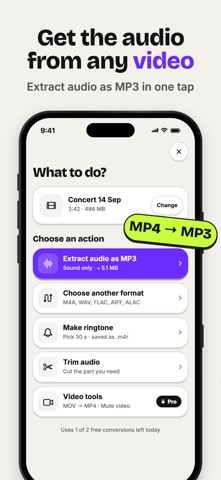
AUDIO FROM VIDEOS • Extract the soundtrack from any video in your Photos or Files • Save a lecture, a concert or a clip as MP3 or M4A • Video tools: convert MOV to MP4 and mute a video in one step
TRIM & FADE • Full-width waveform with precise start and end handles • Pinch to zoom, preview the selection, loop playback • Fade in / fade out and volume normalization
BATCH CONVERSION • Convert a whole set of files with the same settings • Track progress for each file and retry any that fail
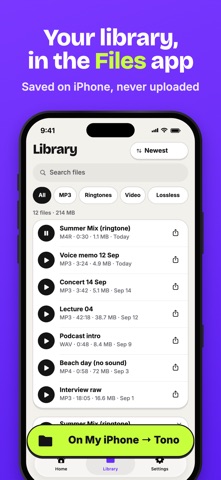
YOUR LIBRARY IN THE FILES APP • Every result is saved to Files → On My iPhone → Tono • Save any result to iCloud Drive or another folder with one tap • Sort, search, filter by format, rename, share or convert again • Built-in player with a waveform
SHARE FROM ANY APP & SHORTCUTS • Use "Convert with Tono" from the share sheet in Photos, Files, Voice Memos and other apps • Open any audio or video file in Tono with "Open in…" • Shortcuts actions: Convert File, Extract Audio, Make Ringtone
PRIVACY • All processing happens on your device — nothing is uploaded • Works offline • No ads, no sign-up
TONO PRO Free to use every day: • 3 conversions per day • Files up to 10 minutes • MP3 and M4A output up to 192 kbps • 1 ringtone to try it out
Tono Pro unlocks everything: • Unlimited conversions of any length • All formats: WAV, FLAC, AIFF, ALAC, M4R • 320 kbps and custom audio settings • Unlimited ringtones • Batch conversion • Fade in / out and normalization • Video tools: MOV to MP4, mute video • Shortcuts actions
Tono Pro is available as a weekly or yearly subscription with a free trial.
Ihmisten arvio
Kirjaudu sisään arvioidaksesi tämän sovelluksen. Rehellisyys on tärkeintä.
Ei vielä arvioita. Oletko kokeillut sitä? Anna ensimmäinen arvio.
Lisää Apuohjelmat-sovelluksia
Viikon parhaat uudet Apuohjelmat-sovellukset Vodoalarm: vodostaji BiHVodoalarm javlja kad tvoja rijeka naglo raste, pa ne moraš stalno gledati vodostaje
 NadhirNadhir is an independent app
 Rokey: Romanian KeyboardType Romanian without worrying about diacritics
 Vibe Island: AI Agent MonitorVibe Island is a command center for the AI coding agents running on your Mac
 Private AuthenticatorPrivate Authenticator keeps your two-factor authentication codes on your own Apple…
 Photo Clean: Photo CleanupA crowded camera roll?