
TV Size Calculator: AR Preview
Ei lunastettuWill 65 inches feel right, or should you go bigger?
Tekijä: Volodymyr Yahenskyi · ApuohjelmatMiksi odotamme sitä: Clear value, honest estimates, and a practical AR preview make this a well-scoped TV sizing tool worth trying.




Lyhyesti
TV Size Calculator: AR Preview helps users pick a TV size from their viewing distance and place a virtual screen on their own wall through augmented reality on iPhone or iPad. It includes width checks, scale checks, and a one-time Pro purchase that adds a room library and model-specific dimensions. Its free tier covers size recommendations and basic AR previews.
Debutsin tekemä tiivistelmä App Store -listauksen pohjalta.Tietoa
Will 65 inches feel right, or should you go bigger?
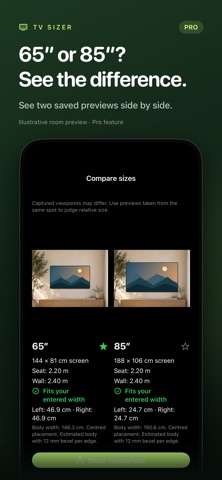
TV Sizer helps you choose a size for your viewing distance and preview it on your own wall in AR. Try different sizes, check the available space, and make your next TV purchase with a clearer idea of how it will look at home.
FIND YOUR STARTING SIZE Enter the distance from your seat to the screen. Choose a relaxed, balanced, or immersive viewing preference and get a recommended size. Compare eight popular diagonals: 32, 43, 50, 55, 65, 75, 85, and 98 inches.
SEE IT ON YOUR WALL Place a virtual TV in your room with augmented reality. Switch sizes, reposition the TV, and lock its placement while you compare. See the difference before moving furniture or buying a screen.
CHECK YOUR SPACE View estimated screen dimensions and enter your available wall width to check fit and side clearance. Switch between metric and imperial units. Use a tape-measured reference to check AR scale.
CAPTURE AND SHARE Capture a preview and share it to get a second opinion. Size recommendations, basic AR previews, wall-width checks, scale checks, and sharing a single capture are free.
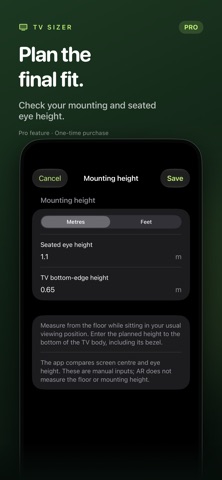
FINISH YOUR PLAN WITH PRO One purchase unlocks all Pro tools: - Save previews in a room library and mark your favorites. - Compare two saved previews side by side and share the comparison. - Enter a specific TV model's body width, height, and depth. - Plan mounting height using your seated eye and TV bottom-edge measurements. - Record your measurement and cable-space checks.
Pro is a one-time purchase. No subscription.
Room previews are stored locally, and you control what you share.
AR is a visual guide. Generic TV dimensions and fit recommendations are estimates. Confirm the final fit with the manufacturer's specifications and a tape measure. AR requires a compatible iPhone or iPad and camera access.
Terms: https://yahenskyi.dev/terms Privacy Policy: https://yahenskyi.dev/privacy
Ihmisten arvio
Kirjaudu sisään arvioidaksesi tämän sovelluksen. Rehellisyys on tärkeintä.
Ei vielä arvioita. Oletko kokeillut sitä? Anna ensimmäinen arvio.
Lisää Apuohjelmat-sovelluksia
Viikon parhaat uudet Apuohjelmat-sovellukset Vodoalarm: vodostaji BiHVodoalarm javlja kad tvoja rijeka naglo raste, pa ne moraš stalno gledati vodostaje
 NadhirNadhir is an independent app
 Rokey: Romanian KeyboardType Romanian without worrying about diacritics
 Vibe Island: AI Agent MonitorVibe Island is a command center for the AI coding agents running on your Mac
 Private AuthenticatorPrivate Authenticator keeps your two-factor authentication codes on your own Apple…
 Photo Clean: Photo CleanupA crowded camera roll?