
1Scanner: PDF & QR Scanner
Non revendiquéeDocuments
Par ANTON TRANTIN · Productivité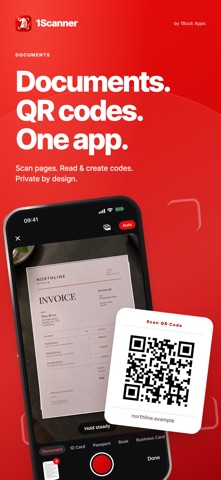




En bref
1Scanner: PDF & QR Scanner turns paper documents into searchable PDFs, reads and creates QR codes and barcodes, and lets users sign, stamp, redact, and compress files. All processing happens on the device, with no ads, tracking, or account required. It suits people who handle paperwork, such as invoices, ID cards, and passports.
Résumé par Debuts, d'après la fiche de l'App Store.À propos
Documents. QR codes. One app.
1Scanner turns paperwork into searchable PDFs. Scan documents, read and create QR codes and barcodes, sign and stamp pages, hide what others shouldn't see, and share files in the size you need. Pages, text and codes are processed on your device.
No ads. No tracking. No account. App Store privacy label: Data Not Collected.
SCAN AND ORGANIZE • Capture pages one after another: the camera finds the page, captures it when it is steady and waits for the next one. • Crop, rotate, filter and reorder pages before saving. Photos to PDF turns pictures into pages; import PDFs and images from Files and other apps. • New scans name themselves from their text, for example "Invoice 4711 · Pineapple Ltd". • Keep documents in folders, filter them by date and find them by name or by any word inside.
ID CARD, PASSPORT, BOOK • ID card: both sides on one page at standard ID card size, ready to print on A4 or Letter. • Passport: the photo page at real size. • Book: each shot of a spread becomes two pages, split at the fold, and counts as two scanned pages. Press the book flat; curved pages are not flattened.
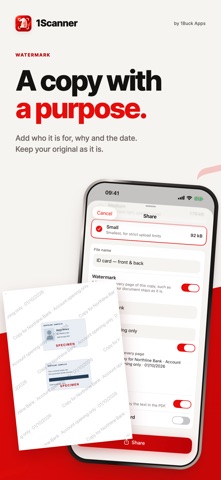
SIGN, STAMP AND SEND • Save your signature and company stamp once: scan them, pick a photo or a file, or draw with your finger. The paper is removed and the ink keeps its color. • Ready Stamps: APPROVED, PAID, COPY, CONFIDENTIAL, DRAFT, RECEIVED and today's date, in red, blue or black, or your own word. • Fill in and mark up documents with Apple's Markup. • Share as PDF, JPEG or text in Original, Medium or Small, with the real file size shown before you send. • Watermark: "Copy for Bank X · only for opening an account · date" across every page of the copy you send, burned into the pages. Your document stays clean.
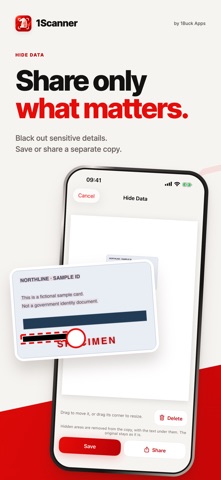
HIDE DATA Black out numbers, addresses or photos by drawing a box or tapping a line of text. You get a new copy in which those areas and the text under them are gone; the original stays as it is.
PDF TOOLS Compress, merge, split, add a password, copy the text or print. The original always stays as it is.
SUMMARY On iPhones with Apple Intelligence, Summarize writes a few short points about a document, right on your iPhone, when Apple Intelligence supports the document's language. Nothing is sent anywhere.
BUSINESS CARDS Scan a stack card after card, or several cards in one photo. The name, company, phones and emails are read on your device; check them, then add a card to Contacts or export your cards as vCard or CSV. Each saved card counts as one scanned page.
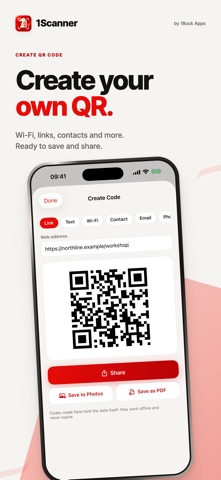
QR CODES AND BARCODES • Scan with the camera or from a photo or screenshot, without limit. • Nothing opens by itself: links show the full address with the real site and warn about lookalike names, plain http and link shorteners. • Wi-Fi codes: join the network or copy the password. Contacts, email, phone and more. • Create QR codes for links, text, Wi-Fi, contacts, email and phone, plus Code 128 barcodes. They hold the data itself and never expire.
PRIVATE BY DESIGN Your library stays on your device, unless you choose a folder for PDF copies (for example in iCloud Drive). Lock the app with Face ID, Touch ID or your passcode.
Les notes des utilisateurs
Connecte-toi pour noter cette appli. Ce qui compte, c'est d'être honnête.
Pas encore de notes. Tu l'as essayée ? Sois le premier à la noter.
Plus d'apps Productivité
Les meilleures nouvelles apps Productivité de la semaine ChickMark: Habit TrackerChickMark is a simple habit tracker for routines, goals, and reminders
 Dayflint: One Thing a DayToo many priorities?
 Fristo CAFMFristo is the app for Fristo CAFM, the facility management software
- BeginAnywayMorning alarm for hard tasks: set one task, prove you started, build a streak
 DHUDEDHUDE Analityxs es la herramienta de gestión diaria para grupos de restauración y ocio…
 ScrollTime: Limit & ChallengesTikTok, Instagram, Facebook… ScrollTime helps you take back control of the time you…