
AI Screenshot Capture
Non revendiquéeCapture, annotate, and share screenshots from your Mac’s menu bar
Par Mike Fifield · Productivité


En bref
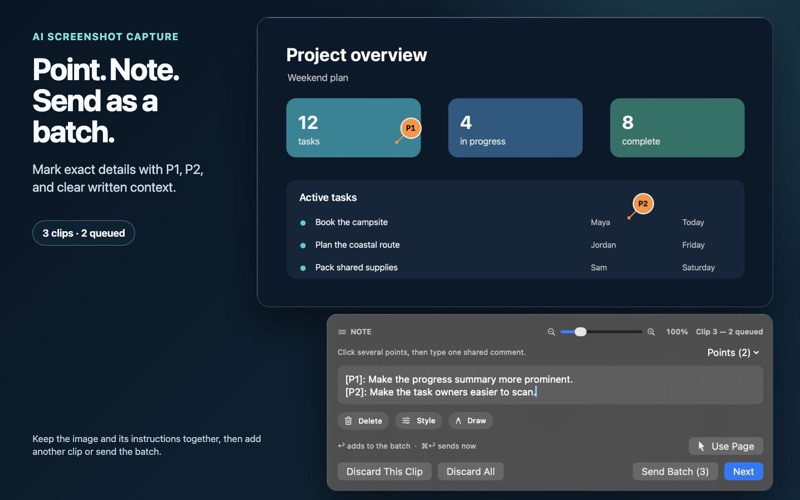
AI Screenshot Capture is a productivity app for Mac that captures full screens, windows, selected areas, or batches of clips from the menu bar. Users can annotate images with numbered points, drawings, and notes, record their screen with optional microphone audio, and keep clipboard history on the device. It stands out for its privacy approach: captures and clipboard history stay on the Mac, with no account, analytics, or tracking required.
Résumé par Debuts, d'après la fiche de l'App Store.À propos
Capture, annotate, and share screenshots from your Mac’s menu bar. AI Screenshot Capture brings full-screen, window, area, and batch captures together with screen recording and local clipboard history.
• Capture a window, a selected area, or your full screen. • Add numbered points, draw on images, and write notes before copying. • Collect multiple clips into a batch. • Record your screen, with optional microphone audio. • Copy your result and open the destination app, then press Command-V to paste. • Save captures and recordings to folders you choose. • Optionally enable clipboard history and clear it at any time.
Built for privacy: captures and clipboard history stay on your Mac. No account, API key, advertising, analytics, tracking, or developer cloud upload is required. Screen Recording permission is needed for capture; Microphone permission is requested only when you enable microphone audio.
The Mac App Store edition uses Copy & Open. It does not automatically paste into other apps or require Accessibility permission.
Les notes des utilisateurs
Connecte-toi pour noter cette appli. Ce qui compte, c'est d'être honnête.
Pas encore de notes. Tu l'as essayée ? Sois le premier à la noter.
Plus d'apps Productivité
Les meilleures nouvelles apps Productivité de la semaine ChickMark: Habit TrackerChickMark is a simple habit tracker for routines, goals, and reminders
 Dayflint: One Thing a DayToo many priorities?
 Fristo CAFMFristo is the app for Fristo CAFM, the facility management software
- BeginAnywayMorning alarm for hard tasks: set one task, prove you started, build a streak
 DHUDEDHUDE Analityxs es la herramienta de gestión diaria para grupos de restauración y ocio…
 ScrollTime: Limit & ChallengesTikTok, Instagram, Facebook… ScrollTime helps you take back control of the time you…