
CalScout
Non revendiquéeCalScout finds the open times in your week and turns the ones you pick into a friendly…
Par Mahmoud Pouladi · Productivité


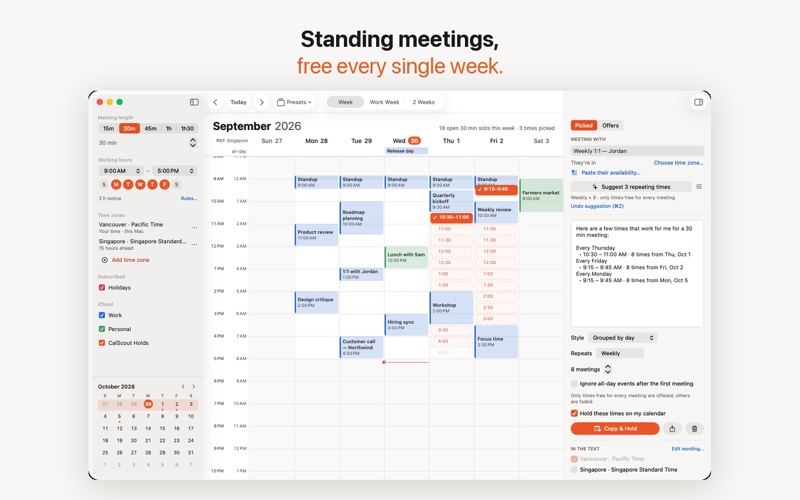

En bref
CalScout finds free times in your week across all calendars on your device and turns the slots you pick into a message ready to paste into email, Messages or Slack. It suits anyone who schedules meetings by hand and wants to avoid booking links and accounts. Copy & Hold places tentative calendar holds on offered times, and unused offers lapse on their own after a few days.
Résumé par Debuts, d'après la fiche de l'App Store.À propos
CalScout finds the open times in your week and turns the ones you pick into a friendly message, ready to paste into email, Messages or Slack. No booking links, no accounts — just your calendar and a few good times.
PICK, SEND, DONE • Every calendar on your device in one week view: iCloud, Google, Exchange and subscribed calendars. • Your free times appear at the meeting length you choose, inside your working hours. • Tap or drag to pick. Touching times join into one range. • Copy a clear, friendly message — grouped by day, numbered, or compact.
HOLDS THAT LET GO BY THEMSELVES • Copy & Hold puts a tentative hold on your calendar for each time you offered, so nothing else takes it. • When they reply, confirm the time in a tap. It becomes the meeting, and the other holds disappear. • Offers lapse on their own after a few days, so stale holds never clutter your week.
ACROSS TIME ZONES • Add a time zone and see it beside yours, on the week and in the message. • Suggest picks a well-spread handful of good times for you.
YOUR RULES • Buffers around meetings, a lunch break, minimum notice and a daily meeting limit. • Block days with all-day events or out-of-office keywords.
CALSCOUT PRO Try every Pro feature free for 14 days, then unlock them all with a one-time purchase that covers your iPhone, iPad and Mac — and your family, with Family Sharing. • Repeating meetings: offer only times that are free every week, every other week or every month. • Calendar invites they add with a tap. • Group scheduling: paste when others said they're free, and see the times that suit everyone. Read on your device. • A second extra time zone, and the people you meet remembered: where they are and when they work, with the times outside their day faded. • Presets for each kind of meeting. • Your own intro, sign-off and meeting details. • Siri and Shortcuts, widgets for your offers and next free time, and Find Times from the share sheet (or the Mac's Services menu, menu bar panel and global shortcut).
PRIVATE BY DESIGN CalScout reads your calendars on your device. Nothing is collected, there's no account, and your settings and offers sync only through your own iCloud.
Questions or ideas? support@calscout.app
Les notes des utilisateurs
Connecte-toi pour noter cette appli. Ce qui compte, c'est d'être honnête.
Pas encore de notes. Tu l'as essayée ? Sois le premier à la noter.
Plus d'apps Productivité
Les meilleures nouvelles apps Productivité de la semaine ChickMark: Habit TrackerChickMark is a simple habit tracker for routines, goals, and reminders
 Dayflint: One Thing a DayToo many priorities?
- BeginAnywayMorning alarm for hard tasks: set one task, prove you started, build a streak
 DHUDEDHUDE Analityxs es la herramienta de gestión diaria para grupos de restauración y ocio…
 FTC BIOBUZZ Scorer & TrainerBIOBUZZ Scorer is a free, ad-free scorer for the 2026–2027 FTC season, built on…
 Intent - Scroll by ChoiceTake back control of your screen time