
ClusterEye
Non revendiquéeClusterEye is the mobile companion for ClusterEye, the database operations platform for…
Par BARIS SEN · UtilitairesPourquoi nous l'attendons : Clear value for database teams, with useful alarm actions on Apple Watch and strong enterprise security controls.


En bref
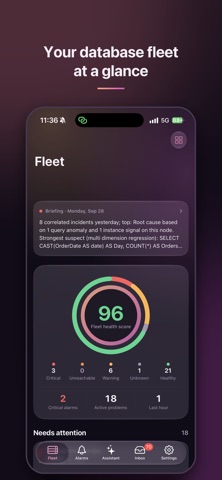
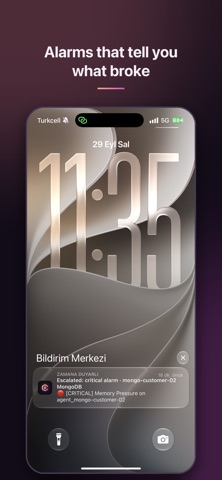
ClusterEye is a mobile companion for the ClusterEye database operations platform, covering PostgreSQL, SQL Server, Oracle, MySQL, MongoDB, ClickHouse, Elasticsearch and Redis. It lets database teams receive alarm notifications, acknowledge or snooze them from the lock screen or Apple Watch, and check fleet health and dashboards. It needs a ClusterEye server, and the alarm details come directly from that server rather than third parties.
Résumé par Debuts, d'après la fiche de l'App Store.À propos
ClusterEye is the mobile companion for ClusterEye, the database operations platform for PostgreSQL, SQL Server, Oracle, MySQL, MongoDB, ClickHouse, Elasticsearch and Redis.
Stay on top of your databases when you're away from your desk:
• Alarm notifications with the details: the host and message come straight from your own ClusterEye server, never through third parties. • Acknowledge or snooze an alarm from the lock screen or your Apple Watch, without opening the app. • Fleet health at a glance: health score, instances that need attention, operational checks and topology exceptions. • Alarms and incidents: filter by severity, take ownership, investigate, add notes and resolve. • Your team's dashboards, with time ranges and live refresh. • Ask the AI Database Assistant about your databases. • Daily briefing of what happened across your estate. • Home Screen and Lock Screen widgets, and Siri shortcuts.
Built for enterprise teams:
• Pair your phone by scanning a QR code in ClusterEye → Settings → Mobile devices. • Face ID or passcode lock, and a privacy screen in the app switcher. • Managed configuration for Intune, Jamf and other MDMs: server address, required Face ID and lock timeout. • Permissions follow your ClusterEye roles; revoke a device from the web at any time.
Requires a ClusterEye server.
Les notes des utilisateurs
Connecte-toi pour noter cette appli. Ce qui compte, c'est d'être honnête.
Pas encore de notes. Tu l'as essayée ? Sois le premier à la noter.
Plus d'apps Utilitaires
Les meilleures nouvelles apps Utilitaires de la semaine Vodoalarm: vodostaji BiHVodoalarm javlja kad tvoja rijeka naglo raste, pa ne moraš stalno gledati vodostaje
 Rokey: Romanian KeyboardType Romanian without worrying about diacritics
 Vibe Island: AI Agent MonitorVibe Island is a command center for the AI coding agents running on your Mac
 Private AuthenticatorPrivate Authenticator keeps your two-factor authentication codes on your own Apple…
 Photo Clean: Photo CleanupA crowded camera roll?
 Songbird AlarmWhat if the morning didn't have to start with a loud noise?