
Copydock: Clipboard History
Non revendiquéeYour clipboard
Par Bedrock Group LLC · ProductivitéPourquoi nous l'attendons : Clear value and thoughtful privacy details make this clipboard manager a promising, well-described debut.


En bref
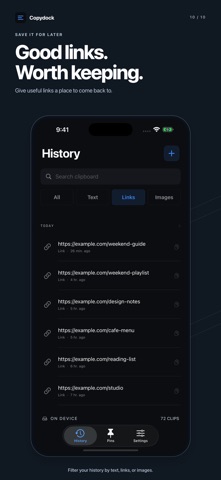
Copydock: Clipboard History is a productivity app that saves copied text, links, and images so they can be searched, pinned, and reused later. It suits people who often reuse replies, links, or snippets and want them kept on the device with no account required. One notable point is that the library stays on the device, with an optional iCloud backup available through Pro.
Résumé par Debuts, d'après la fiche de l'App Store.À propos
Your clipboard. With a memory.
A reply you send every day. A link you meant to revisit. That useful bit of text you copied and lost. Give it all a place to stay with Copydock.
Copy something, open Copydock to save it, and come back when you need it. Search your library, keep your favorites pinned, and bring saved words into your next reply with the Copydock keyboard.
FIND IT. COPY IT. KEEP GOING. - Search clips by the words you remember. - Filter history by text, links, or images. - Tap a clip to copy it again. - Open longer text to read beyond the preview. - Browse in pages of 30 instead of an endless feed.
KEEP YOUR FAVORITES CLOSE Pin the snippets you use most and arrange them in your own order. Save a standard reply, an email address, a project link, or a note you want within reach.
ON YOUR DEVICE. ON YOUR TERMS. No account to create. No ads or analytics. Your library is stored on your device. Add a device authentication lock, choose Light or Dark appearance, and control clipboard capture in Settings.
START FREE Access up to 30 text or link clips, including three pins. Search, the keyboard, and privacy lock are included.
MORE ROOM WITH COPYDOCK PRO - Unlimited history and pins - Image clips - Home Screen and Lock Screen widgets - Five text tools: uppercase, lowercase, title case, trim, and collapse spaces - Optional backup and restore through your own iCloud Drive
Choose monthly, yearly, or a one-time Lifetime purchase. If Pro ends, extra clips, extra pins, and images stay saved but locked. Activate Pro again to use them.
GOOD TO KNOW Copydock captures while the app is open and capture is enabled. It does not record continuously in the background. iOS may ask for paste permission. Enable the keyboard in iOS Settings to use it in compatible apps. Secure fields and some apps do not support third-party keyboards. Recognized sensitive clipboard markers are skipped, but iOS does not identify every copied password.
Subscriptions renew automatically unless cancelled in your Apple Account settings. Current prices and terms appear before purchase. Lifetime is a one-time purchase. Optional iCloud backup requires Pro and an available iCloud account.
Privacy Policy: https://copydock-support.josh208738.chatgpt.site/privacy/ Terms of Use: https://www.apple.com/legal/internet-services/itunes/dev/stdeula/
Les notes des utilisateurs
Connecte-toi pour noter cette appli. Ce qui compte, c'est d'être honnête.
Pas encore de notes. Tu l'as essayée ? Sois le premier à la noter.
Plus d'apps Productivité
Les meilleures nouvelles apps Productivité de la semaine ChickMark: Habit TrackerChickMark is a simple habit tracker for routines, goals, and reminders
 Dayflint: One Thing a DayToo many priorities?
 Snappy Do ItSix connected modes. One traceable journey.
 Fristo CAFMFristo is the app for Fristo CAFM, the facility management software
 UhWhat? Voice NotesCatch the thought before it disappears
- BeginAnywayMorning alarm for hard tasks: set one task, prove you started, build a streak