
Day Rail – Menu Bar Tasks
Non revendiquéeDay Rail is a to-do list for one day at a time
Par OMER FARUK CAKI · ProductivitéPourquoi nous l'attendons : Its clear one-day focus, automatic task carryover, and thoughtful keyboard and accessibility details make it a compelling menu bar companion.


En bref
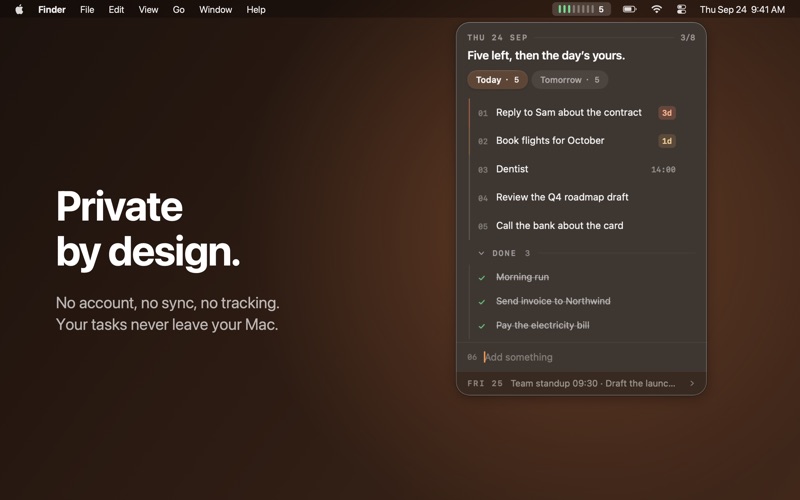
Day Rail, Menu Bar Tasks is a macOS to-do list that lives in the menu bar as a row of small bars, one per task, turning green when done. Unfinished tasks carry over to the next day automatically, with a badge showing how long each has waited. It suits people who want a keyboard-driven daily list with no account, sync, or analytics, and its data stays in one local file.
Résumé par Debuts, d'après la fiche de l'App Store.À propos
Day Rail is a to-do list for one day at a time. It lives in your menu bar as a row of small bars: one per task, green when it's done, with a count of what's left. You can see how your day is going without opening anything.
Click the bars to open your list. Type to add a task, press Return, keep typing. Press Space to check one off.
WORK THAT CARRIES ITSELF OVER Anything you don't finish today moves to the top of tomorrow on its own. No prompt, no "reschedule" dialog. A small badge shows how many days a task has been waiting, so the ones you keep avoiding are easy to spot.
PLAN TOMORROW TONIGHT Switch to Tomorrow to line up the next day before you close the laptop. Push a task to tomorrow with ⌘→, or drag it onto the Tomorrow pill.
BUILT FOR THE KEYBOARD • ⌥Space from any app opens the list with the add field ready (you can change the shortcut) • ↑ ↓ to move, Space to complete, Return to edit, ⌘N to add • ⌥↑ ⌥↓ to reorder, or drag • ⌘→ ⌘← to move between Today and Tomorrow • ⌘⌫ to delete, then Undo from the footer or ⌘Z Opening Day Rail doesn't take focus from the app you're working in.
SMALL TOUCHES • The first launch comes with five practice tasks, one per feature. Do them, or delete them. • Write "Dentist 14:00" and the time shows as a hint on the right • A soft chime and a small burst when you check something off (both optional) • Light and dark appearance, color themes, high contrast, and Reduce Motion (yours or the system's) • Full VoiceOver support, and text that meets accessibility contrast in every theme
PRIVATE BY DESIGN No account, no sync, no analytics, no network access. Your tasks are stored in one small file on your Mac and never leave it. If that file ever can't be read or saved, Day Rail tells you, keeps a backup, and offers a way out. Nothing fails quietly.
WHAT IT DOESN'T DO No projects, tags, priorities, due dates, reminders or stats. Day Rail is for today, and it stays out of your way the rest of the time.
Les notes des utilisateurs
Connecte-toi pour noter cette appli. Ce qui compte, c'est d'être honnête.
Pas encore de notes. Tu l'as essayée ? Sois le premier à la noter.
Plus d'apps Productivité
Les meilleures nouvelles apps Productivité de la semaine ChickMark: Habit TrackerChickMark is a simple habit tracker for routines, goals, and reminders
 Dayflint: One Thing a DayToo many priorities?
 Snappy Do ItSix connected modes. One traceable journey.
 Fristo CAFMFristo is the app for Fristo CAFM, the facility management software
 UhWhat? Voice NotesCatch the thought before it disappears
- BeginAnywayMorning alarm for hard tasks: set one task, prove you started, build a streak