
DocuClue: PDF Scan & Resize
Non revendiquéeUpload forms are fussy
Par Chinonso Nnam · ProductivitéPourquoi nous l'attendons : Clear value and a sharp focus on form uploads, with on-device privacy and ready-made presets for common portals.


En bref
DocuClue: PDF Scan & Resize scans documents with the camera or merges existing photos and PDFs into one file that fits a set size limit. It is aimed at people filling in online upload forms for visa, school, job, bank and government portals, with presets that follow published upload rules. It stands out for processing files on the phone and removing hidden details such as GPS location from photos.
Résumé par Debuts, d'après la fiche de l'App Store.À propos
Upload forms are fussy. One wants a single PDF under 4 MB, another wants a passport photo at exactly 600 by 600 pixels, and your phone photos are sideways and far too big. DocuClue fixes all of that in a minute.
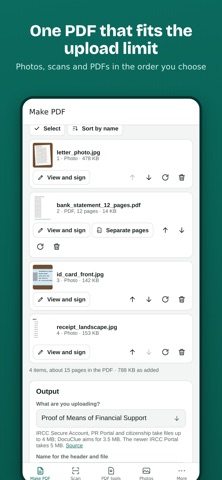
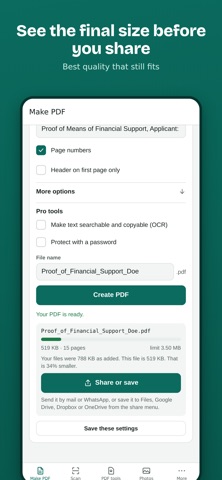
Scan your pages with the camera, or pick photos and PDFs you already have. DocuClue puts them in order, straightens and cleans the scans, and saves one tidy PDF that fits the size limit. You see the final size before you share it.
WHAT YOU CAN DO
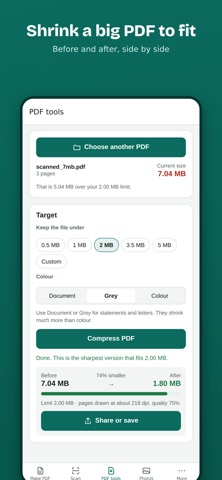
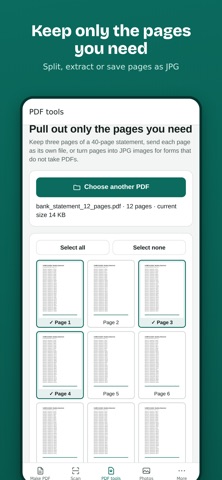
- Scan documents with the camera. Edges are found and pages flattened for you. - Put both sides of an ID card on one page. - Merge photos and PDFs into one file, in the order you choose. - Fit any size limit, like 2 MB or 4 MB, at the best quality that still fits. - Shrink a big PDF so it fits, or pull out only the pages you need. - Remove pages, crop photos, and save pages as JPG when a form won't take PDFs. - Sign by drawing, typing or from a photo of your signature. Add the date, your name or a check mark. - Black out account and ID numbers, fill in PDF forms, and open password protected statements. - Resize photos to exact pixels for passport, visa and exam forms. - Share the finished file to email, WhatsApp, Drive or any app.
READY FOR THE PORTALS PEOPLE USE
Presets follow the published upload rules for immigration and visa portals in Canada, the US, the UK, Australia, India, Nigeria and Schengen countries, plus school, job, housing, bank and government forms. Pick what you are uploading and the size limit, page size and file name fill in for you. You can change any of them.
PRIVATE BY DESIGN
Your documents are processed on your phone and never uploaded to us. There is no account to create. When a photo goes into a PDF it is redrawn, which removes hidden details like the GPS location where it was taken.
IN YOUR LANGUAGE
DocuClue works in 20 languages, including English, French, Spanish, Portuguese, Arabic, Hindi, Chinese and Swahili.
Every tool is free to use right now.
DocuClue is an independent tool and is not affiliated with any government agency, school or company.
Les notes des utilisateurs
Connecte-toi pour noter cette appli. Ce qui compte, c'est d'être honnête.
Pas encore de notes. Tu l'as essayée ? Sois le premier à la noter.
Plus d'apps Productivité
Les meilleures nouvelles apps Productivité de la semaine ChickMark: Habit TrackerChickMark is a simple habit tracker for routines, goals, and reminders
 Dayflint: One Thing a DayToo many priorities?
- BeginAnywayMorning alarm for hard tasks: set one task, prove you started, build a streak
 DHUDEDHUDE Analityxs es la herramienta de gestión diaria para grupos de restauración y ocio…
 FTC BIOBUZZ Scorer & TrainerBIOBUZZ Scorer is a free, ad-free scorer for the 2026–2027 FTC season, built on…
 Intent - Scroll by ChoiceTake back control of your screen time