
Domad – Markdown Notes & PDF
Non revendiquéeOpen the Markdown notes and PDFs you keep in the cloud — anywhere, on your iPhone and…
Par Doctor's fit Inc. · Productivité



À propos
Open the Markdown notes and PDFs you keep in the cloud — anywhere, on your iPhone and iPad.
Domad is Digital + Nomad: wherever you are, reach your .md files from the device in your hand and read or edit them.
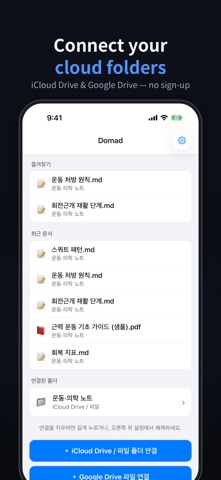
Domad connects folders and files in iCloud Drive and Google Drive so you can read, edit and save .md notes, flip through PDFs, and print, export or share either one. No account, no developer servers.
Note: the app interface is currently in Korean.
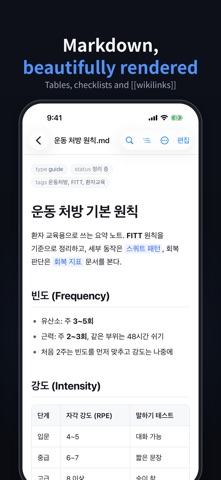
READ • Headings, lists, tables, code, quotes and checkboxes rendered cleanly • Front matter shown as tidy tag chips • Tap a [[wikilink]] to jump to that note in the same folder • Find in document — every match highlighted, step through them one by one • Outline — see all headings and jump straight to one
WRITE • Edit the raw Markdown and save it back to the original file in your drive • Formatting toolbar: bold, italic, lists, checkboxes, quotes, code, links, indent • Live character and word count • Warns you before saving if the file changed on another device, so nothing gets overwritten • Asks before you leave with unsaved changes
IPAD • Two-pane layout in landscape: folders on the left, your note on the right • Collapsible file list in portrait • Side-by-side live preview while you edit • Magic Keyboard and Bluetooth keyboard shortcuts — ⌘E read/edit, ⌘S save, ⌘F find, ⌘B bold and more. Hold ⌘ to see them all
FOLDERS & FILES • Connect a whole iCloud Drive folder and browse every subfolder • Pick the .md and .pdf files you need from Google Drive • Favorites and recent documents • File-name search across the current folder and its subfolders
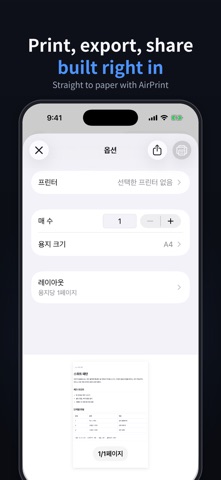
PDF & OUTPUT • Swipe through and zoom into PDFs • AirPrint, export as PDF, or send to another app with the share sheet
APPEARANCE • Light, Dark, or follow the system
PRIVACY Domad only accesses the folders and files you choose. Documents are opened and saved on your device and are never sent to our servers. No ads, no tracking.
Contact: drsfit@doctorsfit.kr
Les notes des utilisateurs
Connecte-toi pour noter cette appli. Ce qui compte, c'est d'être honnête.
Pas encore de notes. Tu l'as essayée ? Sois le premier à la noter.
Plus d'apps Productivité
Les meilleures nouvelles apps Productivité de la semaine ChickMark: Habit TrackerChickMark is a simple habit tracker for routines, goals, and reminders
 Dayflint: One Thing a DayToo many priorities?
- BeginAnywayMorning alarm for hard tasks: set one task, prove you started, build a streak
 DHUDEDHUDE Analityxs es la herramienta de gestión diaria para grupos de restauración y ocio…
 FTC BIOBUZZ Scorer & TrainerBIOBUZZ Scorer is a free, ad-free scorer for the 2026–2027 FTC season, built on…
 Intent - Scroll by ChoiceTake back control of your screen time