
Excerpta: Reading Journal
Non revendiquéeExcerpta is a book tracker that doubles as a reading journal
Par Trevor Tarakjian · ÉducationPourquoi nous l'attendons : The description clearly explains a thoughtful reading journal with quote capture, timelines, and shelves for every reading format.



En bref
Excerpta: Reading Journal is a book tracker that also works as a reading journal. Each book gets its own timeline of saved quotes, notes, daily pages read, and mood, with the camera available for capturing passages. It is aimed at readers who want to track print, e-book, or audiobook reading together, and it stands out for importing from Goodreads, StoryGraph, Kindle, and Kobo.
Résumé par Debuts, d'après la fiche de l'App Store.À propos
Excerpta is a book tracker that doubles as a reading journal.
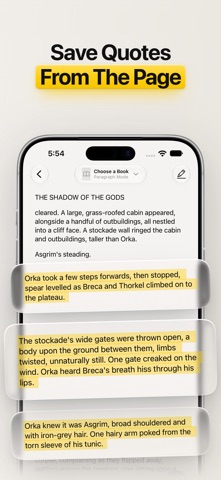
Every book gets its own timeline: the lines that stopped you, the notes you wrote, the pages you read each day, and how it all felt, in order from the first page to the last. Point your camera at a page to keep a quote. It keeps the rest too: your shelves, where you left off, and how your year in reading is going.
KEEP THE WORDS – Capture quotes with the camera, from photos (a few pages at once), or by typing. The text is read right on your phone. – Tap a paragraph to keep it whole, or drag the highlighter across just the words you want. – Pick one of six highlight colors, add a note, and mark the page or chapter. – Tag the character who said it and add how it made you feel. Your moods can go to Apple Health too, if you like. – Quotes that don't belong to any book land in your Commonplace book.
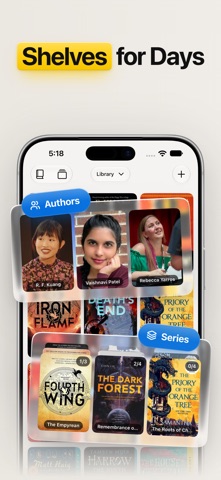
HOWEVER YOU READ Print, e-book, or audiobook. Owned, borrowed, or gifted. Three books at once, or one favorite for the fifth time. They all share the same shelves. – Add books by searching, scanning the barcode, or typing them in yourself. – Browse by book, author, character, or series. Series fill themselves in, or you can build your own. – Make as many shelves as you like, and put a book on several at once. – Rate in half stars (or quarter stars), write a review, and start a reread with its own fresh timeline. – Waiting on a new release? Add it as Upcoming and you'll get a note the day it's out.
KNOW WHERE YOU LEFT OFF – Start the reading timer, or set your page, your percent, or the time left in an audiobook. – Give one book a finish date, or give your whole year a goal. – The Calendar shows each day you read as a cover, ringed by your mood, with your streak up top.
SEE HOW THE YEAR IS GOING Stats shows what your reading actually looked like: Books Read, Pages Read, Days Read, Genres, Formats, Ownership, Ratings, Mood, Top Authors, and Time to Finish. Reading Nooks gathers the photos you took and maps the places you read. Pick the cards and their order, then look at a month, a year, or all time.
FIND THE NEXT ONE Discovery brings in the NYT Bestsellers lists. Connect Hardcover to add what's trending, the most anticipated books, and lists and prompts from other readers.
BRING YOUR BOOKS ALONG – Import from Goodreads, StoryGraph, Kindle highlights, Kobo, Apple Books, or a spreadsheet. – Sync between your devices with iCloud. – Sync your library and shelves both ways with Hardcover, and your progress with KOReader. – Export whenever you like, as one Markdown file per book, ready for Obsidian, Bear, or Notes. Export is always free.
AROUND YOUR PHONE – Widgets for a quote, your current book, and your reading calendar, on the Home Screen and Lock Screen. – Screen Saver plays your quotes on a slow loop while your phone charges. – Capture a quote from Shortcuts or the Action button. – Share a quote as an image card, or send a friend a link to a book. – Ten reading fonts, and an app icon in your favorite highlight color.
YOURS TO KEEP Your library lives on your phone and in your own iCloud. Open the app and add your first book. That's the whole sign-up.
Excerpta is made by one person and one corgi. Your next favorite quote is waiting to be remembered.
EXCERPTA UNBOUND Excerpta Unbound opens up everything above. Try it free for 7 days with the monthly or yearly plan, or pay once and keep it for good. If your plan ends, your library stays readable and export stays free.
Les notes des utilisateurs
Connecte-toi pour noter cette appli. Ce qui compte, c'est d'être honnête.
Pas encore de notes. Tu l'as essayée ? Sois le premier à la noter.
Plus d'apps Éducation
Les meilleures nouvelles apps Éducation de la semaine FluencyToolShadow a native Japanese sentence, hear your own voice back, and get scored.
 YoMoo: Read & Shadow JapaneseYoMoo turns real Japanese writing into graded reading practice: news articles, Wikipedia…
 KeyswingLearn music notes, rhythm and piano through playful practice in a magical forest.
 Uncle Math Homeschool - 6 to 8No Math Fear, Uncle Math Is Here
 Malachi SpeaksMalachi Speaks gives a voice to people who don't use speech
 SelvarisWatch evolution unfold in real time – on an entire planet