
FREESNAP - Long Screenshot
Non revendiquéeLong screenshots from a scroll, stitched recordings, cropping, and automatic status bar…
Par 波 王 · Utilitaires


À propos
Long screenshots from a scroll, stitched recordings, cropping, and automatic status bar and scroll indicator cleanup — FREESNAP turns what you scroll through into one complete image.
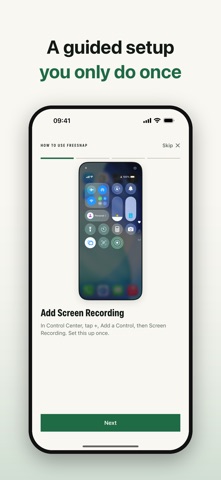
LONG SCREENSHOTS WITHOUT THE HASSLE • In Control Center, long-press Screen Recording and choose FREESNAP • Go to any app and scroll at a normal pace: chats, web pages, articles, product pages, comment threads • Pause for a moment — a light vibration tells you the capture has ended • If a playing video keeps it going, tap the red indicator at the top left to stop; what was captured still becomes a long image • Frames are aligned to how far the page really moved, so seams don't repeat or drop lines
TURN A RECORDING YOU ALREADY HAVE INTO ONE IMAGE • Import a portrait scrolling screen recording, check its first frame, length and size, then stitch
TIDY IT UP BEFORE YOU SHARE • Crop by dragging the two green lines; zoom in to check details • Remove the status bar and home indicator, keeping only the page (PRO) • Paint out the system scroll indicator using real pixels from neighbouring frames (PRO) • Local library of everything you've made, with multi-select save to Photos and delete
EXPORT THE WAY YOU NEED • PNG, lossless, with the cleanest text edges for chats and documents • High-quality JPG at about a third of the size • Save to Photos or share straight to another app
PRIVATE BY DESIGN • Everything happens on your iPhone: nothing is uploaded, no account, no ads, no analytics • FREESNAP only asks to add images to Photos and never reads your photos
FREE AND PRO • Free: up to 5 screens per image, with a small FREESNAP mark • FREESNAP PRO: a one-time purchase that removes the mark and the 5-screen limit and unlocks status bar and scroll indicator cleanup
Available in English, Simplified and Traditional Chinese, Japanese, Korean, Spanish and German.
Tip: scroll at a normal pace — very fast flicks can confuse the stitching. See the walkthrough in Settings, or email us if something goes wrong.
Les notes des utilisateurs
Connecte-toi pour noter cette appli. Ce qui compte, c'est d'être honnête.
Pas encore de notes. Tu l'as essayée ? Sois le premier à la noter.
Plus d'apps Utilitaires
Les meilleures nouvelles apps Utilitaires de la semaine Vodoalarm: vodostaji BiHVodoalarm javlja kad tvoja rijeka naglo raste, pa ne moraš stalno gledati vodostaje
 Letter Explainer: PostklarGot an official letter and only understand half of it?
 NadhirNadhir is an independent app
 Rokey: Romanian KeyboardType Romanian without worrying about diacritics
 Vibe Island: AI Agent MonitorVibe Island is a command center for the AI coding agents running on your Mac
 Private AuthenticatorPrivate Authenticator keeps your two-factor authentication codes on your own Apple…