
IOSEA BLE Configurator
Non revendiquéeConfigure, update and service IOSEA Bluetooth tags from your phone
Par IoSea LLC · ProductivitéPourquoi nous l'attendons : Thorough, well-explained feature set with clear value for field technicians configuring IOSEA tags.


En bref
IOSEA BLE Configurator lets users read, change, and update settings on IOSEA Bluetooth tags over Bluetooth, including device, LED, accelerometer, advertising, and Hubble options. It also covers temperature log download, over-the-air firmware updates, and unattended batch provisioning. The app suits people who set up or service these tags in the field. It detects which features each tag's firmware supports before writing.
Résumé par Debuts, d'après la fiche de l'App Store.À propos
Configure, update and service IOSEA Bluetooth tags from your phone. No laptop, no cable, no dock — connect to a tag and every setting it exposes is yours to read and change.
CONFIGURE EVERY SETTING • Device — name, pairing passkey, TX power, CTE length • LED — operating mode, plus custom blink timing • Accelerometer — shake and motion triggers, custom sensitivity thresholds • Advertising — burst, non-connectable and connectable modes, each with its own interval • Hubble — network keys for tags built with Hubble support
Read the tag's current configuration into the app, change what you need, and write it all back in one step — or write a single characteristic on its own.
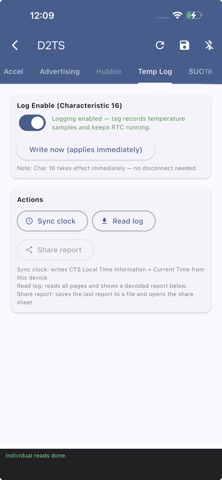
TEMPERATURE LOGGING Tags built with the onboard logger record temperature against a real-time clock. Set that clock from your phone, download the full log, and share a decoded report straight from the app.
FIRMWARE UPDATES OVER THE AIR Run a SUOTA update from your phone: choose the firmware image, pick the memory type and image bank, and watch each block transfer with a live progress log. No programmer, no disassembly.
PROVISIONING AT SCALE Commissioning a batch works unattended. Choose a configuration profile, set which tags qualify by name, address or signal strength, and start. The app scans, connects, writes the profile, disconnects and moves to the next one, keeping a timestamped log of every device it programs and skipping anything it has already done.
BUILT FOR THE FIELD The app adapts to whatever firmware a tag is running. Features compiled out of a build are detected on connection and shown as unavailable, so you always know what the tag in your hand can actually do rather than discovering it from a failed write. Configuration is read back after writing and verified.
BEFORE YOU START Tags accept connections for a short window after power-on — around ten seconds by default, and adjustable once you are connected. Power-cycle the tag, then tap it as soon as it appears. First connection asks for the pairing passkey (123456 unless it has been changed).
Settings are held in RAM while connected and committed to flash when the tag disconnects, so always disconnect from the app before removing power.
Bluetooth permission is required. Location permission is requested only where the operating system requires it for Bluetooth scanning; the app does not collect or transmit your location.
Les notes des utilisateurs
Connecte-toi pour noter cette appli. Ce qui compte, c'est d'être honnête.
Pas encore de notes. Tu l'as essayée ? Sois le premier à la noter.
Plus d'apps Productivité
Les meilleures nouvelles apps Productivité de la semaine ChickMark: Habit TrackerChickMark is a simple habit tracker for routines, goals, and reminders
 Dayflint: One Thing a DayToo many priorities?
 Snappy Do ItSix connected modes. One traceable journey.
 Fristo CAFMFristo is the app for Fristo CAFM, the facility management software
 UhWhat? Voice NotesCatch the thought before it disappears
- BeginAnywayMorning alarm for hard tasks: set one task, prove you started, build a streak